Character Count Tool icon

Character Count Tool Chrome Extension Analysis

Automation & Workflow Efficiency

Chrome extension ID: fpclnanofjokkahejckkangbnklldclk

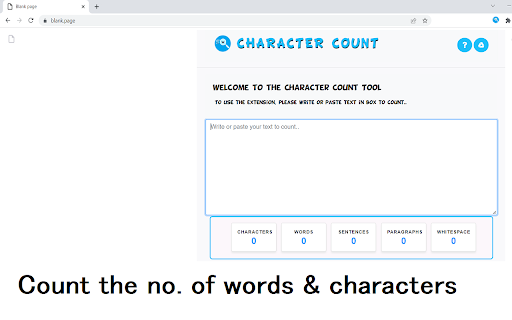
A productivity extension that allows users to highlight text and right-click to instantly see word and character counts. It also offers a manual paste option through the extension icon for text analysis.

Developer:Free Apps
Version:3.0.5
Size:1.36MiB
Last updated:

Overview

Installs

7K+

Rating

4.7

33 reviews

Languages

41 locales

Includes Deutsch, English, English (United States), Filipino...

Market analysis

Review-backed positioning, friction, and market signals for this Chrome extension.

Backed by review samples

Macro category

Automation & Workflow Efficiency

Pricing friction

Low review signal

Complaint intensity

Moderate review signal

Listing & review signals
Observed signals from store listing text and review samples.

Listing positioning

The product is positioned as a quick and easy utility for calculating word and character counts via a browser context menu. It emphasizes convenience for users writing essays or reading articles who need to verify length limits.

Inferred product pattern

A lightweight, context-menu driven text utility tool for quick length verification.

Review-backed pain points

Users reported inaccuracies in the count, a fixed results window that obstructs the webpage text, and the need to restart Chrome when the tool fails to trigger on certain pages.

Observed feature gaps

The tool lacks a movable or floating UI component and does not consistently work on all websites.

Tags
Word CounterCharacter CounterText AnalysisProductivity Tool
Target users

- Students

- Writers

- Content Creators

- Editors

Primary use cases

- Checking essay word counts

- Verifying character limits for social media or articles

- Analyzing text length on webpages

Positive themes

- Ease of use via right-click menu

- Lack of character limits compared to competitors

- Convenient functionality

Negative themes

- Accuracy issues in character counting

- Non-movable UI window blocking content

- Inconsistent performance across different websites

Observed friction

- Performance complaints detected

- No pricing friction observed as the tool is marketed as free.

Evidence boundary: Analysis based on store description and user reviews highlighting utility, UI limitations, and accuracy concerns. Small review sample size of 33 comments.
Complaint summaries
Review-backed complaint signals grouped by operational area.

Support

No support complaints observed.

Reliability

Users noted intermittent failure to function on certain pages and occasionally requiring a browser restart.

Privacy

No privacy complaints observed.

Access & pricing

- Free usage observed

- No account requirement observed

- Free plan or free usage claimed

Store listing facts

Listing assets

- Screenshots: 1

- Videos: 0

- Languages: 41

Trust signals

- Privacy policy

- Developer contact

- Official website

Store metadata

- Version: 3.0.5

- Size: 1.36MiB

- Last updated:

Listing SEO keywords

Search intent keywords
Keyword signals for evaluating how users may discover, compare, or search for this extension category.

Core discovery

character count toolword count extensiontext countercount words on page

Comparison

word counter extensioncharacter count utility

Problem

how many words in this textcheck character limitword count checker

Alternative

word countercharacter counter

Similar extensions

Jump to related discovery paths:

Screenshots

Character Count Tool screenshot

Links

Recommended Chrome extensions

Related listings from the same category, trending peers, and the same publisher portfolio.

Browse workflow