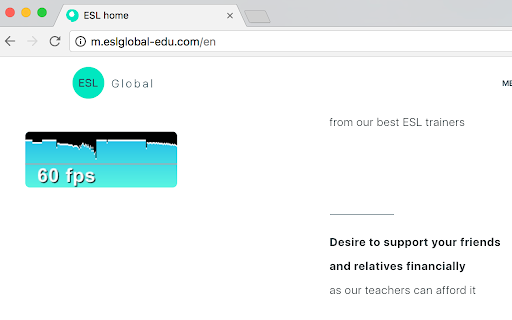
FPS extension icon

FPS extension Chrome Extension Analysis

Developer & Designer Tools

Chrome extension ID: gdkkmimldhefhmmmlalioafomdlahcog

A productivity utility that displays a real-time FPS counter on web pages. It is designed to help developers quickly assess rendering performance without opening full developer consoles.

Developer:Yuri Artiukh
Version:0.0.4
Size:13.4KiB
Last updated:

Overview

Installs

9K+

Rating

3.3

99 reviews

Languages

1 locales

Includes English (United States)

Market analysis

Review-backed positioning, friction, and market signals for this Chrome extension.

Backed by review samples

Macro category

Developer & Designer Tools

Pricing friction

Low review signal

Complaint intensity

High review signal

Listing & review signals
Observed signals from store listing text and review samples.

Listing positioning

The extension positions itself as a lightweight tool for debugging website performance. It is marketed as a faster, more convenient alternative to the built-in Chrome Developer Tools for monitoring frames per second (FPS).

Inferred product pattern

Simple single-purpose developer utility for performance monitoring.

Review-backed pain points

Users frequently report that clicking the extension icon results in no visible change or counter appearing on the page. There are also complaints that the tool cannot measure frame rates above 60 FPS, rendering it useless for high-refresh-rate testing.

Observed feature gaps

Lack of support for high-refresh-rate monitors (above 60Hz) and a lack of compatibility with recent Chrome extension best practices/manifest versions.

Tags
FPS CounterPerformance DebuggingWeb Development
Target users

- Web Developers

- Performance Engineers

- QA Testers

Primary use cases

- Monitoring web page frame rates

- Quickly debugging rendering performance

- Checking for frame drops during website interaction

Positive themes

No positive theme data.

Negative themes

- Complete failure to launch

- Inaccurate FPS capping at 60

- Outdated extension manifest standards

Observed friction

- Performance complaints detected

- No pricing friction observed as the product is free.

Evidence boundary: Analysis based on store listing data and a sample of 10 high-signal negative reviews. No positive reviews were included in the sample set, limiting the ability to identify successful use cases.
Complaint summaries
Review-backed complaint signals grouped by operational area.

Support

No specific support communication complaints, but users report the tool is effectively broken.

Reliability

Severe reliability issues; multiple users state the extension does not function at all and produces no output upon activation.

Privacy

No privacy or security complaints observed.

Access & pricing

- Free usage observed

- No account requirement observed

- Free plan or free usage claimed

Store listing facts

Listing assets

- Screenshots: 1

- Videos: 0

- Languages: 1

Trust signals

- Developer contact

Store metadata

- Version: 0.0.4

- Size: 13.4KiB

- Last updated:

Listing SEO keywords

Search intent keywords
Keyword signals for evaluating how users may discover, compare, or search for this extension category.

Core discovery

Chrome FPS counterweb page frame ratewebsite performance debugger

Comparison

FPS extension vs Chrome DevTools

Problem

how to check website fpsweb page frame rate lag

Alternative

FPS counter extensionweb performance monitor

Similar extensions

Jump to related discovery paths:

Screenshots

FPS extension screenshot

Recommended Chrome extensions

Related listings from the same category, trending peers, and the same publisher portfolio.

Browse developer