Web Component DevTools icon

Web Component DevTools Chrome Extension Analysis

Developer & Designer Tools

Chrome extension ID: gdniinfdlmmmjpnhgnkmfpffipenjljo

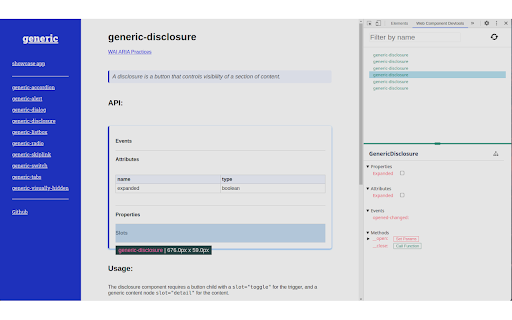
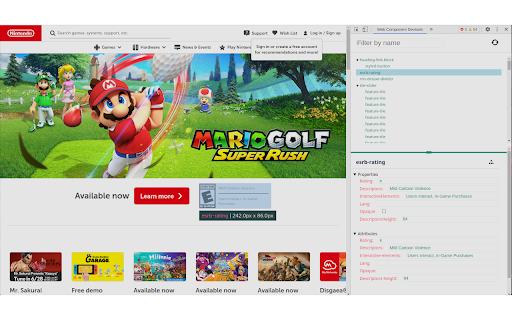
Web Component DevTools is a Chrome extension that adds a dedicated panel to the browser's developer tools. It enables real-time inspection and modification of custom element attributes, properties, and events, simplifying workflows for developers building with or without component libraries.

Developer:Matsuuu
Version:0.2.2
Size:1.74MiB
Last updated:

Overview

Installs

8K+

Rating

4.3

9 reviews

Languages

1 locales

Includes English

Market analysis

Review-backed positioning, friction, and market signals for this Chrome extension.

Backed by review samples

Macro category

Developer & Designer Tools

Pricing friction

Low review signal

Complaint intensity

Moderate review signal

Listing & review signals
Observed signals from store listing text and review samples.

Listing positioning

The extension positions itself as an essential productivity aid for frontend developers working with Web Components, particularly those utilizing the Custom Elements Manifest. It frames the product as a direct solution to the limitations of standard browser devtools when interacting with Shadow DOM elements and complex properties.

Inferred product pattern

Open-source developer utility focused on browser-native inspection panels.

Review-backed pain points

Users have reported significant lag when analyzing components and occasional interference with application runtime, specifically regarding method overrides.

Observed feature gaps

The extension may struggle with detecting specific web component configurations and has known performance bottlenecks for larger or more complex component trees.

Tags
Web ComponentsChrome DevToolsFrontend DevelopmentLitDebugging
Target users

- Frontend Developers

- UI Engineers

- Web Component Library Maintainers

Primary use cases

- Inspecting web component properties and attributes

- Monitoring dispatched events from custom elements

- Testing component functions and state modification via UI controls

Positive themes

- Enhanced workflow efficiency

- Comparison to Storybook for live websites

- Powerful introspection capabilities

Negative themes

- Performance latency during analysis

- Potential conflicts with application code (method overriding)

- Detection failures for specific component structures

Observed friction

- Performance complaints detected

- No pricing friction observed; the extension is presented as a free developer tool.

Evidence boundary: Evidence is derived from Chrome Web Store user feedback and listing descriptions. Review sample size is small, representing a narrow snapshot of user sentiment.
Complaint summaries
Review-backed complaint signals grouped by operational area.

Support

No direct support complaints, though users are directed to GitHub for issue tracking.

Reliability

Users noted performance slowness and potential stability issues where the extension interfered with core application functionality.

Privacy

None observed.

Access & pricing

- Free usage observed

- No account requirement observed

- Free plan or free usage claimed

Store listing facts

Listing assets

- Screenshots: 2

- Videos: 0

- Languages: 1

Trust signals

- Developer contact

- Support link

Store metadata

- Version: 0.2.2

- Size: 1.74MiB

- Last updated:

Listing SEO keywords

Search intent keywords
Keyword signals for evaluating how users may discover, compare, or search for this extension category.

Core discovery

Web Component InspectorChrome DevTools extensionCustom Elements Manifest toolLit component debugging

Comparison

Storybook alternativebrowser devtools enhancement

Problem

debug web componentsShadow DOM inspector

Alternative

Web Component DevTools alternatives

Similar extensions

Jump to related discovery paths:

Screenshots

Web Component DevTools screenshot

Links

Recommended Chrome extensions

Related listings from the same category, trending peers, and the same publisher portfolio.

Browse developer