Twitch Latency Display icon

Twitch Latency Display Chrome Extension Analysis

Niche Lifestyle & Gaming Hacks

Chrome extension ID: gfbfblhgcnaceejlekkogpbjjogdealk

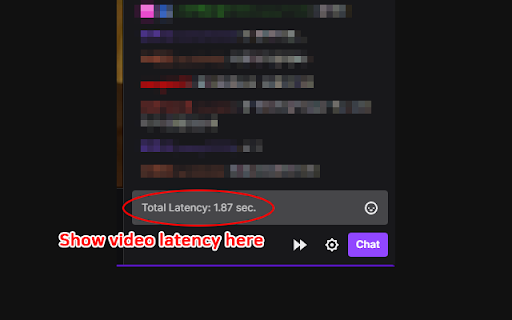
Twitch Latency Display is a browser extension designed to help Twitch users manage broadcast delays. It injects latency data into the chat input area and provides a manual buffer clearing mechanism to help users catch up to live streams.

Developer:sweet
Version:1.1.3
Size:78.43KiB
Last updated:

Overview

Installs

10K+

Rating

4.7

59 reviews

Languages

2 locales

Includes English, 한국어

Market analysis

Review-backed positioning, friction, and market signals for this Chrome extension.

Backed by review samples

Macro category

Niche Lifestyle & Gaming Hacks

Pricing friction

Low review signal

Complaint intensity

Moderate review signal

Listing & review signals
Observed signals from store listing text and review samples.

Listing positioning

The extension positions itself as a lightweight utility for Twitch viewers to monitor stream latency directly within the chat interface. It explicitly promises to enhance the viewing experience by providing a stream buffer fast-forward function and video performance statistics.

Inferred product pattern

Single-purpose browser utility providing a UI overlay for third-party streaming platform data.

Review-backed pain points

The most significant pain point is a bug that forces the 'Closed Caption Settings' menu to pop up every time a stream starts, causing user frustration.

Observed feature gaps

Users frequently request relocating the 'fast forward' button from the chat window to the video player itself to support embedded or popout player modes.

Tags
TwitchLatency MonitorStream BufferGaming Utilities
Target users

- Twitch Viewers

- Live Stream Power Users

- Gaming Enthusiasts

Primary use cases

- Reducing stream latency

- Monitoring video stats

- Fast-forwarding stream buffers

Positive themes

- Effective at combatting twitch latency

- Useful for reducing stream delay

- Helpful utility for serious viewers

Negative themes

- Persistent closed caption settings menu bug

- Video stats overlay is too large

- Lack of recent updates for newer platform changes

- Requests for better UI placement of buttons

Observed friction

- Performance complaints detected

- None; the product appears to be completely free.

Evidence boundary: Extracted from public Chrome Web Store listing data and user reviews which highlight both functionality and recent UI regression bugs. Review data is limited to user-reported experiences and may not account for the latest version deployments.
Complaint summaries
Review-backed complaint signals grouped by operational area.

Support

Users report that bugs remain unfixed and the extension lacks recent developer updates to keep up with Twitch UI changes.

Reliability

The extension suffers from a UI interference bug where it triggers the stream's subtitle settings menu upon loading, and the 'video stats' overlay is described as obstructively large.

Privacy

No privacy complaints observed.

Access & pricing

- Free usage observed

- No account requirement observed

- Free plan or free usage claimed

Store listing facts

Listing assets

- Screenshots: 1

- Videos: 0

- Languages: 2

Trust signals

- Developer contact

Store metadata

- Version: 1.1.3

- Size: 78.43KiB

- Last updated:

Listing SEO keywords

Search intent keywords
Keyword signals for evaluating how users may discover, compare, or search for this extension category.

Core discovery

Twitch latency checkerTwitch stream buffer fixreduce Twitch delay extensionTwitch video stats

Comparison

Twitch low latency mode alternative

Problem

Twitch delayhigh latency twitchstream buffering issues

Alternative

Twitch speed boosterTwitch chat tools

Similar extensions

Jump to related discovery paths:

Screenshots

Twitch Latency Display screenshot

Recommended Chrome extensions

Related listings from the same category, trending peers, and the same publisher portfolio.

Browse social