Video playback rate control for YouTube™ icon

Video playback rate control for YouTube™ Chrome Extension Analysis

Automation & Workflow Efficiency

Chrome extension ID: nhmbfmdoocndmmdjkmoecaeknicggffl

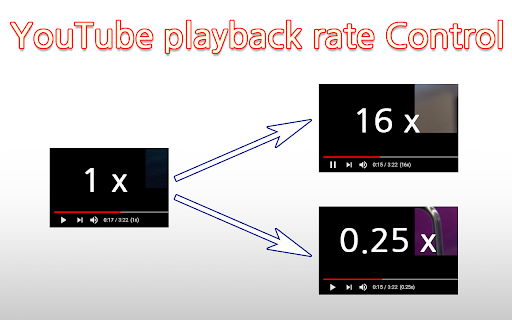
This browser extension allows users to adjust YouTube video playback speed up to 16x and provides custom time-seeking functionality. It integrates seamlessly with existing keyboard shortcuts to improve the efficiency of consuming video content.

Developer:sweet
Version:0.2.3
Size:17.83KiB
Last updated:

Overview

Installs

8K+

Rating

4.6

16 reviews

Languages

2 locales

Includes English, 한국어

Market analysis

Review-backed positioning, friction, and market signals for this Chrome extension.

Backed by review samples

Macro category

Automation & Workflow Efficiency

Pricing friction

Low review signal

Complaint intensity

Moderate review signal

Listing & review signals
Observed signals from store listing text and review samples.

Listing positioning

The extension is positioned as a lightweight utility to extend YouTube's native playback speed controls beyond the standard limitations. It emphasizes ease of use through familiar keyboard shortcuts and provides visual feedback directly on the video player.

Inferred product pattern

Single-purpose browser utility offering functional enhancements to a specific popular web platform.

Review-backed pain points

Users have identified frustration with speed settings failing to persist across video transitions or after pausing, requiring manual readjustment.

Observed feature gaps

The lack of a 'lock' setting or persistent user-defined speed preference is the primary requested feature in reviews.

Tags
YouTubePlayback SpeedKeyboard ShortcutsProductivity
Target users

- Power users

- Students

- Language learners

- Video researchers

Primary use cases

- Accelerating video playback speed

- Precision seeking/rewinding

- Efficient video navigation via hotkeys

Positive themes

- Ease of use

- Effective integration with native YouTube shortcuts

- Stable performance

- Minimalist interface

Negative themes

- Resetting to default speed upon pausing or loading new tabs

- Lack of a persistent speed-lock feature

Observed friction

- None; the product is free to use without reported paywalls.

Evidence boundary: Evidence is derived from Chrome Web Store user reviews which confirm high satisfaction with functionality and specific requests for persistent speed settings. The sample size is modest and contains both English and Korean reviews, which may not capture the full diversity of the global user base.
Complaint summaries
Review-backed complaint signals grouped by operational area.

Support

No specific support complaints identified; user feedback focuses on functional feature requests.

Reliability

Minor functional complaints regarding speed resetting, but no reports of general extension breakage or severe performance degradation.

Privacy

No privacy-related complaints found.

Access & pricing

- Free usage observed

- No account requirement observed

- Free plan or free usage claimed

Store listing facts

Listing assets

- Screenshots: 1

- Videos: 0

- Languages: 2

Trust signals

- Developer contact

Store metadata

- Version: 0.2.3

- Size: 17.83KiB

- Last updated:

Listing SEO keywords

Search intent keywords
Keyword signals for evaluating how users may discover, compare, or search for this extension category.

Core discovery

YouTube playback speed controllerchange YouTube speedfaster YouTube videoYouTube hotkeys

Comparison

YouTube speed extensionbetter YouTube player control

Problem

YouTube speed resethow to play YouTube faster than 2x

Alternative

YouTube speed pluginbrowser extension for video speed

Similar extensions

Jump to related discovery paths:

Screenshots

Video playback rate control for YouTube™ screenshot

Recommended Chrome extensions

Related listings from the same category, trending peers, and the same publisher portfolio.

Browse workflow
Twitch Latency Display icon

Twitch Latency Display

sweet

For a quick chating, Displays the latency of the video in the chat input window.

Installs

10K+

Rating

4.7

Google Search - Geolocation & Language Change icon

Google Search - Geolocation & Language Change

sweet

You can easily change your location and language in the Google search results screen.

Installs

10K+

Rating

4.1

Web Threat Shield icon

Web Threat Shield

Webroot

Keeps you safe when browsing the web by identifying and blocking dangerous websites.

Installs

3.0M+

Rating

2.5

Free Download Manager icon

Free Download Manager

Free Download Manager.ORG

Free Download Manager integration with browser

Installs

3.0M+

Rating

4.2

TeraBox Download Assistant icon

TeraBox Download Assistant

terabox-developers

Supports screenshots, uploads, and other TeraBox features

Installs

3.0M+

Rating

2.3

夸克网盘-网页嗅探 icon

夸克网盘-网页嗅探

广州市动悦信息技术有限公司

识别到网页资源时,可一键存夸克网盘

Installs

3.0M+

Rating

1.7

AI Grammar Checker & Paraphraser – LanguageTool icon

AI Grammar Checker & Paraphraser – LanguageTool

lt-extension-publisher

Instantly Enhance Your Texts with LanguageTool’s Grammar Checker and Paraphrasing Tool

Installs

2.0M+

Rating

4.7

Sound Booster - increase volume up icon

Sound Booster - increase volume up

Sound-ultimate.com

Volume Booster helps boost sound video or music on any tab! Increase volume and bass booster, equalizer. Volume control.

Installs

2.0M+

Rating

4.5

Momentum icon

Momentum

Momentum

Transform your browser into a beautifully designed tab that helps you feel calm, keep focus, and stay energized.

Installs

2.0M+

Rating

4.5

Pop up blocker for Chrome™ - Poper Blocker icon

Pop up blocker for Chrome™ - Poper Blocker

dingosolutions

Block popups, ads, cookie requests, trackers, notifications, ads on social media & more. A clean browsing experience starts today.

Installs

2.0M+

Rating

4.8