CSS Scan icon

CSS Scan Chrome Extension Analysis

Developer & Designer Tools

Chrome extension ID: gieabiemggnpnminflinemaickipbebg

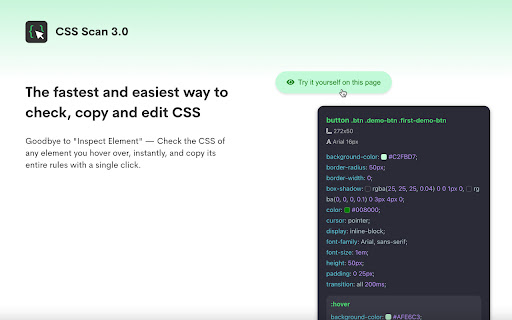
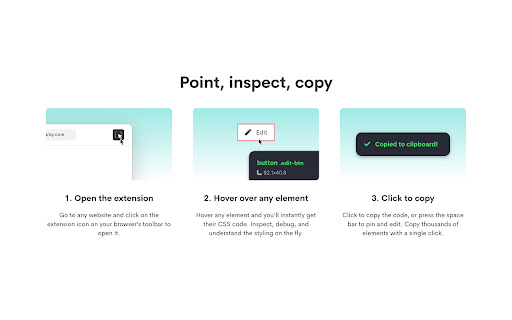
CSS Scan is a developer utility that allows users to hover over any web element to see its CSS properties and copy them immediately. It is designed to streamline the process of extracting styles from live websites.

Developer:gvrizzo
Version:4.5
Size:1.41MiB
Last updated:

Overview

Installs

10K+

Rating

3.5

101 reviews

Languages

27 locales

Includes English, Indonesia, Melayu, Nederlands...

Market analysis

Review-backed positioning, friction, and market signals for this Chrome extension.

Backed by review samples

Macro category

Developer & Designer Tools

Pricing friction

High review signal

Complaint intensity

High review signal

Listing & review signals
Observed signals from store listing text and review samples.

Listing positioning

The product is positioned as the fastest and easiest way for professional developers to inspect, visualize, and copy CSS rules instantly. It emphasizes efficiency and ease of use through a single-click workflow.

Inferred product pattern

A specialized developer productivity tool that offers high-speed CSS extraction but suffers from high user friction due to its pricing presentation and code output quality.

Review-backed pain points

Users report significant frustration regarding the unexpected paywall, with many feeling misled by the lack of clear pricing indicators. There is also dissatisfaction with the 'cluttered' nature of the copied CSS, which requires extensive manual cleanup.

Observed feature gaps

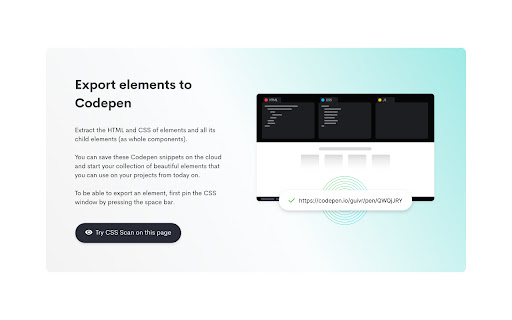
Limited functionality regarding child element CSS copying, failure to automatically update with media queries/window resizing, and suboptimal performance in mobile emulation mode.

Tags
CSS InspectorWeb DevelopmentCode ExtractionFrontend Tools
Target users

- Professional Developers

- Web Designers

- Frontend Engineers

Primary use cases

- Inspecting web element styles

- Copying CSS rules for rapid prototyping

- Extracting CSS from live websites

Positive themes

- High speed and ease of use for CSS extraction

Negative themes

- Lack of pricing transparency in store listing

- Extracted CSS contains excessive unnecessary rules

- Poor handling of media queries and mobile view

Observed friction

- Payment required for meaningful usage

- Free-tier complaints detected

- Performance complaints detected

- High friction due to users discovering the tool requires a paid license only after installation; users also find the cost high relative to the cleanliness of the output.

Evidence boundary: Data extracted from the Chrome Web Store listing and a sample of user reviews focusing on functionality and pricing experiences. The review sample is relatively small and shows a heavy bias toward negative sentiment regarding the pricing model.
Complaint summaries
Review-backed complaint signals grouped by operational area.

Support

No specific support or refund complaints were explicitly detailed in the provided samples.

Reliability

Users reported that the extension does not correctly respond to media query changes without a page refresh and has issues in Chrome's mobile view.

Privacy

No privacy or security complaints were observed.

Access & pricing

- Subscription model observed

- Login needed for core features

- Paid-only usage observed

Store listing facts

Listing assets

- Screenshots: 3

- Videos: 1

- Languages: 27

Trust signals

- Developer contact

- Official website

Store metadata

- Version: 4.5

- Size: 1.41MiB

- Last updated:

Listing SEO keywords

Search intent keywords
Keyword signals for evaluating how users may discover, compare, or search for this extension category.

Core discovery

CSS inspectorcopy CSS from websiteinspect CSS rulesweb developer utility

Comparison

Chrome DevToolsSnappySnippetCSS Peeper

Problem

messy CSS extractionunnecessary CSS rulesCSS media query issues

Alternative

CSS inspector toolweb style extractor

Similar extensions

Jump to related discovery paths:

Screenshots

CSS Scan screenshot
CSS Scan screenshot
CSS Scan screenshot

Links

Website: getcssscan.com

Videos: Watch

Recommended Chrome extensions

Related listings from the same category, trending peers, and the same publisher portfolio.

Browse developer
Tampermonkey BETA icon

Tampermonkey BETA

Jan Biniok

Change the web at will with userscripts

Installs

700K+

Rating

4.8

Color Picker for Chrome™ icon

Color Picker for Chrome™

colorpicker08

HEX, RGB Color picker, Advanched Eyedropper, Find color code on any page

Installs

700K+

Rating

4.0

Assinatura Digital no Navegador icon

Assinatura Digital no Navegador

bry-suporte-apps

Esta extensão é projetada para ser utilizada em conjunto com outras soluções e não funciona de forma isolada para a assinatura.

Installs

700K+

Rating

2.4

Postman Interceptor icon

Postman Interceptor

Postman

Capture requests from any website and send them to Postman Client.

Installs

700K+

Rating

4.3

Window Resizer icon

Window Resizer

Ionuț Botizan

Resize the browser window to emulate various screen resolutions.

Installs

700K+

Rating

4.3

Talend API Tester - Free Edition icon

Talend API Tester - Free Edition

Qlik

Visually interact with REST, SOAP and HTTP APIs.

Installs

600K+

Rating

4.8

Detailed SEO Extension icon

Detailed SEO Extension

ahrefsseotoolbar

Get SEO insights at the click of a button to any website you're currently on. Built by full-time SEO's for daily analysis.

Installs

600K+

Rating

4.9

TikTok Pixel Helper icon

TikTok Pixel Helper

TikTok For Business

The TikTok Pixel Helper is a plug-in that monitors whether your TikTok Pixel is functioning properly.

Installs

600K+

Rating

2.6

Google Analytics Debugger icon

Google Analytics Debugger

Google Analytics

Prints useful information to the JavaScript console by enabling the debug version of the Google Analytics Javascript.

Installs

600K+

Rating

4.2

Salesforce Inspector Reloaded icon

Salesforce Inspector Reloaded

Thomas Prouvot

Productivity tools for Salesforce administrators and developers to inspect data and metadata directly from the Salesforce UI.

Installs

500K+

Rating

4.8