API Tester - REST Client Testing Tool icon

API Tester Chrome Extension Analysis

Developer & Designer Tools

Store listing title: API Tester - REST Client Testing Tool

Chrome extension ID: gjpgfhjgdajmdhialdclpkjmfkhbdchl

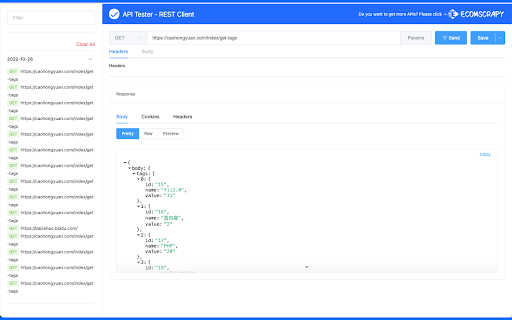
API Tester is a browser-based HTTP client that allows developers to send GET, POST, PUT, and DELETE requests. It provides features for saving favorite requests, syncing data via Google accounts, and viewing formatted responses.

Developer:ASOTools
Version:1.4.0
Size:426KiB
Last updated:

Overview

Installs

10K+

Rating

2.7

9 reviews

Languages

1 locales

Includes English

Market analysis

Review-backed positioning, friction, and market signals for this Chrome extension.

Backed by review samples

Macro category

Developer & Designer Tools

Pricing friction

Low review signal

Complaint intensity

Moderate review signal

Listing & review signals
Observed signals from store listing text and review samples.

Listing positioning

The listing positions the tool as a straightforward, 100% free alternative to Postman for developing, testing, and debugging RESTful APIs. It highlights synchronization capabilities, a user-friendly UI, and features like history management and custom headers.

Inferred product pattern

Basic lightweight browser-based API client focusing on simplicity and Google account sync.

Review-backed pain points

Users are frustrated by the inability to send raw JSON payloads or configure specific headers like cookies, which significantly limits the tool's utility for standard API development tasks.

Observed feature gaps

Core functionality for modern API development—specifically raw JSON body input and response status code visibility—is frequently reported as missing or broken.

Tags
API TestingREST ClientHTTP DebuggerWeb Development
Target users

- Web Developers

- API Developers

- QA Engineers

Primary use cases

- Testing REST API endpoints

- Debugging HTTP requests

- Saving and re-using API request configurations

Positive themes

- Serves as a functional alternative to legacy tools

- Simple and effective for basic HTTP operations

Negative themes

- Inability to add raw JSON request bodies

- Lack of cookie header support

- Failure to display response status codes

Observed friction

- None observed; the product claims to be 100% free with no strings attached.

Evidence boundary: Extracted from public Chrome Web Store listing and a sample of 9 user reviews highlighting both functional utility and significant feature gaps. Review volume is low, focusing heavily on specific technical shortcomings rather than general usability or long-term reliability.
Complaint summaries
Review-backed complaint signals grouped by operational area.

Support

No specific complaints regarding support, though users express confusion regarding the absence of core features.

Reliability

Users report critical functional gaps regarding body input and status code visibility that hinder standard workflows.

Privacy

None observed. The developer includes a disclaimer regarding the 'Read and change all your data' permission being necessary for cross-domain requests.

Access & pricing

- Free usage observed

- No account requirement observed

- Free plan or free usage claimed

Store listing facts

Listing assets

- Screenshots: 1

- Videos: 0

- Languages: 1

Trust signals

- Developer contact

Store metadata

- Version: 1.4.0

- Size: 426KiB

- Last updated:

Listing SEO keywords

Search intent keywords
Keyword signals for evaluating how users may discover, compare, or search for this extension category.

Core discovery

REST API tester chrome extensionHTTP request toolPostman alternative for chromeAPI debugger extension

Comparison

Postman alternativeRESTED replacement

Problem

cannot add json bodymissing response code

Alternative

InsomniaPostmanThunder Client

Similar extensions

Jump to related discovery paths:

Screenshots

API Tester - REST Client Testing Tool screenshot

Recommended Chrome extensions

Related listings from the same category, trending peers, and the same publisher portfolio.

Browse developer