Class Spot — Shared Tab Control icon

Class Spot Chrome Extension Analysis

Automation & Workflow Efficiency

Store listing title: Class Spot — Shared Tab Control

Chrome extension ID: gmbaigjechneajlohdbafkkpiahlpckf

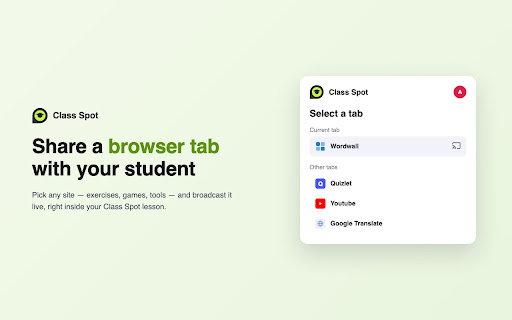
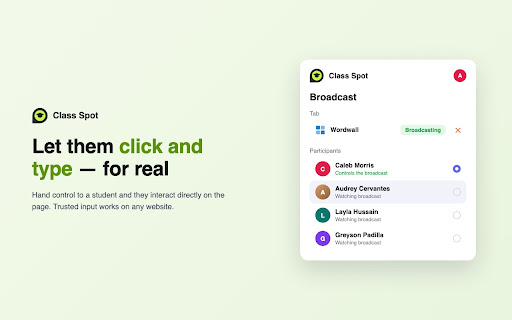
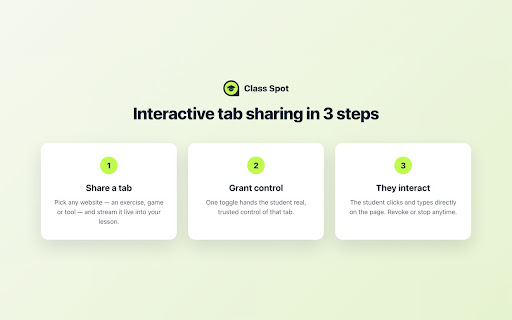
This extension facilitates peer-to-peer shared tab control between instructors and students. It allows a teacher to share a specific browser tab, granting the student permission to move the mouse, click, and type within that tab.

Version:1.1.0
Size:557KiB
Last updated:

Overview

Installs

25

Rating

★ —

0 reviews

Languages

1 locales

Includes English (United States)

Market analysis

Review-backed positioning, friction, and market signals for this Chrome extension.

No review samples found

Macro category

Automation & Workflow Efficiency

Pricing friction

Low review signal

Complaint intensity

Low review signal

Listing & review signals
Observed signals from store listing text and review samples.

Listing positioning

Class Spot is positioned as a specialized companion extension for the Class Spot online lesson platform. It is marketed as a tool for teachers to provide controlled, real-time interactive web browsing experiences for students during lessons.

Inferred product pattern

A niche educational utility designed to facilitate interactive, peer-to-peer browser control for remote instruction.

Review-backed pain points

Review-backed data is not available.

Observed feature gaps

Review-backed data is not available.

Tags
Shared Tab ControlRemote InteractionEducational Tool
Target users

- Online Educators

- Teachers

- Remote Learning Instructors

Primary use cases

- Interactive remote teaching

- Live student demonstrations

- Guided web-based learning

Positive themes

No positive theme data.

Negative themes

No negative theme data.

Observed friction

- Review-backed data is not available.

Evidence boundary: Analysis based on the product's store listing description and metadata. No user reviews were available to provide sentiment, performance, or specific user feedback.
Complaint summaries
Review-backed complaint signals grouped by operational area.

Support

Review-backed data is not available.

Reliability

Review-backed data is not available.

Privacy

Review-backed data is not available.

Access & pricing

- No clear monetization signal

- Account required for core usage

- No clear pricing signal

Store listing facts

Listing assets

- Screenshots: 3

- Videos: 0

- Languages: 1

Trust signals

- Privacy policy

- Developer contact

- Official website

- Support link

Store metadata

- Version: 1.1.0

- Size: 557KiB

- Last updated:

Listing SEO keywords

Search intent keywords
Keyword signals for evaluating how users may discover, compare, or search for this extension category.

Core discovery

shared tab controlremote student interactiononline teaching extensionClass Spot tool

Comparison

remote desktop for educationinteractive screen sharing

Problem

remote student engagementinteractive online lessons

Alternative

screen sharing toolsclassroom control software

Similar extensions

Jump to related discovery paths:

Screenshots

Class Spot — Shared Tab Control screenshot

Links

Recommended Chrome extensions

Related listings from the same category, trending peers, and the same publisher portfolio.

Browse education
Yutu Класс — Совместная вкладка icon

Yutu Класс — Совместная вкладка

Winssen Holdings Limited

Поделитесь вкладкой браузера с учеником и дайте ему взаимодействовать с ней во время урока Yutu Класс.

Installs

879

Rating

★ 5.0

You Shall Not Pass by TeacherMagic.org icon

You Shall Not Pass by TeacherMagic.org

JamesTyler

Blocks proxy sites, filter evasion exploits, tab spam, and Google Sites abuse on student Chromebooks. Free forever.

Installs

700K+

Rating

★ 1.9

edpuzzle icon

edpuzzle

Edpuzzle

Import your favorite educational YouTube video into Edpuzzle with a click!

Installs

600K+

Rating

★ 4.1

Cite This For Me: Web Citer icon

Cite This For Me: Web Citer

Chegg Writing Tools

Automatically create website citations in the APA, MLA, Chicago, or Harvard referencing styles at the click of a button.

Installs

600K+

Rating

★ 3.5

GPTZero: AI Detection & Writing Replay icon

GPTZero: AI Detection & Writing Replay

chrome-extension-publisher

Bring AI detection, citation checks, live essay feedback, and writing replays directly into Google Docs and your workflow.

Installs

500K+

Rating

★ 4.6

Translate for Chrome -Translator, Dictionary icon

Translate for Chrome -Translator, Dictionary

Translator App.

Translate words, phrases or text on any webpage. Full page translator and dictionary, text to speech (TTS) using Google Translate.

Installs

500K+

Rating

★ 4.2

オクリンクプラス Webページスクリーンショット機能 icon

オクリンクプラス Webページスクリーンショット機能

ベネッセコーポレーション

オクリンクプラスのカードにWebページのスクリーンショットを挿入し、リンクを埋め込むことができます!

Installs

500K+

Rating

★ 3.0

Google Meet Breakout by Robert Hudek icon

Google Meet Breakout by Robert Hudek

Unknown developer

Only the teacher needs to install. Completely Free and your Data is Private. Google Classroom integration, Slider Control.

Installs

400K+

Rating

★ 4.4

Assessment Lock (Vretta) icon

Assessment Lock (Vretta)

google-web-store-admin

Assessment Security extension for e-Assessments running on ChromeOS

Installs

400K+

Rating

★ 2.1

Google Meet Attendance List icon

Google Meet Attendance List

MeetList

Easiest way to save the attendance list for your meetings or lectures

Installs

400K+

Rating

★ 4.8