e-Okul Karne Görüşü Yardımcısı icon

e-Okul Karne Görüşü Yardımcısı Chrome Extension Analysis

Automation & Workflow Efficiency

Chrome extension ID: gmiogjegcomdijoeknjocidnlddlkgmf

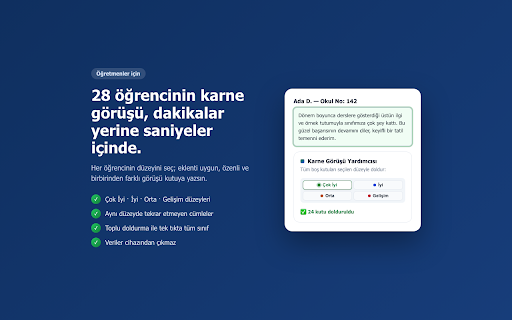
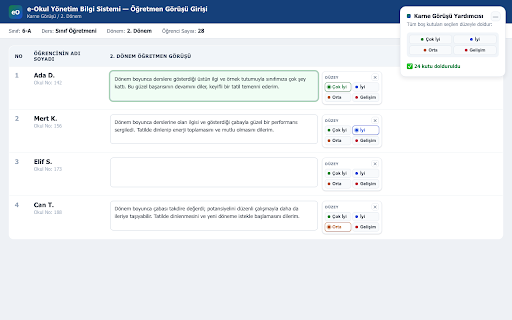
This extension adds a selection bar to the report card comment input fields within the e-Okul teacher portal. It allows users to select a performance level for each student and automatically generates unique, level-appropriate comments while providing options to clear fields or perform batch filling.

Version:1.0.1
Size:15.17KiB
Last updated:

Overview

Installs

16

Rating

0 reviews

Languages

1 locales

Includes Türkçe

Market analysis

Review-backed positioning, friction, and market signals for this Chrome extension.

No review samples found

Macro category

Automation & Workflow Efficiency

Pricing friction

Low review signal

Complaint intensity

Low review signal

Listing & review signals
Observed signals from store listing text and review samples.

Listing positioning

The product positions itself as a productivity tool for teachers using the e-Okul platform to expedite the process of writing student report card comments. It emphasizes ease of use through one-click automated text insertion and batch processing capabilities.

Inferred product pattern

Single-purpose productivity utility for a specific web-based administrative portal.

Review-backed pain points

Review-backed data is not available.

Observed feature gaps

No specific feature gaps identified in listing data.

Tags
EducationTeacher ToolWorkflow AutomationE-Okul
Target users

- Teachers

- Educators

Primary use cases

- Automating report card comment entry

- Batch processing student evaluations

Positive themes

No positive theme data.

Negative themes

No negative theme data.

Observed friction

- None; product claims to be a free utility.

Evidence boundary: Analysis based on the Chrome Web Store listing provided by the developer, highlighting functionality for e-Okul portal integration. Evidence is limited to public store description; no user reviews are available to verify performance or real-world reliability.
Complaint summaries
Review-backed complaint signals grouped by operational area.

Support

Review-backed data is not available.

Reliability

Review-backed data is not available.

Privacy

None; developer explicitly states no data is collected or transmitted.

Access & pricing

- Free usage observed

- No account requirement observed

- Free plan or free usage claimed

Store listing facts

Listing assets

- Screenshots: 2

- Videos: 0

- Languages: 1

Trust signals

- Privacy policy

- Developer contact

Store metadata

- Version: 1.0.1

- Size: 15.17KiB

- Last updated:

Listing SEO keywords

Search intent keywords
Keyword signals for evaluating how users may discover, compare, or search for this extension category.

Core discovery

e-Okul karne görüşükarne görüşü yazma eklentisie-Okul otomatik doldurma

Comparison

e-Okul yardımcı araçları

Problem

karne görüşü yazma sorunuyavaş e-Okul işlemleri

Alternative

e-Okul otomasyon

Similar extensions

Jump to related discovery paths:

Screenshots

e-Okul Karne Görüşü Yardımcısı screenshot

Links

Recommended Chrome extensions

Related listings from the same category, trending peers, and the same publisher portfolio.

Browse education
Gelişim Raporu Seçici icon

Gelişim Raporu Seçici

mehmetmesutpeker

Öğrenci durumuna göre radio butonlarını otomatik işaretler.

Installs

2K+

Rating

5.0

Pratik Not Analizi (e-Okul İçin) icon

Pratik Not Analizi (e-Okul İçin)

mehmetmesutpeker

Acik e-Okul not girisi sayfasindan yazili ve ders ici performans analiz raporlari olusturur.

Installs

136

Rating

rikaikun icon

rikaikun

Erek Speed

rikaikun shows the reading and English definition of Japanese words when you hover over Japanese text in the browser.

Installs

200K+

Rating

4.7

Revision History: Writing Process Visibility for Google Docs & Slides icon

Revision History: Writing Process Visibility for Google Docs & Slides

Revision History

Built for teachers: See how students write, not just what they wrote. View the writing process in Google Docs & Slides.

Installs

200K+

Rating

3.7

Mouse Tooltip Translator - PDF & Netflix YouTube dual subs icon

Mouse Tooltip Translator - PDF & Netflix YouTube dual subs

ttop324

Mouse Tooltip Translator translate mouseover text using google translate. Support OCR, TTS, manga translator & pdf translator.

Installs

200K+

Rating

4.6

Paperpile Extension icon

Paperpile Extension

Paperpile

Collect, organize, annotate and cite your research papers in Chrome.

Installs

200K+

Rating

4.6

ExCITATION – Journal Ranking & Impact Factor for Google Scholar™ icon

ExCITATION – Journal Ranking & Impact Factor for Google Scholar™

Excitation Journal

Show SJR, ABS & ABDC journal rankings in Google Scholar. Sort by citations, detect predatory journals & preview abstracts — free.

Installs

200K+

Rating

4.5

OpenDyslexic for Chrome icon

OpenDyslexic for Chrome

OpenDyslexic

Format pages using the OpenDyslexic font and low contrast help

Installs

200K+

Rating

4.1

Reverso – Translation, dictionary icon

Reverso – Translation, dictionary

Reverso Technologies Inc.

Translate and learn languages while reading or watching movies online. It's free.

Installs

200K+

Rating

4.6

Rapid Journal Quality Check icon

Rapid Journal Quality Check

jrk.devgit

Displays rankings and h-index for academic journals next to Google Scholar search results.

Installs

200K+

Rating

4.2