World Time icon

World Time Chrome Extension Analysis

Automation & Workflow Efficiency

Chrome extension ID: goedhhlgjnahdhgdngddoadlldodddfk

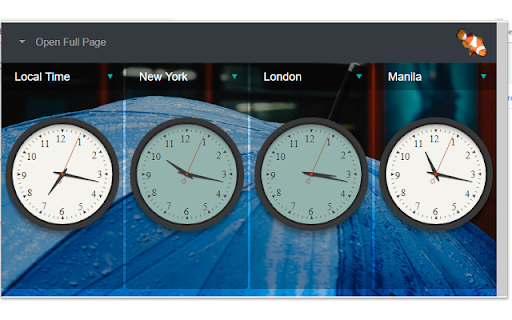
World Time is a Chrome extension that displays the time in up to four different time zones simultaneously. It features a dark clock face to indicate nighttime and remembers user selections in the browser. The extension also provides links to other tools from the developer.

Developer:LinangData
Version:1.0.7
Size:2.92MiB
Last updated:

Overview

Installs

1K+

Rating

3.3

6 reviews

Languages

1 locales

Includes English (United States)

Market analysis

Review-backed positioning, friction, and market signals for this Chrome extension.

Backed by review samples

Macro category

Automation & Workflow Efficiency

Pricing friction

Low review signal

Complaint intensity

Low review signal

Listing & review signals
Observed signals from store listing text and review samples.

Listing positioning

This extension positions itself as a solution for remote teams and individuals needing to track multiple time zones at a glance. It emphasizes its ability to display times in four different zones, with a visual indicator for nighttime.

Inferred product pattern

A simple utility extension designed to solve a specific time zone management problem for remote or globally connected users.

Review-backed pain points

One user reported that the extension did not work as expected and did not display as shown in the application screenshots.

Observed feature gaps

No significant feature gaps observed from the listing or reviews. The core functionality appears to be present.

Tags
World ClockTime ZonesRemote WorkProductivity
Target users

- Remote workers

- Global teams

- Frequent travelers

- Individuals with international contacts

Primary use cases

- Managing remote team schedules

- Coordinating with international clients

- Keeping track of family/friends in different time zones

- Planning international calls/meetings

Positive themes

- Useful application

- Fast information

- Easy to use

Negative themes

- Does not work as expected

- Does not display as shown in screenshots

Observed friction

- The extension is free to use and no payment friction was observed.

Evidence boundary: Analysis is based on the Chrome Web Store listing data and user reviews. The limited number of reviews and user comments may not fully represent the overall user experience or all potential issues.
Complaint summaries
Review-backed complaint signals grouped by operational area.

Support

No complaints regarding support or account issues were found.

Reliability

One user reported the extension not working correctly, suggesting potential reliability issues for some users.

Privacy

No privacy concerns were raised in the reviews or listing.

Access & pricing

- Free usage observed

- No account requirement observed

- Free plan or free usage claimed

Store listing facts

Listing assets

- Screenshots: 1

- Videos: 0

- Languages: 1

Trust signals

- Privacy policy

- Developer contact

- Official website

Store metadata

- Version: 1.0.7

- Size: 2.92MiB

- Last updated:

Listing SEO keywords

Search intent keywords
Keyword signals for evaluating how users may discover, compare, or search for this extension category.

Core discovery

world time extensionchrome time zoneglobal clockremote work time zonesinternational time converter

Comparison

world clock chrometime zone extensiongoogle chrome world clockmultiple time zone app

Problem

time zone differenceremote team coordinationscheduling across time zonesinternational meetings

Alternative

online world clocktime zone calculatorbrowser time extension

Similar extensions

Jump to related discovery paths:

Screenshots

World Time screenshot

Links

Recommended Chrome extensions

Related listings from the same category, trending peers, and the same publisher portfolio.

Browse workflow