Segment Event Tracker icon

Segment Event Tracker Chrome Extension Analysis

Developer & Designer Tools

Chrome extension ID: hbanigoffkilibdakdmmlgefndpjmajl

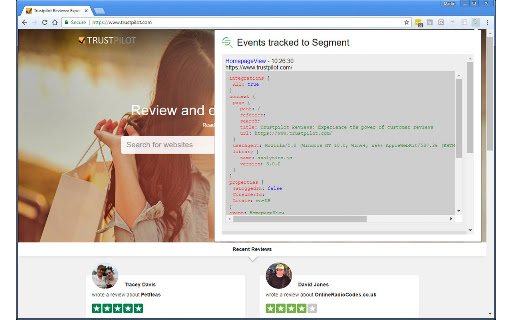
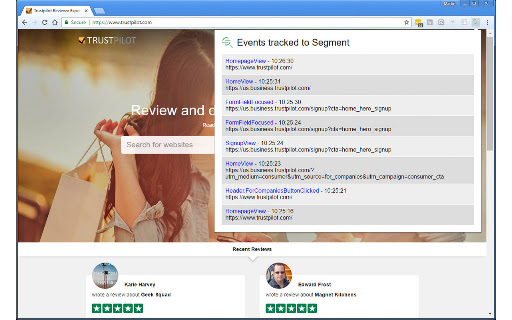
The Segment Event Tracker is a browser extension designed to monitor events sent to data platforms such as Segment, Rudderstack, Attribution, and Dreamdata. It provides a visual interface to see when these events are fired from a website, simplifying debugging and data analysis for users.

Version:3.2
Size:35.08KiB
Last updated:

Overview

Installs

10K+

Rating

4.7

12 reviews

Languages

1 locales

Includes English

Market analysis

Review-backed positioning, friction, and market signals for this Chrome extension.

Backed by review samples

Macro category

Developer & Designer Tools

Pricing friction

Low review signal

Complaint intensity

Moderate review signal

Listing & review signals
Observed signals from store listing text and review samples.

Listing positioning

This Chrome extension is positioned as a tool for developers and data professionals to easily track and debug events sent to Segment and other compatible data platforms. It simplifies the process of monitoring website events like page loads and clicks, which is crucial for making data-driven decisions.

Inferred product pattern

A browser extension that intercepts and displays data events being sent from a website to specific analytics and data platforms. It acts as a real-time debugging and monitoring tool for event tracking.

Review-backed pain points

Some users have experienced issues with the extension not tracking events, even when other tracking tools indicate events are firing. There was also a period where the extension required full access to browsing history and the ability to copy and paste, raising privacy concerns for some users.

Observed feature gaps

Users have requested the inclusion of 'Group' calls in the event tracking and more advanced filtering functionalities within the extension.

Tags
Event TrackerSegment DebuggerData EventsDeveloper Tool
Target users

- Data Analysts

- Web Developers

- Marketing Technologists

- Product Managers

Primary use cases

- Debugging event tracking implementation

- Monitoring data pipeline events

- Validating data platform integrations

- Simplifying event inspection

Positive themes

- Saves time compared to checking the network tab

- Easy to use and understand

- Works instantly and effectively

- Helpful for debugging event tracking

Negative themes

- Issue with tracking events in recent Chrome versions

- Concerns about extension requiring full history access and copy/paste permissions

- Requests for additional functionality like Group call tracking and filtering

Observed friction

- Privacy complaints detected

- The extension appears to be free to use, with no mention of payment friction in the listing or reviews.

Evidence boundary: Store listing description, user reviews (both positive and negative). Limited number of reviews (12 total) provides a narrow view of user experience. No specific data on user numbers or engagement beyond the 10,000+ indicator.
Complaint summaries
Review-backed complaint signals grouped by operational area.

Support

One user expressed concern about recent permission changes requiring history access and copy/paste, but this was later resolved by a fix from the developer. No other support-related complaints were observed.

Reliability

One user reported that the extension was not tracking events, suggesting a potential reliability issue in a specific version or Chrome update. This issue was later addressed.

Privacy

One review specifically mentioned uninstalling the extension due to it requiring 'full access to history and has the ability to copy and paste'. This indicates a privacy concern for some users regarding the permissions requested.

Access & pricing

- Free usage observed

- No clear access signal

- Free plan or free usage claimed

Store listing facts

Listing assets

- Screenshots: 2

- Videos: 0

- Languages: 1

Trust signals

- Developer contact

Store metadata

- Version: 3.2

- Size: 35.08KiB

- Last updated:

Listing SEO keywords

Search intent keywords
Keyword signals for evaluating how users may discover, compare, or search for this extension category.

Core discovery

segment event tracker chrome extensionrudderstack event trackerattribution event trackerdreamdata events chromedebug website eventstrack analytics events

Comparison

segment debuggernetwork tab eventswebsite event monitoring

Problem

fix event trackingdebug segment eventswebsite data errors

Alternative

browser event loggerdata platform inspector

Similar extensions

Jump to related discovery paths:

Screenshots

Segment Event Tracker screenshot

Recommended Chrome extensions

Related listings from the same category, trending peers, and the same publisher portfolio.

Browse developer