SnipCSS icon

SnipCSS Chrome Extension Analysis

Developer & Designer Tools

Chrome extension ID: hbdnoadcmapfbngbodpppofgagiclicf

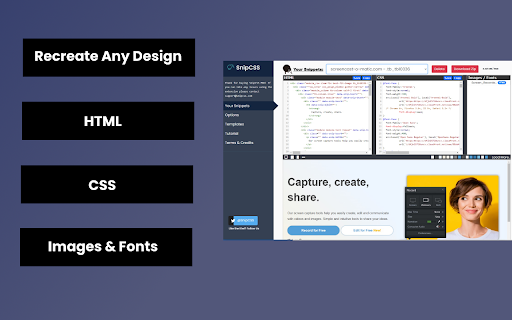
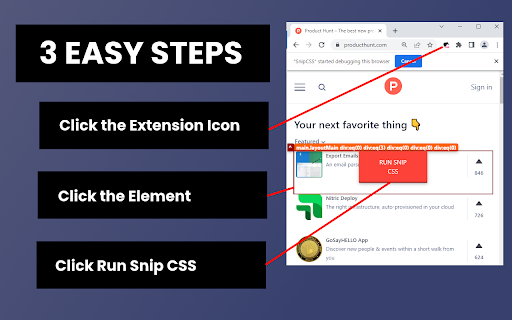
SnipCSS is a browser extension that allows users to extract HTML, CSS, and associated images from specific elements on any webpage. It is designed to facilitate rapid prototyping and component reuse for web developers and designers.

Version:2.0.3
Size:13.11MiB
Last updated:

Overview

Installs

20K+

Rating

3.8

35 reviews

Languages

1 locales

Includes English

Market analysis

Review-backed positioning, friction, and market signals for this Chrome extension.

Backed by review samples

Macro category

Developer & Designer Tools

Pricing friction

Moderate review signal

Complaint intensity

High review signal

Listing & review signals
Observed signals from store listing text and review samples.

Listing positioning

SnipCSS positions itself as a high-fidelity extraction tool that utilizes the Chrome DevTools protocol to provide more accurate CSS/HTML than standard 'computed style' extractors. It highlights advanced developer workflows, including Tailwind CSS conversion and AI-powered component generation for React and Vue.

Inferred product pattern

A developer productivity utility that uses a freemium model, offering basic element extraction for free while gating advanced automation and AI-driven conversion features behind a Pro subscription.

Review-backed pain points

Users report significant technical issues including 'extension context invalidated' errors, 'failed to load' messages, and general failure to extract working CSS. There is also reported friction regarding the limited value of the free tier and the difficulty of using the tool without deactivating other extensions.

Observed feature gaps

Reviews indicate that elements utilizing JavaScript do not copy well, and there is a perceived gap between the promised capabilities and the actual free-tier experience.

Tags
CSS ExtractorHTML Snippet ToolTailwind ConverterWeb Prototyping
Target users

- Web Developers

- Frontend Engineers

- UI/UX Designers

Primary use cases

- Extracting web component styles

- Converting HTML/CSS to Tailwind

- Generating React/Vue templates

- Rapid web prototyping

Positive themes

- Effective for capturing simple HTML/CSS elements

- Useful for modeling existing web designs

Negative themes

- Frequent technical stability errors

- High difficulty of use/finicky interface

- Limited free functionality

Observed friction

- Free-tier complaints detected

- Performance complaints detected

- Users expressed frustration regarding the limited extent of free features compared to the advertised capabilities.

Evidence boundary: Analysis based on the Chrome Web Store listing and user reviews documenting technical errors and feature limitations. The sample size of reviews is relatively small.
Complaint summaries
Review-backed complaint signals grouped by operational area.

Support

no-review fallback

Reliability

Significant complaints regarding technical breakage, specifically errors related to Chrome updates and failed extraction processes.

Privacy

no-review fallback

Access & pricing

- Free entry with paid features

- Login needed for core features

- Limited free usage observed

Store listing facts

Listing assets

- Screenshots: 2

- Videos: 1

- Languages: 1

Trust signals

- Privacy policy

- Developer contact

- Official website

Store metadata

- Version: 2.0.3

- Size: 13.11MiB

- Last updated:

Listing SEO keywords

Search intent keywords
Keyword signals for evaluating how users may discover, compare, or search for this extension category.

Core discovery

extract css from websitehtml css extractorconvert html to tailwindweb component snippets

Comparison

css extractor vs computed styles

Problem

extension context invalidatedfailed to load csscss extraction error

Alternative

css inspectorhtml sniffer

Similar extensions

Jump to related discovery paths:

Screenshots

SnipCSS screenshot
SnipCSS screenshot

Links

Website: snipcss.com

Privacy policy: https://www.snipcss.com/privacy

Videos: Watch

Recommended Chrome extensions

Related listings from the same category, trending peers, and the same publisher portfolio.

Browse developer
Productivity Owl icon

Productivity Owl

Productive Mark LLC

Want to be productive? Let the Productivity Owl guide you to accomplishment.

Installs

6K+

Rating

4.0

Chromebook Recovery Utility icon

Chromebook Recovery Utility

google.com

Create recovery media for your Chromebook.

Installs

2.0M+

Rating

2.6

CRXLauncher icon

CRXLauncher

CRXLauncher

Effortlessly Launch Chrome Extensions with CRXLauncher

Installs

1.0M+

Rating

4.6

Stylus icon

Stylus

stylus.openstyles

Redesign the web with Stylus, a user styles manager. Stylus allows you to easily install themes and skins for many popular sites.

Installs

1.0M+

Rating

4.5

SEOquake: On-Page SEO Checker icon

SEOquake: On-Page SEO Checker

SEOquake

Run page-level SEO audits, check technical issues, analyze links and keyword density, and view Semrush metrics.

Installs

1.0M+

Rating

4.5

Similarweb - Website Traffic, AI Traffic & SEO Checker icon

Similarweb - Website Traffic, AI Traffic & SEO Checker

Similarweb

Instant website analysis, AI traffic insights, and SEO metrics at your fingertips.

Installs

1.0M+

Rating

4.6

Eye Dropper icon

Eye Dropper

Eye Dropper

Pick colors from any website.

Installs

1.0M+

Rating

4.3

Lighthouse icon

Lighthouse

lighthouse-extension-owners

Lighthouse is an open-source, automated tool for improving the performance, quality, and correctness of your web apps.

Installs

1.0M+

Rating

4.4

Topaz SigPlusExtLite Extension icon

Topaz SigPlusExtLite Extension

Topaz Systems Inc

The Topaz SigPlusExtLite Chrome Extension enables users to capture signatures on a wide variety of Topaz signature pads.

Installs

1.0M+

Rating

4.0

Контур.Плагин icon

Контур.Плагин

kontur.extension

Расширение браузера, выполняющее криптографические операции в сервисах СКБ Контур

Installs

1.0M+

Rating

3.3