CMS Detect - What CMS is that site using? icon

CMS Detect Chrome Extension Analysis

Developer & Designer Tools

Store listing title: CMS Detect - What CMS is that site using?

Chrome extension ID: hkkdnbjbdnfjmnldiogaepcokpldimao

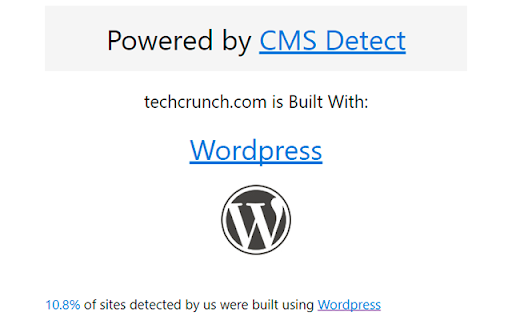
CMS Detect is a Chrome extension that identifies the content management system and web frameworks powering a website. By clicking the extension icon, users receive instant information about the site's underlying technology stack.

Developer:OK Digital Ltd.
Version:1.1
Size:47.41KiB
Last updated:

Overview

Installs

30K+

Rating

4.8

230 reviews

Languages

1 locales

Includes English

Market analysis

Review-backed positioning, friction, and market signals for this Chrome extension.

Backed by review samples

Macro category

Developer & Designer Tools

Pricing friction

Low review signal

Complaint intensity

Moderate review signal

Listing & review signals
Observed signals from store listing text and review samples.

Listing positioning

The product positions itself as a simple and lightweight tool for web designers, developers, and SEO specialists to identify the CMS and frameworks used by any website. It claims to support over 600 different systems and serves as an integral part of a website builder's research process.

Inferred product pattern

A lightweight developer utility focused on technology stack identification through browser-based detection.

Review-backed pain points

Users report frequent failures to detect the CMS on many sites, including simple examples, and occasionally report the extension stops working entirely.

Observed feature gaps

Users suggested a more modern/stylish UI and improved detection reliability for a broader range of websites.

Tags
CMS DetectorFramework IdentifierWeb Development ToolSEO Tool
Target users

- Web Designers

- Web Developers

- SEO Specialists

- Web Enthusiasts

Primary use cases

- Identifying website technology stacks

- Competitive research for website builders

- Discovering frameworks used on reference websites

Positive themes

- Lightweight and non-bloated compared to competitors

- Effective detection of specific frameworks like Django

- Cost-effective alternative to paid tools

Negative themes

- Inconsistent detection accuracy

- Failure to detect basic CMS like WordPress

- Unappealing user interface

Observed friction

- No pricing friction identified in the provided data.

Evidence boundary: Analysis based on the Chrome Web Store listing description and various user reviews highlighting accuracy and UI feedback. Review data is based on a limited sample of users and may not reflect the complete sentiment distribution.
Complaint summaries
Review-backed complaint signals grouped by operational area.

Support

No support or account-related complaints observed.

Reliability

Users have reported that the tool sometimes fails to recognize even simple CMS platforms or stops functioning across different browsers.

Privacy

No privacy or security complaints observed.

Access & pricing

- No clear monetization signal

- No account requirement observed

- No clear pricing signal

Store listing facts

Listing assets

- Screenshots: 1

- Videos: 0

- Languages: 1

Trust signals

- Developer contact

- Official website

- Support link

Store metadata

- Version: 1.1

- Size: 47.41KiB

- Last updated:

Listing SEO keywords

Search intent keywords
Keyword signals for evaluating how users may discover, compare, or search for this extension category.

Core discovery

CMS detectordetect website frameworkidentify CMSwhat CMS is this site usingweb technology detector

Comparison

Wappalyzer alternative

Problem

failed to detect CMSwebsite technology identification

Alternative

WappalyzerBuiltWith

Similar extensions

Jump to related discovery paths:

Screenshots

CMS Detect - What CMS is that site using? screenshot

Links

Recommended Chrome extensions

Related listings from the same category, trending peers, and the same publisher portfolio.

Browse developer
Scan WP - WordPress Theme and Plugin Detector icon

Scan WP - WordPress Theme and Plugin Detector

OK Digital Ltd.

Have you ever been on a really great WordPress site and want to know how it was built? What theme they used? What plugins give it…

Installs

40K+

Rating

3.9

Tampermonkey BETA icon

Tampermonkey BETA

Jan Biniok

Change the web at will with userscripts

Installs

700K+

Rating

4.8

Color Picker for Chrome™ icon

Color Picker for Chrome™

colorpicker08

HEX, RGB Color picker, Advanched Eyedropper, Find color code on any page

Installs

700K+

Rating

4.0

Assinatura Digital no Navegador icon

Assinatura Digital no Navegador

bry-suporte-apps

Esta extensão é projetada para ser utilizada em conjunto com outras soluções e não funciona de forma isolada para a assinatura.

Installs

700K+

Rating

2.4

Postman Interceptor icon

Postman Interceptor

Postman

Capture requests from any website and send them to Postman Client.

Installs

700K+

Rating

4.3

Window Resizer icon

Window Resizer

Ionuț Botizan

Resize the browser window to emulate various screen resolutions.

Installs

700K+

Rating

4.3

Talend API Tester - Free Edition icon

Talend API Tester - Free Edition

Qlik

Visually interact with REST, SOAP and HTTP APIs.

Installs

600K+

Rating

4.8

Detailed SEO Extension icon

Detailed SEO Extension

ahrefsseotoolbar

Get SEO insights at the click of a button to any website you're currently on. Built by full-time SEO's for daily analysis.

Installs

600K+

Rating

4.9

TikTok Pixel Helper icon

TikTok Pixel Helper

TikTok For Business

The TikTok Pixel Helper is a plug-in that monitors whether your TikTok Pixel is functioning properly.

Installs

600K+

Rating

2.6

Google Analytics Debugger icon

Google Analytics Debugger

Google Analytics

Prints useful information to the JavaScript console by enabling the debug version of the Google Analytics Javascript.

Installs

600K+

Rating

4.2