Optimizely Assistant icon

Optimizely Assistant Chrome Extension Analysis

Developer & Designer Tools

Chrome extension ID: hkmpnondmidmfdlaphahbalnmphelnfo

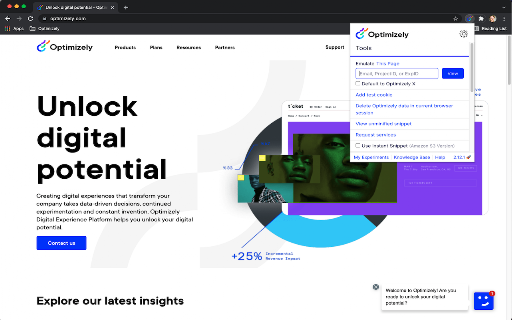
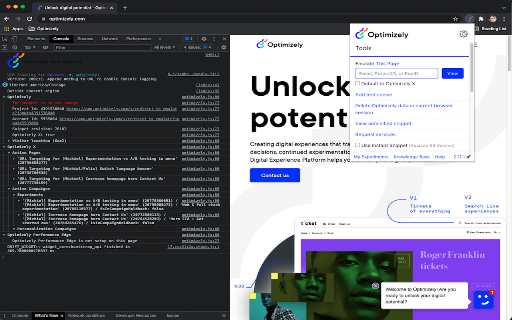
A Chrome extension that allows developers to inspect Optimizely JavaScript data and state on a webpage. It provides visibility into running experiments and bucketing variations via the browser console.

Developer:Optimizely
Version:3.1.2
Size:515KiB
Last updated:

Overview

Installs

6K+

Rating

★ 3.7

3 reviews

Languages

1 locales

Includes English (United States)

Market analysis

Review-backed positioning, friction, and market signals for this Chrome extension.

Backed by review samples

Macro category

Developer & Designer Tools

Pricing friction

Low review signal

Complaint intensity

Moderate review signal

Listing & review signals
Observed signals from store listing text and review samples.

Listing positioning

The product is positioned as a technical debugging utility for Optimizely experiments. It emphasizes reducing wait times for staging content by providing JavaScript console logging, caching controls, and snippet injection.

Inferred product pattern

Official companion debugging utility for a B2B SaaS experimentation platform.

Review-backed pain points

Users report a critical missing feature: the ability to manually select which experiment variation to view, leading some to use third-party alternatives.

Observed feature gaps

Manual variation selection/forcing specific variations.

Tags
A/B TestingDebugging ToolDeveloper UtilityOptimizely Assistant
Target users

- Frontend Developers

- QA Engineers

- CRO Specialists

- Optimizely Platform Users

Primary use cases

- Debugging Optimizely experiments

- Verifying variation bucketing

- Testing staging content on production sites

- Bypassing snippet caching

Positive themes

- Effective for developer-specific purposes

Negative themes

- Lack of manual variation selection

- Feature bloat/unused functionality

Observed friction

- No pricing friction observed; the tool appears to be a free utility for Optimizely account holders.

Evidence boundary: Analyzed official store listing and two representative user reviews. Extremely low review volume (3 total comments) limits the ability to generalize sentiment.
Complaint summaries
Review-backed complaint signals grouped by operational area.

Support

No support complaints observed in the provided samples.

Reliability

No reliability complaints observed; one user confirmed it is working well for dev purposes.

Privacy

No privacy complaints observed.

Access & pricing

- Free usage observed

- Account required for core usage

- Free plan or free usage claimed

Store listing facts

Listing assets

- Screenshots: 2

- Videos: 0

- Languages: 1

Trust signals

- Privacy policy

- Developer contact

- Support link

Store metadata

- Version: 3.1.2

- Size: 515KiB

- Last updated:

Listing SEO keywords

Search intent keywords
Keyword signals for evaluating how users may discover, compare, or search for this extension category.

Core discovery

Optimizely debuggerA/B testing debuggingexperiment snippet injectionJS console logging

Comparison

Optimizely Assistant vs third-party debuggers

Problem

how to debug Optimizely experimentsOptimizely variation bucketing issuesOptimizely snippet caching

Alternative

Optimizely debugging alternativesexperimentation debugger extension

Similar extensions

Jump to related discovery paths:

Screenshots

Optimizely Assistant screenshot

Links

Recommended Chrome extensions

Related listings from the same category, trending peers, and the same publisher portfolio.

Browse developer
Optimizely Web Companion icon

Optimizely Web Companion

Optimizely

Get into your Optimizely Web Experimentation experiments faster.

Installs

196

Rating

★ 5.0

GoFullPage - Full Page Screen Capture icon

GoFullPage - Full Page Screen Capture

GoFullPage

Capture a screenshot of your current page in entirety and reliably—without requesting any extra permissions!

Installs

11.0M+

Rating

★ 4.9

TouchEn PC보안 확장 icon

TouchEn PC보안 확장

라온시큐어

브라우저에서 라온시큐어의 PC보안 기능을 사용하기 위한 확장 프로그램입니다.

Installs

8.0M+

Rating

★ 1.2

React Developer Tools icon

React Developer Tools

React Foundation

Adds React debugging tools to the Chrome Developer Tools. Created from revision 1d34f91dfd.

Installs

5.0M+

Rating

★ 3.5

ColorZilla icon

ColorZilla

colorzilla.com

Advanced Eyedropper, Color Picker, Gradient Generator and other colorful goodies

Installs

4.0M+

Rating

★ 4.7

Full Page Screenshot & PDF - Web Capture by FireShot icon

Full Page Screenshot & PDF - Web Capture by FireShot

Evgeny Vokilsus

Capture full-page screenshots. Save as PDF or image. Trusted since 2010. Your screenshots stay private. Minimal permissions.

Installs

3.0M+

Rating

★ 4.9

Meta Ads Data Advisor icon

Meta Ads Data Advisor

Meta

Meta Ads Data Advisor automates connecting your website and marketing data to Meta for better ad performance. No developers needed.

Installs

3.0M+

Rating

★ 2.0

Tag Assistant icon

Tag Assistant

Google

The Tag Assistant extension works with Tag Assistant to help troubleshoot installation of gtag.js and Google Tag Manager.

Installs

3.0M+

Rating

★ 3.5

Wappalyzer - Technology profiler icon

Wappalyzer - Technology profiler

Wappalyzer

Identify web technologies

Installs

3.0M+

Rating

★ 4.0

WhatFont icon

WhatFont

Chengyin Liu

The easiest way to identify fonts on web pages.

Installs

3.0M+

Rating

★ 3.8