Odoo Debug icon

Odoo Debug Chrome Extension Analysis

Developer & Designer Tools

Chrome extension ID: hmdmhilocobgohohpdpolmibjklfgkbi

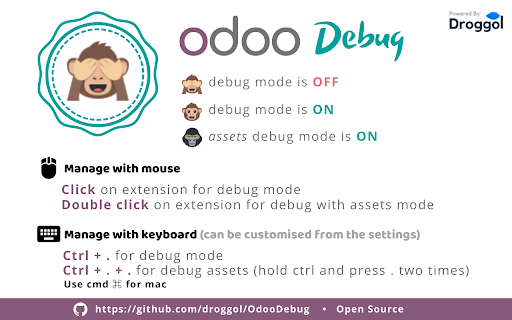
This extension enables users to quickly toggle Odoo debug mode and debug assets mode without manually editing URLs or re-entering command parameters. It acts as a browser-based shortcut tool specifically for Odoo platform administrators and developers.

Developer:Droggol
Version:5.1
Size:372KiB
Last updated:

Overview

Installs

100K+

Rating

4.7

102 reviews

Languages

1 locales

Includes English

Market analysis

Review-backed positioning, friction, and market signals for this Chrome extension.

Backed by review samples

Macro category

Developer & Designer Tools

Pricing friction

Low review signal

Complaint intensity

Low review signal

Listing & review signals
Observed signals from store listing text and review samples.

Listing positioning

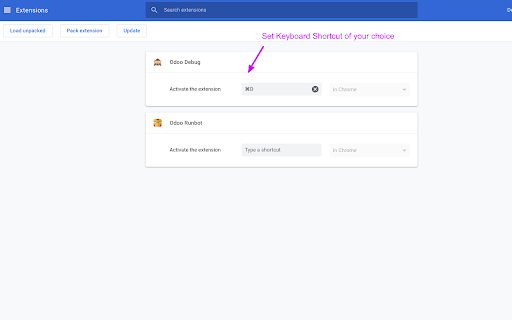
Odoo Debug positions itself as a lightweight, minimalist utility designed to streamline developer workflows by toggling Odoo debug modes. It emphasizes speed and ease of use through both mouse interactions and configurable keyboard shortcuts.

Inferred product pattern

Utility-focused developer tool with open-source roots.

Review-backed pain points

Users struggle with the toggle logic (cycling through modes), intermittent issues after browser or Odoo version updates, and the desire for more advanced features like per-URL defaults.

Observed feature gaps

Lack of persistent debug mode settings for specific URLs and potential script errors when interacting with newer Odoo versions.

Tags
OdooDeveloper ToolsDebuggingProductivity
Target users

- Odoo Developers

- Odoo System Administrators

- ERP Implementers

Primary use cases

- Activating Odoo debug mode

- Activating Odoo debug mode with assets

- Reducing manual URL parameter entry

Positive themes

- Significant time saver for daily Odoo management

- Simple and efficient functionality

- Responsive developer history

Negative themes

- Toggle logic inconsistency

- Compatibility issues with newer Odoo versions (e.g., v17/v19)

- Chrome update interference

Observed friction

- Performance complaints detected

- None; the extension is free to use.

Evidence boundary: Evidence based on user feedback regarding functional behavior, version compatibility with Odoo/Chrome, and general utility experiences. Review data is historical, spanning multiple years, which may include feedback on legacy versions that do not reflect current performance.
Complaint summaries
Review-backed complaint signals grouped by operational area.

Support

Minimal; most support interaction revolves around feature requests or bug reports related to Odoo/Chrome version updates.

Reliability

Occasional reports of the extension failing to persist or triggering console errors after Chrome or Odoo platform updates.

Privacy

No privacy-related complaints observed.

Access & pricing

- Free usage observed

- No account requirement observed

- Free plan or free usage claimed

Store listing facts

Listing assets

- Screenshots: 2

- Videos: 0

- Languages: 1

Trust signals

- Developer contact

- Official website

- Support link

Store metadata

- Version: 5.1

- Size: 372KiB

- Last updated:

Listing SEO keywords

Search intent keywords
Keyword signals for evaluating how users may discover, compare, or search for this extension category.

Core discovery

Odoo debug mode extensionOdoo developer toolsactivate Odoo debugOdoo debug shortcut

Comparison

Odoo debug module vs extension

Problem

Odoo debug not workingOdoo developer mode issues

Alternative

Odoo URL parameter helper

Similar extensions

Jump to related discovery paths:

Screenshots

Odoo Debug screenshot

Links

Recommended Chrome extensions

Related listings from the same category, trending peers, and the same publisher portfolio.

Browse developer
Odoo Utility icon

Odoo Utility

Droggol

Simple shortcuts and tools to save time

Installs

8K+

Rating

5.0

Postman Interceptor icon

Postman Interceptor

Postman

Capture requests from any website and send them to Postman Client.

Installs

700K+

Rating

4.3

Window Resizer icon

Window Resizer

Ionuț Botizan

Resize the browser window to emulate various screen resolutions.

Installs

700K+

Rating

4.3

Talend API Tester - Free Edition icon

Talend API Tester - Free Edition

Qlik

Visually interact with REST, SOAP and HTTP APIs.

Installs

600K+

Rating

4.8

Detailed SEO Extension icon

Detailed SEO Extension

ahrefsseotoolbar

Get SEO insights at the click of a button to any website you're currently on. Built by full-time SEO's for daily analysis.

Installs

600K+

Rating

4.9

TikTok Pixel Helper icon

TikTok Pixel Helper

TikTok For Business

The TikTok Pixel Helper is a plug-in that monitors whether your TikTok Pixel is functioning properly.

Installs

600K+

Rating

2.6

Google Analytics Debugger icon

Google Analytics Debugger

Google Analytics

Prints useful information to the JavaScript console by enabling the debug version of the Google Analytics Javascript.

Installs

600K+

Rating

4.2

Tag Assistant Companion icon

Tag Assistant Companion

Google

The Tag Assistant Companion extension works with Tag Assistant to help troubleshoot installation of gtag.js and Google Tag Manager.

Installs

500K+

Rating

3.1

Salesforce Inspector Reloaded icon

Salesforce Inspector Reloaded

Thomas Prouvot

Productivity tools for Salesforce administrators and developers to inspect data and metadata directly from the Salesforce UI.

Installs

500K+

Rating

4.8

Axure RP Extension for Chrome icon

Axure RP Extension for Chrome

Axure Software Solutions, Inc.

An extension that allows viewing of locally published Axure RP prototypes (HTML files) from Google Chrome.

Installs

500K+

Rating

3.3