Bulk URL Opener - Open Multiple Links icon

Bulk URL Opener Chrome Extension Analysis

Tab & Bookmark Productivity

Store listing title: Bulk URL Opener - Open Multiple Links

Chrome extension ID: hoomlkhemfldmmbfkklphmcmjcelfdji

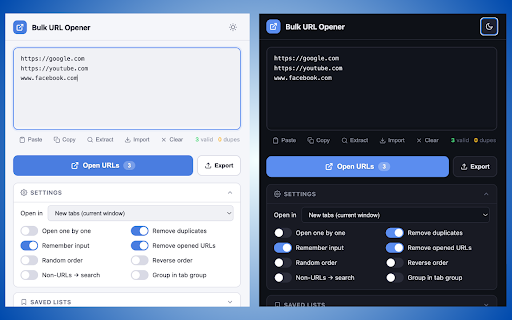
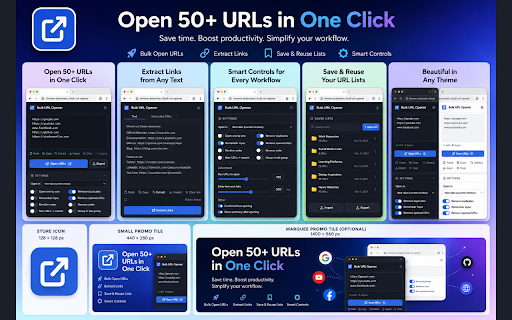
Bulk URL Opener is a productivity browser extension that helps users import, clean, and open large lists of web links in one click. It allows users to paste raw lists, extract URLs from unstructured text, or import files like TXT, CSV, and JSON to streamline daily workflows. Key features include staggered tab opening, list saving, and search integration for non-URL text inputs.

Developer:muji.star657
Version:1.0.1
Size:16.39KiB
Last updated:

Overview

Installs

95

Rating

★ —

0 reviews

Languages

1 locales

Includes English

Market analysis

Review-backed positioning, friction, and market signals for this Chrome extension.

No review samples found

Macro category

Tab & Bookmark Productivity

Pricing friction

Low review signal

Complaint intensity

Low review signal

Listing & review signals
Observed signals from store listing text and review samples.

Listing positioning

Bulk URL Opener is positioned as a fast, clean, and 100% free utility designed to open multiple links simultaneously. The listing highlights advanced tab control features, such as staggered loading to prevent browser lag, duplicate removal, and automatic Chrome tab grouping. It strongly emphasizes privacy by stating that all operations run locally on the user's device with no account required.

Inferred product pattern

A high-performance offline browser utility focused on tab control, link extraction, and workflow efficiency.

Review-backed pain points

Review-backed data is not available.

Observed feature gaps

No feature gaps identified from user reviews as review-backed data is not available.

Tags
Bulk URL OpenerTab ManagementLink ExtractorProductivity
Target users

- SEO Professionals

- Web Developers

- Researchers

- Social Media Managers

- QA Testers

Primary use cases

- Opening multiple documentation or testing links at once

- Extracting and cleaning URLs from cluttered text, emails, or HTML

- Staggering tab loading to prevent browser crashes during high-volume operations

- Saving and loading custom URL lists for daily workspace setups

Positive themes

- Review-backed data is not available.

Negative themes

- Review-backed data is not available.

Observed friction

- The store listing claims the extension is 100% free with no account registration or payment structures mentioned.

Evidence boundary: Analysis is based on the official Chrome Web Store listing details, features, and target workflows. No customer reviews or user count metrics were available at the time of evaluation. The lack of user reviews and active installation data prevents validation of performance claims, reliability, or software stability.
Complaint summaries
Review-backed complaint signals grouped by operational area.

Support

No support or account-related complaints are available as review-backed data is not available.

Reliability

No performance or reliability complaints are available as review-backed data is not available.

Privacy

No privacy or data tracking concerns have been reported as review-backed data is not available.

Access & pricing

- Free usage observed

- No account requirement observed

- Free plan or free usage claimed

Store listing facts

Listing assets

- Screenshots: 2

- Videos: 0

- Languages: 1

Trust signals

- Privacy policy

- Developer contact

Store metadata

- Version: 1.0.1

- Size: 16.39KiB

- Last updated:

Listing SEO keywords

Search intent keywords
Keyword signals for evaluating how users may discover, compare, or search for this extension category.

Core discovery

open multiple urlsbulk url openerbatch link openeropen multiple linksextract urls from text

Comparison

bulk url opener vs speed dialmulti url opener chromebest bulk tab opener

Problem

how to open many links at onceprevent browser crash opening many tabsextract links from text document

Alternative

open multiple urls extensionbatch tab openerlinkclump alternative

Similar extensions

Jump to related discovery paths:

Screenshots

Bulk URL Opener - Open Multiple Links screenshot

Links

Recommended Chrome extensions

Related listings from the same category, trending peers, and the same publisher portfolio.

Browse tools
Volume Booster: Sound Booster & Equalizer icon

Volume Booster: Sound Booster & Equalizer

muji.star657

Volume booster and sound booster for Chrome. Boost any tab to 600% with bass, EQ, balance, mono and one-click presets.

Installs

194

Rating

★ 5.0

Video Download Helper icon

Video Download Helper

Aclap

Download Videos from the Web.

Installs

6.0M+

Rating

★ 4.7

AnyDoc Translator - Translate Web and PDF icon

AnyDoc Translator - Translate Web and PDF

www.wps.com

Handwritten notes, course reading, creased scans, TED/Coursera lectures: layout kept, bilingual subtitles. Web instant, auto match.

Installs

6.0M+

Rating

★ 4.6

WPS PDF - Read, Edit, Fill, Convert, and AI Chat PDF with Ease icon

WPS PDF - Read, Edit, Fill, Convert, and AI Chat PDF with Ease

www.wps.com

Easy-to-use PDF tools to view, edit, convert, fill, e-sign PDF files, and more in your browser.

Installs

6.0M+

Rating

★ 4.5

Sider: Chat with all AI: GPT-5, Claude, DeepSeek, Gemini, Grok icon

Sider: Chat with all AI: GPT-5, Claude, DeepSeek, Gemini, Grok

ChatGPT Sidebar

ChatGPT, DeepSeek, Gemini, Claude, Grok all in one AI sidebar, for AI search, read, and write.

Installs

5.0M+

Rating

★ 4.9

Norton Safe Search icon

Norton Safe Search

NortonLifeLock Inc

Search safely online by enabling Norton Safe Search as your default search provider for maximum protection on Chrome.

Installs

5.0M+

Rating

★ 2.7

Shazam: Find song names from your browser icon

Shazam: Find song names from your browser

Shazam

Identify music, search lyrics & more

Installs

5.0M+

Rating

★ 4.7

Google Input Tools icon

Google Input Tools

cloud-input-team

Input Tools lets you type in the language of your choice.

Installs

4.0M+

Rating

★ 3.7

IE Tab icon

IE Tab

Blackfish Software

Display web pages using IE within Chrome. Use Java, Silverlight, ActiveX, Sharepoint, and more.

Installs

4.0M+

Rating

★ 4.0

Ad Blocker: Stands AdBlocker icon

Ad Blocker: Stands AdBlocker

Stands

Stands AdBlocker – it's a free ad blocker for YouTube, Twitch, Pop-Ups, Video Ads, and websites. Block ads everywhere with Stands!

Installs

4.0M+

Rating

★ 4.8