
Mirroring360 Sender for Chrome Chrome Extension Analysis
Automation & Workflow EfficiencyChrome extension ID: iaigceaehdihlnolehbapjfbbfpnlngg
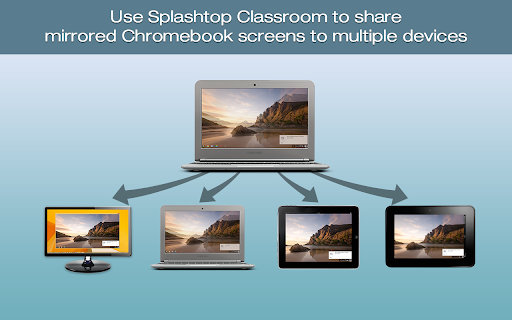
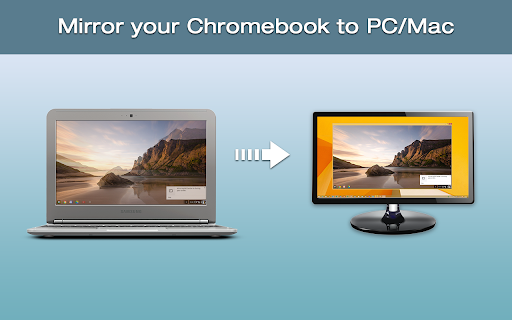
Mirroring360 Sender for Chrome is a Chrome app that allows users to cast their computer screen to another computer (PC or Mac) wirelessly. It's designed for presentations in educational and business environments, supporting the casting of any application or multi-media content.
Overview
Installs
200K+
Rating
★ 2.8
162 reviews
Languages
4 locales
Includes English, 中文(中国), 中文(台灣), 日本語
Market analysis
Review-backed positioning, friction, and market signals for this Chrome extension.
Macro category
Automation & Workflow Efficiency
Pricing friction
Moderate review signal
Complaint intensity
High review signal
Listing positioning
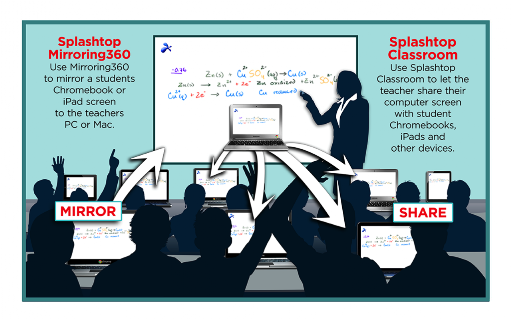
Mirroring360 Sender for Chrome is positioned as a collaboration tool for classrooms and boardrooms, enabling presenters to wirelessly cast their Chromebook or computer screen to a PC or Mac. The listing highlights ease of use, fast sharing, and deployment in educational settings.
Inferred product pattern
A Chrome extension designed to facilitate wireless screen sharing between computers, requiring a companion receiver application on the target device and potentially a paid license for full functionality. The product appears to have significant usability and reliability issues for a subset of its users.
Review-backed pain points
Users frequently report an inability to connect devices, specifically mentioning issues with iOS to Chromebook mirroring and a lack of a visible mirroring ID. Instructions are described as unclear or referencing non-existent features. Some users also encountered a requirement to purchase a license and found the app to be completely non-functional.
Observed feature gaps
The listing mentions casting from Chromebooks or computers to PCs/Macs, but multiple reviews indicate issues with mirroring iPads to Chromebooks or vice-versa. The 'general tab' or QR code mentioned in some instructions does not seem to be present in the app for many users, suggesting a discrepancy between documentation and actual functionality.
- Teachers
- Students
- Business Presenters
- IT Administrators in Educational Institutions
- Wireless screen casting from Chromebooks/computers to PCs/Macs
- Real-time sharing of applications and content during presentations
- Enhancing classroom engagement through screen mirroring
- Collaborative presentations in boardrooms
No positive theme data.
- Inability to connect iOS devices to Chromebooks
- Difficulty finding or generating the mirroring ID
- Instructions are unclear or reference non-existent features
- Requirement to purchase a license despite app installation
- App does not work as expected or is generally useless
- Payment required for meaningful usage
- Performance complaints detected
- One user explicitly stated that the app requires payment (licensing) and still does not work, indicating a significant pricing friction. The process of needing to install separate receiver software and potentially purchase a license can be a barrier.
Support
Users express frustration with the lack of clear instructions and the absence of easily accessible support channels like live chat or a phone number, leaving them unable to resolve connection or setup issues.
Reliability
Multiple reviews indicate the app does not work, fails to connect devices, or does not provide the necessary identifiers (like mirroring ID) for functionality, suggesting significant reliability issues for many users.
Privacy
No privacy-related complaints were observed in the provided reviews.
- No clear monetization signal
- No clear access signal
- Trial or limited free usage before paid plan
Store listing facts
- Screenshots: 4
- Videos: 1
- Languages: 4
- Privacy policy
- Developer contact
- Support link
- Version: 1.1.0.5
- Size: 226KiB
- Last updated:
Listing SEO keywords
Core discovery
Comparison
Problem
Alternative
Similar extensions
Jump to related discovery paths:
Screenshots

Links
Privacy policy: https://www.mirroring360.com/privacy
Support links: http://www.mirroring360.com/help
Videos: Watch