

Auto Clicker Chrome Extension Analysis
Automation & Workflow EfficiencyChrome extension ID: idlepjdnhiagmieafhenbeaacbgiolde
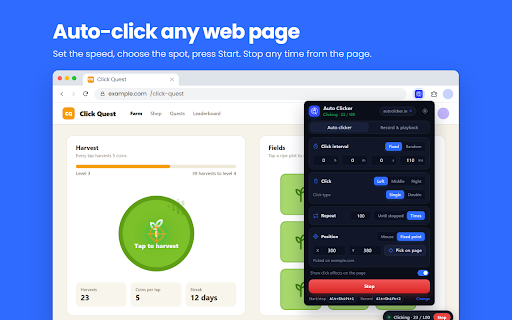
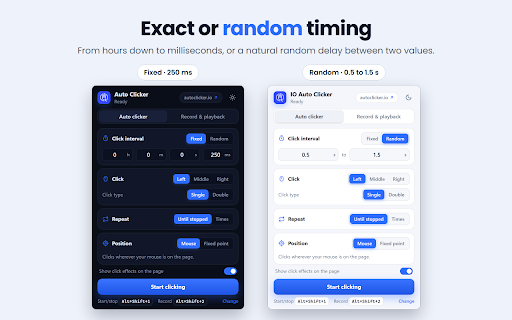
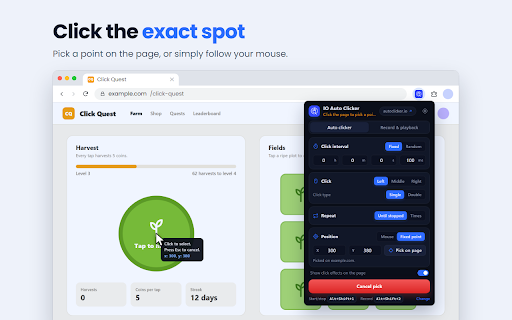
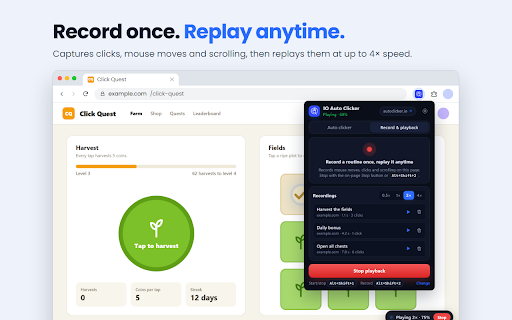
Auto Clicker is a Chrome extension designed to automate repetitive clicking actions. It allows users to customize click speed, select specific click points, and set up click sequences or schedules for automated tasks. The tool aims to assist gamers in clicker and RPG games, as well as users with other repetitive clicking needs.
Overview
Installs
100K+
Rating
★ 3.7
634 reviews
Languages
1 locales
Includes English (United States)
Market analysis
Review-backed positioning, friction, and market signals for this Chrome extension.
Macro category
Automation & Workflow Efficiency
Pricing friction
Low review signal
Complaint intensity
High review signal
Listing positioning
This Chrome extension positions itself as an essential tool for automating repetitive clicking tasks. It targets testers, developers, gamers, and general users seeking to alleviate hand stress and streamline gameplay or workflows. The listing emphasizes its ability to provide a gaming advantage and enhance efficiency through customizable click speeds and sequences.
Inferred product pattern
The product presents itself as a Chrome extension for automated clicking, but reviews indicate it acts as a downloader for a separate desktop application. This application is flagged by users and security software for potentially malicious behavior, including cryptocurrency mining and malware. The Chrome extension itself seems to lack the promised core functionality.
Review-backed pain points
Users report that the extension does not function as an in-browser auto-clicker, instead directing them to download a separate .exe file. There are significant concerns that this .exe file contains malware or engages in cryptocurrency mining, leading to a perceived loss of time and potential security risks. Many users found the tool to be a 'total waste of time' and 'pointless'.
Observed feature gaps
The core functionality advertised (in-browser auto-clicking) appears to be absent or non-functional, with the extension primarily acting as a gateway to a separate desktop application. Users expect an integrated Chrome extension experience, not a redirect to external downloads that raise security flags.
- Gamers (especially for idle/incremental/clicker games)
- Testers
- Developers
- Users with repetitive clicking tasks
- Automating clicks in games
- Reducing hand strain from repetitive clicking
- Streamlining repetitive digital tasks
- Testing applications requiring multiple clicks
No positive theme data.
- Extension redirects to download an .exe file instead of working in-browser.
- Users suspect the .exe installer contains malware or mines cryptocurrency.
- The extension does not function as an auto-clicker within Chrome.
- Difficulty or inability to use the controls as intended.
- Concerns about trustworthiness and security after installation.
- Privacy complaints detected
- No specific pricing friction was noted in the reviews, as the primary complaint was the lack of core functionality and perceived security risks rather than cost.
Support
No specific support complaints were detailed, but the overall sentiment suggests a lack of reliable functionality and potential deceptive practices that would preclude users from seeking support.
Reliability
Users overwhelmingly reported that the extension does not work as expected, with many stating it is 'totally pointless' and 'doesn't do anything'. The core functionality of auto-clicking within the browser appears to be absent or non-operational for many.
Privacy
Several users reported that their computers detected viruses, trojans, or malware after attempting to use the extension or its associated downloaded .exe file. One review explicitly quotes the developer's policy stating they will 'use your computing resources, possibly including your central processing unit, graphics processing unit, random-access memory, storage, band', raising significant concerns about privacy and resource abuse.
- No clear monetization signal
- No clear access signal
- No clear pricing signal
Store listing facts
- Screenshots: 5
- Videos: 1
- Languages: 1
- Privacy policy
- Developer contact
- Official website
- Support link
- Version: 4.0
- Size: 39.17KiB
- Last updated:
Listing SEO keywords
Core discovery
Comparison
Problem
Alternative
Similar extensions
Jump to related discovery paths:
Screenshots
Links
Website: autoclicker.io
Privacy policy: https://autoclicker.io/privacy-policy/
Support links: https://autoclicker.io/support/
Videos: Watch








