Spoof Geolocation icon

Spoof Geolocation Chrome Extension Analysis

Developer & Designer Tools

Chrome extension ID: ihdobppgelceaoeojmhpmbnaljhhmhlc

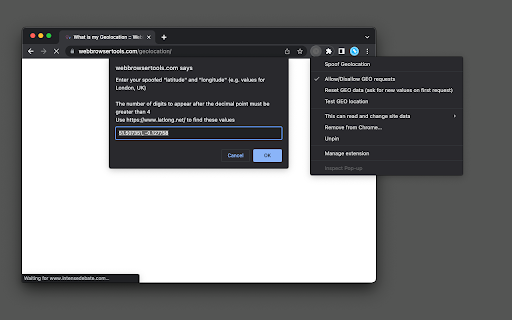
A Chrome extension that allows users to manually define the latitude and longitude reported by their browser. It includes features for randomized data, accuracy configuration, and the ability to grant or deny GEO access via a context menu.

Developer:joue.quroi
Version:0.3.1
Size:165KiB
Last updated:

Overview

Installs

100K+

Rating

4.3

54 reviews

Languages

1 locales

Includes English

Market analysis

Review-backed positioning, friction, and market signals for this Chrome extension.

Backed by review samples

Macro category

Developer & Designer Tools

Pricing friction

Low review signal

Complaint intensity

Moderate review signal

Listing & review signals
Observed signals from store listing text and review samples.

Listing positioning

The product is positioned as a technical utility to override browser geolocation coordinates. It highlights its ability to function without hardware GPS and its use of polyfills to ensure compatibility across different browser environments.

Inferred product pattern

Technical browser API override utility for location spoofing.

Review-backed pain points

Users are frustrated by the lack of a map-based interface, requiring them to manually find and enter coordinates. Some users report the extension fails to function on Windows 11 or resets settings when changing networks.

Observed feature gaps

Lack of an integrated map or search box for location selection; failure to spoof specific aggressive iframe sandbox contentWindow javascript methods.

Tags
Geolocation SpoofingPrivacy ToolDeveloper UtilityLocation Masking
Target users

- Developers

- QA Testers

- Privacy-conscious users

- VPN users

Primary use cases

- Testing location-based web applications

- Masking physical location for privacy

- Bypassing region-specific browser restrictions

Positive themes

- Superior performance compared to other spoofing extensions

- Effective when paired with a VPN

- Successfully overrides persistent browser location settings

Negative themes

- Difficult user interface requiring manual coordinate lookups

- Inconsistent performance on Windows 11

- Repetitive prompts during network switches

Observed friction

- Performance complaints detected

- No pricing friction observed as the tool appears to be free.

Evidence boundary: Analysis based on the official store listing and a sample of 10 helpful reviews. Small review sample size; conflicting user reports regarding Windows 11 compatibility.
Complaint summaries
Review-backed complaint signals grouped by operational area.

Support

No direct support complaints, though usability frustrations are evident in reviews.

Reliability

Reports of instability on Windows 11 and bugged behavior during network transitions.

Privacy

No privacy complaints observed.

Access & pricing

- Free usage observed

- No account requirement observed

- Free plan or free usage claimed

Store listing facts

Listing assets

- Screenshots: 1

- Videos: 0

- Languages: 1

Trust signals

- Developer contact

- Official website

Store metadata

- Version: 0.3.1

- Size: 165KiB

- Last updated:

Listing SEO keywords

Search intent keywords
Keyword signals for evaluating how users may discover, compare, or search for this extension category.

Core discovery

spoof geolocation chromechange browser locationfake gps extension

Comparison

best geolocation spoofing extensionspoof geolocation vs chrome devtools

Problem

browser reporting wrong locationbypass geolocation restrictionshide my location chrome

Alternative

geolocation spoofing alternativesfake location chrome extension

Similar extensions

Jump to related discovery paths:

Screenshots

Spoof Geolocation screenshot

Links

Recommended Chrome extensions

Related listings from the same category, trending peers, and the same publisher portfolio.

Browse developer