dataslayer icon

dataslayer Chrome Extension Analysis

Developer & Designer Tools

Chrome extension ID: ikbablmmjldhamhcldjjigniffkkjgpo

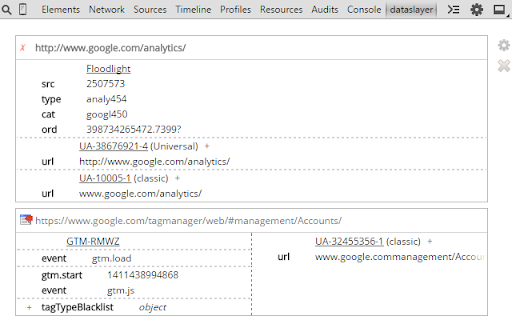
A Chrome extension that monitors and decodes data layers from platforms like Google Tag Manager, Adobe Launch, and Tealium. It displays tag events and variable changes within a dedicated DevTools panel.

Developer:Sean Adams
Version:2.0.0
Size:420KiB
Last updated:

Overview

Installs

70K+

Rating

★ 4.5

83 reviews

Languages

1 locales

Includes English (United States)

Market analysis

Review-backed positioning, friction, and market signals for this Chrome extension.

Backed by review samples

Macro category

Developer & Designer Tools

Pricing friction

Low review signal

Complaint intensity

Moderate review signal

Listing & review signals
Observed signals from store listing text and review samples.

Listing positioning

Dataslayer is positioned as a debugging and testing utility for tag management systems and analytics implementations. It integrates directly into Chrome Developer Tools to monitor data layer changes in a user-friendly format.

Inferred product pattern

A specialized developer utility providing real-time visibility into tag management and analytics data streams within the browser console.

Review-backed pain points

Users report instances of incorrect data attribution (e.g., events appearing on the wrong URL), discrepancies with Google Tag Assistant, and the extension occasionally stopping event updates until DevTools is restarted.

Observed feature gaps

Users have noted a lack of onClick tag capture and difficulties filtering between multiple data layers due to broken dropdown functionality.

Tags
Tag ManagementAnalytics DebuggingData Layer MonitorDeveloper Tool
Target users

- Analytics Engineers

- Digital Marketers

- Web Developers

- SEO Specialists

Primary use cases

- Debugging GTM data layers

- Verifying Adobe Analytics implementations

- Monitoring Tealium data layers

- Testing custom JavaScript data layers

Positive themes

- Efficiently views page load tags with minimal clicking

- Supports complex setups including iframes and multiple containers

Negative themes

- Data inaccuracies and discrepancies compared to other debuggers

- UI readability and column formatting issues

- Reliability issues where the tool stops updating or disappears

Observed friction

- Performance complaints detected

- No pricing friction observed in the provided data.

Evidence boundary: Data extracted from the Chrome Web Store listing and a sample of user reviews covering functionality and reliability. The analysis is based on a limited sample of 84 reviews.
Complaint summaries
Review-backed complaint signals grouped by operational area.

Support

No specific support complaints were identified in the reviews.

Reliability

Users report the tool occasionally stops displaying new events, disappears from the DevTools bar, or ceases to function correctly on local development environments.

Privacy

No privacy or security complaints observed.

Access & pricing

- No clear monetization signal

- No account requirement observed

- No clear pricing signal

Store listing facts

Listing assets

- Screenshots: 1

- Videos: 0

- Languages: 1

Trust signals

- Developer contact

- Official website

Store metadata

- Version: 2.0.0

- Size: 420KiB

- Last updated:

Listing SEO keywords

Search intent keywords
Keyword signals for evaluating how users may discover, compare, or search for this extension category.

Core discovery

tag management debuggerGTM data layer monitoranalytics debugging toolAdobe Launch debuggerTealium data layer checker

Comparison

Google Tag AssistantGTM DebuggerGA Debugger

Problem

incorrect data layer valuesanalytics not firingGTM discrepanciesdata layer errors

Alternative

Tag AssistantOmnibugObservePoint

Similar extensions

Jump to related discovery paths:

Screenshots

dataslayer screenshot

Links

Recommended Chrome extensions

Related listings from the same category, trending peers, and the same publisher portfolio.

Browse developer