WindChat - ChatGPT & Gemini HTML Previewer icon

WindChat Chrome Extension Analysis

Developer & Designer Tools

Store listing title: WindChat - ChatGPT & Gemini HTML Previewer

Chrome extension ID: ipafbgdehdljgphjgfmpkohhbelebdhm

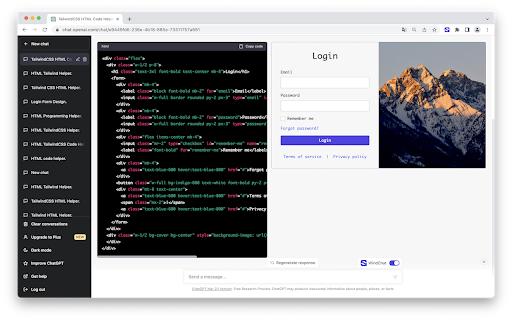
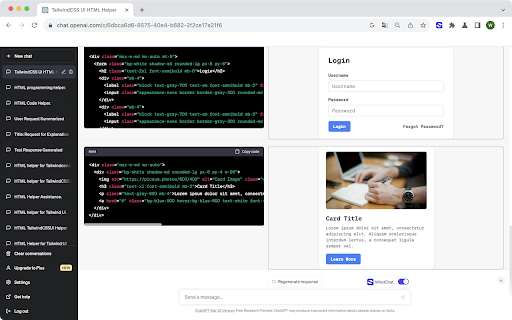
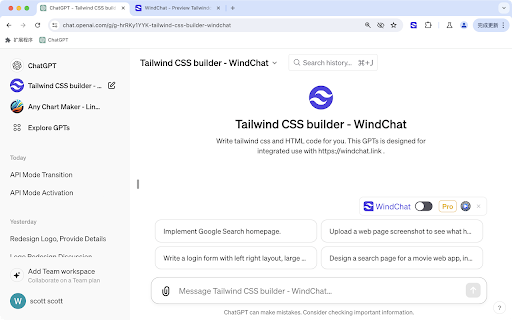
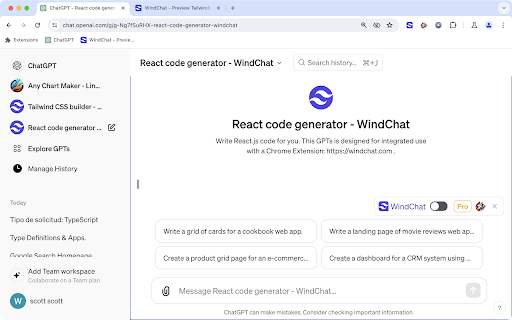
WindChat enables real-time visual previews of React and Tailwind CSS components generated by ChatGPT. It is designed to assist developers and designers in evaluating code snippets without needing to manually copy and paste into a separate environment.

Developer:WooodHead
Version:2026.8.17.1
Size:462KiB
Last updated:

Overview

Installs

836

Rating

4.0

4 reviews

Languages

2 locales

Includes English, 中文(中国)

Market analysis

Review-backed positioning, friction, and market signals for this Chrome extension.

Backed by review samples

Macro category

Developer & Designer Tools

Pricing friction

High review signal

Complaint intensity

Moderate review signal

Listing & review signals
Observed signals from store listing text and review samples.

Listing positioning

The extension positions itself as a productivity companion for AI-assisted frontend development. It focuses on reducing context switching by allowing users to preview AI-generated code directly within the ChatGPT interface.

Inferred product pattern

An AI-wrapper extension designed to bridge the gap between LLM text generation and visual code rendering.

Review-backed pain points

Users reported that the extension hides UI elements in ChatGPT and suffers from scrolling/alignment bugs when multiple code blocks are present.

Observed feature gaps

Lack of support for Tailwind CSS v3 defaults and UI overlap issues in the chat interface.

Tags
ChatGPTReactTailwind CSSFrontendPrototyping
Target users

- React Developers

- Tailwind CSS Users

- Indie Hackers

- UI/UX Designers

- Frontend Students

Primary use cases

- Rapid UI prototyping

- Iterative prompt engineering for web interfaces

- Evaluating generated React components

Positive themes

- Increased productivity

- Effective visual preview functionality

- Responsive developer engagement

Negative themes

- Misleading pricing claims

- UI/UX interference with ChatGPT interface

- Rendering glitches with multiple code blocks

Observed friction

- Payment required for meaningful usage

- Free-tier complaints detected

- Performance complaints detected

- Privacy complaints detected

- Users expressed frustration over the 'free download' label masking an immediate paywall requirement.

Evidence boundary: Evidence gathered from 4 user reviews, product documentation, and store listing details. The sample size of reviews is small, limiting the ability to extrapolate the full extent of UI rendering bugs.
Complaint summaries
Review-backed complaint signals grouped by operational area.

Support

No direct support complaints; developer engagement was noted as positive in review updates.

Reliability

Reported rendering issues including overlapping code blocks and scroll synchronization bugs.

Privacy

Concerns were raised regarding the extension's broad access permissions to confidential information shared within ChatGPT.

Access & pricing

- Subscription model observed

- Account required for core usage

- Paid-only usage observed

Store listing facts

Listing assets

- Screenshots: 4

- Videos: 1

- Languages: 2

Trust signals

- Privacy policy

- Developer contact

- Official website

Store metadata

- Version: 2026.8.17.1

- Size: 462KiB

- Last updated:

Listing SEO keywords

Search intent keywords
Keyword signals for evaluating how users may discover, compare, or search for this extension category.

Core discovery

ChatGPT React previewTailwind CSS ChatGPT extensionAI frontend prototypingReact code visualizer

Comparison

ChatGPT coding toolsAI React generator preview

Problem

ChatGPT preview bugTailwind CSS rendering issue

Alternative

CodePen integrationReplit AI assistant

Similar extensions

Jump to related discovery paths:

Screenshots

WindChat - ChatGPT & Gemini HTML Previewer screenshot

Links

Recommended Chrome extensions

Related listings from the same category, trending peers, and the same publisher portfolio.

Browse developer
ChatNeat - AI Chat Batch Delete History Manager Claude Gemini ChatGPT Grok icon

ChatNeat - AI Chat Batch Delete History Manager Claude Gemini ChatGPT Grok

WooodHead

Batch manage chat history across mainstream AI chat apps.

Installs

2K+

Rating

4.4

AI Chat Conversation History Search icon

AI Chat Conversation History Search

WooodHead

Search your AI chat history locally across supported chat websites.

Installs

2K+

Rating

3.6

GoFullPage - Full Page Screen Capture icon

GoFullPage - Full Page Screen Capture

GoFullPage

Capture a screenshot of your current page in entirety and reliably—without requesting any extra permissions!

Installs

11.0M+

Rating

4.9

TouchEn PC보안 확장 icon

TouchEn PC보안 확장

라온시큐어

브라우저에서 라온시큐어의 PC보안 기능을 사용하기 위한 확장 프로그램입니다.

Installs

8.0M+

Rating

1.3

React Developer Tools icon

React Developer Tools

Meta

Adds React debugging tools to the Chrome Developer Tools. Created from revision 3cde211b0c on 10/20/2025.

Installs

5.0M+

Rating

3.9

ColorZilla icon

ColorZilla

colorzilla.com

Advanced Eyedropper, Color Picker, Gradient Generator and other colorful goodies

Installs

4.0M+

Rating

4.6

Tag Assistant icon

Tag Assistant

Google

The Tag Assistant extension works with Tag Assistant to help troubleshoot installation of gtag.js and Google Tag Manager.

Installs

3.0M+

Rating

3.9

Wappalyzer - Technology profiler icon

Wappalyzer - Technology profiler

Wappalyzer

Identify web technologies

Installs

3.0M+

Rating

4.6

Meta Ads Data Advisor icon

Meta Ads Data Advisor

Meta

Meta Ads Data Advisor automates connecting your website and marketing data to Meta for better ad performance. No developers needed.

Installs

3.0M+

Rating

3.9

Take Webpage Screenshots Entirely - FireShot icon

Take Webpage Screenshots Entirely - FireShot

Evgeny Vokilsus

Take FULL webpage screenshots. Capture, edit and save them to PDF/JPEG/GIF/PNG, upload, print, send to OneNote, clipboard or email.

Installs

3.0M+

Rating

4.8