UserAuthGuard Chromebook Monitor icon

UserAuthGuard Chromebook Monitor Chrome Extension Analysis

Privacy, Security & Ad Blockers

Chrome extension ID: ipgfpphpkjihbkdbgphijecdknjcchnm

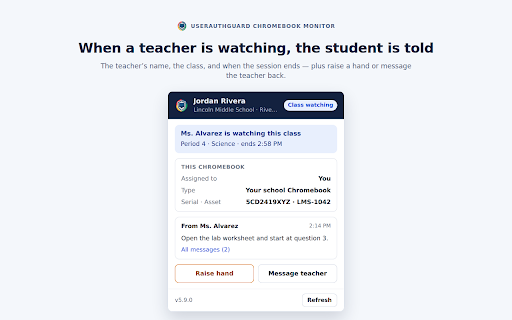
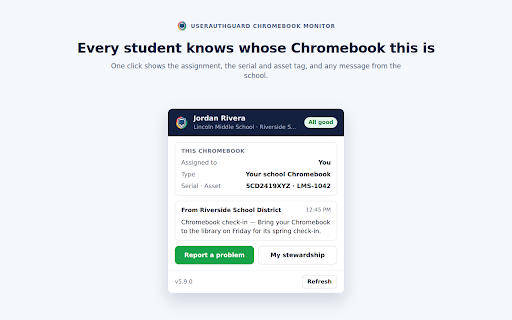
UserAuthGuard Chromebook Monitor is an administrative tool designed for school districts to manage ChromeOS devices. It provides features such as content filtering, real-time screen monitoring, and device health reporting.

Version:5.13.13
Size:1.33MiB
Last updated:

Overview

Installs

9K+

Rating

★ —

0 reviews

Languages

1 locales

Includes English (United States)

Market analysis

Review-backed positioning, friction, and market signals for this Chrome extension.

No review samples found

Macro category

Privacy, Security & Ad Blockers

Pricing friction

Moderate review signal

Complaint intensity

Low review signal

Listing & review signals
Observed signals from store listing text and review samples.

Listing positioning

The product is positioned as a professional K-12 management solution for student safety and device oversight. It emphasizes seamless integration with the Google Admin Console and requires an institutional UserAuthGuard account for operation.

Inferred product pattern

B2B enterprise management extension for educational device security and monitoring.

Review-backed pain points

review-backed data is not available

Observed feature gaps

No feature gaps identified from the listing; functionality appears comprehensive for school device management.

Tags
Chromebook ManagementStudent SafetyClassroom MonitoringIT Admin Tools
Target users

- K-12 School IT Administrators

- Educators

- School District Management

Primary use cases

- Student activity monitoring

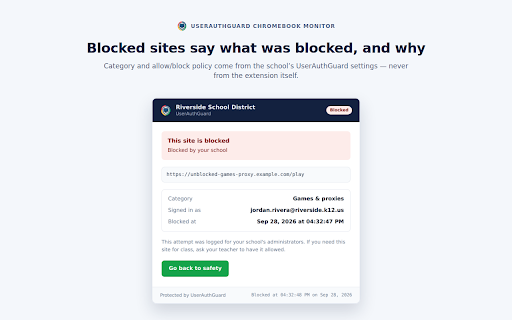
- Content filtering and safety alerts

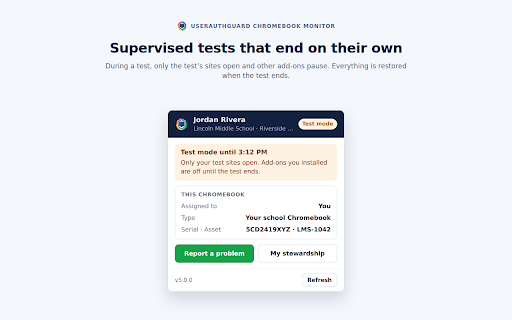
- Exam lockdown mode

- Device health and recovery

Positive themes

- review-backed data is not available

Negative themes

- review-backed data is not available

Observed friction

- Payment required for meaningful usage

- Pricing information is not publicly detailed; the extension requires a pre-existing institutional account.

Evidence boundary: Data extracted from the official Chrome Web Store listing and technical documentation provided in the description. No user reviews were available to assess real-world performance, sentiment, or reliability.
Complaint summaries
Review-backed complaint signals grouped by operational area.

Support

No review-backed support complaints found.

Reliability

No review-backed reliability complaints found.

Privacy

No review-backed privacy complaints found.

Access & pricing

- Subscription model observed

- Account required for core usage

- No clear pricing signal

Store listing facts

Listing assets

- Screenshots: 5

- Videos: 0

- Languages: 1

Trust signals

- Privacy policy

- Developer contact

Store metadata

- Version: 5.13.13

- Size: 1.33MiB

- Last updated:

Listing SEO keywords

Search intent keywords
Keyword signals for evaluating how users may discover, compare, or search for this extension category.

Core discovery

Chromebook managementK-12 student monitoringclassroom screen monitoringstudent safety softwareGoogle Admin Console extension

Comparison

Chromebook monitoring softwareschool device management

Problem

student distractionunsafe browsinglost chromebookdevice health

Alternative

classroom management toolsstudent safety filters

Similar extensions

Jump to related discovery paths:

Screenshots

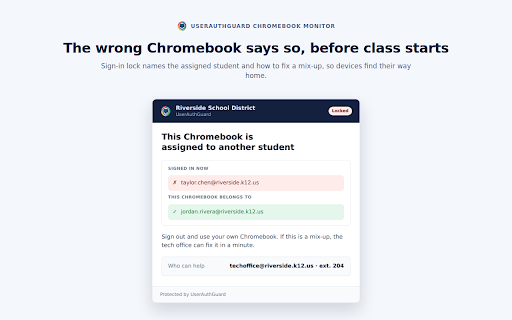
UserAuthGuard Chromebook Monitor screenshot

Links

Recommended Chrome extensions

Related listings from the same category, trending peers, and the same publisher portfolio.

Browse education
Translate for Chrome -Translator, Dictionary icon

Translate for Chrome -Translator, Dictionary

Translator App.

Translate words, phrases or text on any webpage. Full page translator and dictionary, text to speech (TTS) using Google Translate.

Installs

500K+

Rating

★ 4.2

オクリンクプラス Webページスクリーンショット機能 icon

オクリンクプラス Webページスクリーンショット機能

ベネッセコーポレーション

オクリンクプラスのカードにWebページのスクリーンショットを挿入し、リンクを埋め込むことができます!

Installs

500K+

Rating

★ 3.0

Google Meet Breakout by Robert Hudek icon

Google Meet Breakout by Robert Hudek

Unknown developer

Only the teacher needs to install. Completely Free and your Data is Private. Google Classroom integration, Slider Control.

Installs

400K+

Rating

★ 4.4

Assessment Lock (Vretta) icon

Assessment Lock (Vretta)

google-web-store-admin

Assessment Security extension for e-Assessments running on ChromeOS

Installs

400K+

Rating

★ 2.1

Google Meet Attendance List icon

Google Meet Attendance List

MeetList

Easiest way to save the attendance list for your meetings or lectures

Installs

400K+

Rating

★ 4.8

Education Pro Browser Extension MV3 icon

Education Pro Browser Extension MV3

Ativion

Education Pro Browser Extension MV3 for use on Windows and Mac with EdPro client installed

Installs

400K+

Rating

★ 1.0

Scrible Extension icon

Scrible Extension

Scrible, Inc.

Smarter Web reading & research. Annotate, bookmark, save, cite, manage & share online articles. Use with your Scrible.com account.

Installs

400K+

Rating

★ 3.4

Certificate Enrollment for ChromeOS icon

Certificate Enrollment for ChromeOS

google.com

Request a certificate for your device.

Installs

400K+

Rating

★ 4.3

Add to Google Classroom icon

Add to Google Classroom

Canopy

This extension adds the current site to Google Classroom

Installs

400K+

Rating

★ 4.2

Trancy - AI Translator & Dual Subtitles icon

Trancy - AI Translator & Dual Subtitles

Trancy

Trancy provides bilingual subtitle for platforms like YouTube, Netflix, as well as AI translator for websites.

Installs

300K+

Rating

★ 4.4