Canvas Chart icon

Canvas Chart Chrome Extension Analysis

Automation & Workflow Efficiency

Chrome extension ID: ipmmohddmgcjpochjcedmhallbofeefm

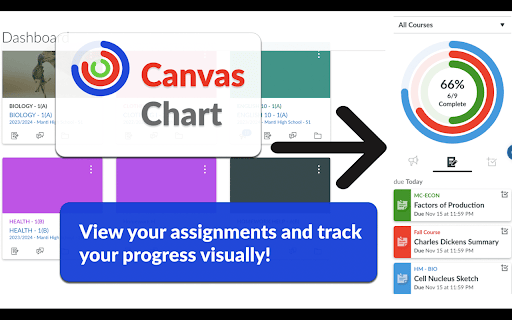
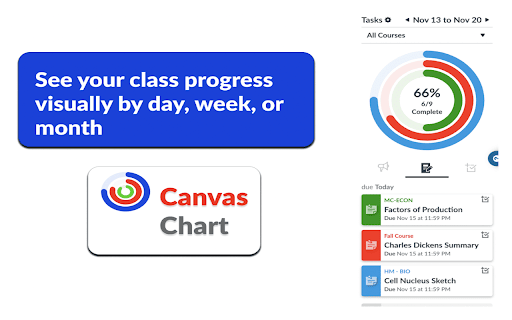
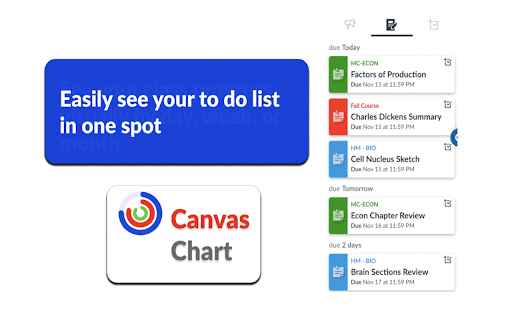
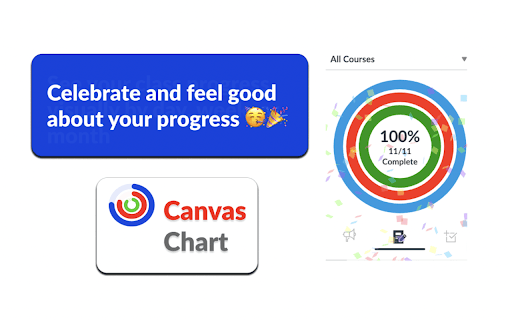
Canvas Chart is a Chrome extension that adds visual progress tracking and an enhanced to-do list to the Canvas LMS interface. It features colored rings for each course that close as tasks are completed, along with customizable timeframes and a custom task addition feature.

Version:1.0.2
Size:275KiB
Last updated:

Overview

Installs

5K+

Rating

4.6

10 reviews

Languages

1 locales

Includes English

Market analysis

Review-backed positioning, friction, and market signals for this Chrome extension.

Backed by review samples

Macro category

Automation & Workflow Efficiency

Pricing friction

Low review signal

Complaint intensity

Low review signal

Listing & review signals
Observed signals from store listing text and review samples.

Listing positioning

The product positions itself as a visual enhancement for the Canvas LMS to help users better track and visualize their school work. It emphasizes transforming the standard to-do list into a more intuitive sidebar with progress rings and customizable visuals.

Inferred product pattern

UI/UX overlay for a specific enterprise SaaS platform to add missing productivity visualizations.

Review-backed pain points

Some users report confusion regarding the installation process and noted that the extension does not appear on the main dashboard, only within individual courses.

Observed feature gaps

Users have expressed a desire for mobile availability. There is also a perceived gap in visibility on the main Canvas dashboard.

Tags
Canvas LMSStudy TrackerTask VisualizationStudent Productivity
Target users

- Students

- Teaching Assistants (TAs)

- Canvas LMS users

Primary use cases

- Visualizing course completion progress

- Managing academic to-do lists

- Tracking grading tasks for TAs

Positive themes

- Increased motivation

- Clear progress visualization

- Aesthetic customization

- Improved organization

Negative themes

- Initial setup confusion

- Limited functionality on the main dashboard

Observed friction

- No pricing friction observed as the product is listed as free to use.

Evidence boundary: Extracted from the store listing and 10 user reviews. Small review sample; data includes irrelevant/spam reviews regarding cryptocurrency that were excluded from analysis.
Complaint summaries
Review-backed complaint signals grouped by operational area.

Support

No formal support complaints, though one user initially struggled with implementation before figuring out the scope of where the tool appears.

Reliability

One user noted the extension does not work on the dashboard, only in specific courses.

Privacy

No privacy or security complaints observed.

Access & pricing

- Free usage observed

- No account requirement observed

- Free plan or free usage claimed

Store listing facts

Listing assets

- Screenshots: 4

- Videos: 0

- Languages: 1

Trust signals

- Privacy policy

- Developer contact

Store metadata

- Version: 1.0.2

- Size: 275KiB

- Last updated:

Listing SEO keywords

Search intent keywords
Keyword signals for evaluating how users may discover, compare, or search for this extension category.

Core discovery

Canvas LMS chartCanvas to do list visualizerCanvas progress trackerCanvas student productivity

Comparison

Canvas Chart vs Canvas default to do list

Problem

organize Canvas assignmentsvisualize school progresstrack Canvas tasks

Alternative

Canvas LMS extensionsstudent productivity tools for Canvas

Similar extensions

Jump to related discovery paths:

Screenshots

Canvas Chart screenshot

Links

Recommended Chrome extensions

Related listings from the same category, trending peers, and the same publisher portfolio.

Browse education
rikaikun icon

rikaikun

Erek Speed

rikaikun shows the reading and English definition of Japanese words when you hover over Japanese text in the browser.

Installs

200K+

Rating

4.7

Mouse Tooltip Translator - PDF & Netflix YouTube dual subs icon

Mouse Tooltip Translator - PDF & Netflix YouTube dual subs

ttop324

Mouse Tooltip Translator translate mouseover text using google translate. Support OCR, TTS, manga translator & pdf translator.

Installs

200K+

Rating

4.6

Paperpile Extension icon

Paperpile Extension

Paperpile

Collect, organize, annotate and cite your research papers in Chrome.

Installs

200K+

Rating

4.6

ExCITATION – Journal Ranking & Impact Factor for Google Scholar™ icon

ExCITATION – Journal Ranking & Impact Factor for Google Scholar™

Excitation Journal

Show SJR, ABS & ABDC journal rankings in Google Scholar. Sort by citations, detect predatory journals & preview abstracts — free.

Installs

200K+

Rating

4.5

OpenDyslexic for Chrome icon

OpenDyslexic for Chrome

OpenDyslexic

Format pages using the OpenDyslexic font and low contrast help

Installs

200K+

Rating

4.1

Reverso – Translation, dictionary icon

Reverso – Translation, dictionary

Reverso Technologies Inc.

Translate and learn languages while reading or watching movies online. It's free.

Installs

200K+

Rating

4.6

Rapid Journal Quality Check icon

Rapid Journal Quality Check

jrk.devgit

Displays rankings and h-index for academic journals next to Google Scholar search results.

Installs

200K+

Rating

4.2

Google Meet Breakout by Robert Hudek icon

Google Meet Breakout by Robert Hudek

Unknown developer

Only the teacher needs to install. Completely Free and your Data is Private. Google Classroom integration, Slider Control.

Installs

200K+

Rating

4.3

Toucan by Babbel - Language Learning icon

Toucan by Babbel - Language Learning

jointoucan.com

Learn a new language just by browsing the internet.

Installs

200K+

Rating

4.6

Certificate Enrollment for ChromeOS icon

Certificate Enrollment for ChromeOS

google.com

Request a certificate for your device.

Installs

200K+

Rating

4.4