Save Image as PNG, JPG, WebP, BMP, AVIF icon

Save Image as PNG, JPG, WebP, BMP, AVIF Chrome Extension Analysis

Developer & Designer Tools

Chrome extension ID: jdidigbghempbkmmalgigikajlgpafhm

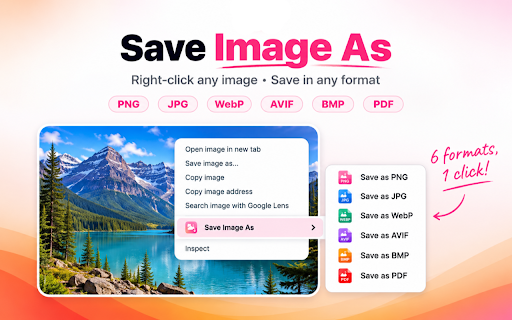
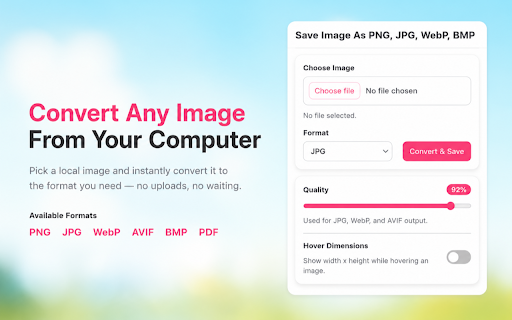
This extension allows users to convert and save images from webpages in various formats including JPG, PNG, WebP, BMP, and AVIF. It provides controls for image quality and displays dimensions, offering flexibility for image manipulation.

Developer:Lokesh
Version:4.0.0
Size:56.19KiB
Last updated:

Overview

Installs

1K+

Rating

4.6

9 reviews

Languages

1 locales

Includes English

Market analysis

Review-backed positioning, friction, and market signals for this Chrome extension.

Backed by review samples

Macro category

Developer & Designer Tools

Pricing friction

Low review signal

Complaint intensity

Low review signal

Listing & review signals
Observed signals from store listing text and review samples.

Listing positioning

This Chrome extension is positioned as a simple and effective tool for saving and converting images directly from webpages. It emphasizes ease of use with a right-click option and the ability to adjust quality and view dimensions before saving.

Inferred product pattern

A utility extension that enhances browser functionality by adding a context menu option for image manipulation, focusing on format conversion and saving.

Review-backed pain points

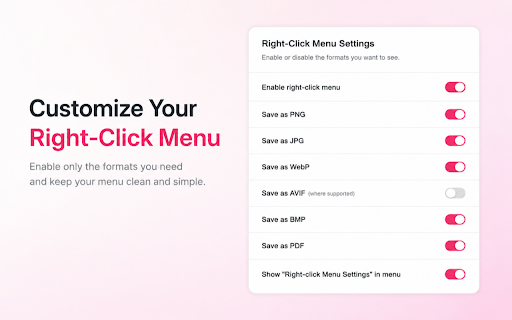
A minor initial frustration was the default behavior of a floating window showing image dimensions when hovering over an image, though this was later discoverable as a disable-able feature. Another minor point was the length of the extension's name in the context menu.

Observed feature gaps

No significant feature gaps were observed based on the provided listing and reviews. Users appear satisfied with the core functionality.

Tags
Image ConverterSave ImageWebPJPGPNG
Target users

- Web developers

- Graphic designers

- Content creators

- Everyday web users

Primary use cases

- Saving images in desired formats

- Converting images between formats (JPG, PNG, WebP, etc.)

- Controlling image save quality

- Quickly extracting images from web pages

Positive themes

- Highly functional and works as intended

- Restores desired functionality, solving a prior user need

- Provides useful format conversion (e.g., WebP)

- Offers good control over save quality

- Considered a valuable and convenient tool

Negative themes

- Default setting for image dimension display can be intrusive

- Extension name in context menu is lengthy

Observed friction

- The extension is available for free, with no observed pricing friction.

Evidence boundary: The analysis is based on the Chrome Web Store listing details and a set of user reviews. The review set is small, with all reviews being positive and uniformly rated. This limits the ability to capture a broad spectrum of user experiences or identify less common issues.
Complaint summaries
Review-backed complaint signals grouped by operational area.

Support

No complaints regarding support or account management were found.

Reliability

No complaints regarding reliability or performance were found.

Privacy

No privacy or security concerns were raised in the reviews.

Access & pricing

- Free usage observed

- No account requirement observed

- Free plan or free usage claimed

Store listing facts

Listing assets

- Screenshots: 2

- Videos: 0

- Languages: 1

Trust signals

- Privacy policy

- Developer contact

Store metadata

- Version: 4.0.0

- Size: 56.19KiB

- Last updated:

Listing SEO keywords

Search intent keywords
Keyword signals for evaluating how users may discover, compare, or search for this extension category.

Core discovery

save imageimage converterjpgpngwebpavifchrome extensiondownload image

Comparison

save image asimage format converterright click save image

Problem

how to save image asconvert image formatdownload webp

Alternative

image downloader extensionbrowser image converter

Similar extensions

Jump to related discovery paths:

Screenshots

Save Image as PNG, JPG, WebP, BMP, AVIF screenshot

Links

Recommended Chrome extensions

Related listings from the same category, trending peers, and the same publisher portfolio.

Browse tools
Pinterest Dark Mode & Theme icon

Pinterest Dark Mode & Theme

Lokesh

Choose from 16 beautiful themes for Pinterest. Dark mode, light mode, colorful themes and more.

Installs

30K+

Rating

4.8

Screen Search - Search Screen with Google Lens icon

Screen Search - Search Screen with Google Lens

Lokesh

Search anything on your screen with Google Lens. Instant visual search, translations, and product info at your fingertips.

Installs

10K+

Rating

4.5

Planet Search icon

Planet Search

Free VPN Planet

Enchanced default search engine.

Installs

2.0M+

Rating

3.4

Lightshot (screenshot tool) icon

Lightshot (screenshot tool)

Skillbrains

Simple and convenient screenshot tool. Select an area, edit your screenshot and upload it to the server.

Installs

2.0M+

Rating

4.4

Screen Recorder & Screenshot App for Chrome | Scrnli icon

Screen Recorder & Screenshot App for Chrome | Scrnli

scrnli

Screen recorder for Chrome: capture, edit, share screenshots and videos instantly

Installs

1.0M+

Rating

4.7

CSFloat Market Checker icon

CSFloat Market Checker

CSFloat Inc.

Shows the float value, paint seed, and more of Counter-Strike (CS:GO & CS2) items on the Steam Market or Inventories

Installs

1.0M+

Rating

3.9

PrintFriendly: Reader Mode, PDF Editor, Save as PDF & Screenshot icon

PrintFriendly: Reader Mode, PDF Editor, Save as PDF & Screenshot

PrintFriendly

Print clean web pages, save as PDF, edit PDFs, and capture full-page screenshots. Integrates with ChatGPT, Claude, and Gemini.

Installs

1.0M+

Rating

4.6

Mobile simulator - responsive testing tool icon

Mobile simulator - responsive testing tool

François Duprat

Smartphone and tablet simulator on computer with several models to test mobile responsive websites.

Installs

1.0M+

Rating

4.9

YouTube Summary with ChatGPT & Claude icon

YouTube Summary with ChatGPT & Claude

Glasp

Summarize YouTube videos, web articles, and PDFs to save time, powered by ChatGPT, Claude, Mistral AI, and Gemini.

Installs

1.0M+

Rating

4.3

Dark Mode icon

Dark Mode

Grephy

A global dark theme for the web.

Installs

1.0M+

Rating

3.6