Zia Search from Zoho icon

Zia Search from Zoho Chrome Extension Analysis

Automation & Workflow Efficiency

Chrome extension ID: jebapbhanimlfnddnammimbopafiddkd

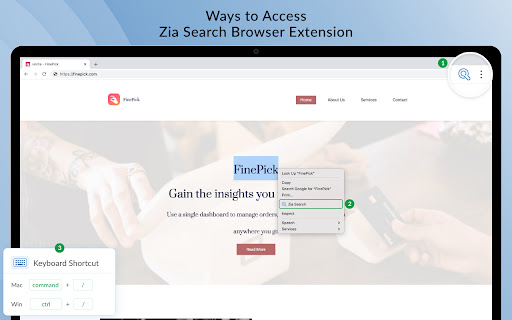
A browser extension that provides a centralized search portal for the Zoho software suite, including Mail, CRM, and Desk. It supports search via the toolbar, text selection, and keyboard shortcuts to retrieve relevant business data quickly.

Version:1.6.3
Size:17.38MiB
Last updated:

Overview

Installs

10K+

Rating

4.3

12 reviews

Languages

1 locales

Includes English

Market analysis

Review-backed positioning, friction, and market signals for this Chrome extension.

Backed by review samples

Macro category

Automation & Workflow Efficiency

Pricing friction

Low review signal

Complaint intensity

Moderate review signal

Listing & review signals
Observed signals from store listing text and review samples.

Listing positioning

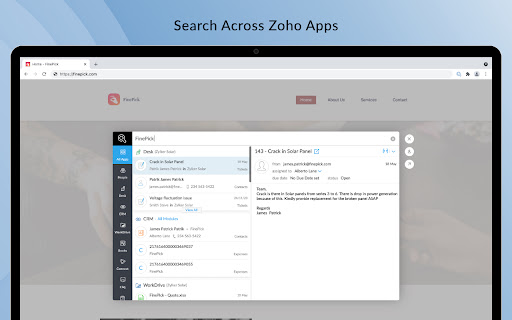
The product is positioned as a unified search system that allows users to find and act on information across 20+ Zoho applications from a single interface. It emphasizes efficiency by eliminating the need to switch between multiple browser tabs or apps.

Inferred product pattern

Ecosystem utility providing a unified search entry point for a proprietary SaaS suite.

Review-backed pain points

Users expressed frustration that the extension primarily functions as a link to a webpage rather than providing a native, embedded search experience within Chrome.

Observed feature gaps

Lack of a native search UI that doesn't require redirecting to the Zia Search webpage.

Tags
Unified SearchZoho EcosystemProductivity ToolEnterprise SearchWorkflow Optimizer
Target users

- Zoho suite users

- Enterprise employees

- CRM administrators

- Business operations managers

Primary use cases

- Searching for a customer ID across multiple Zoho apps

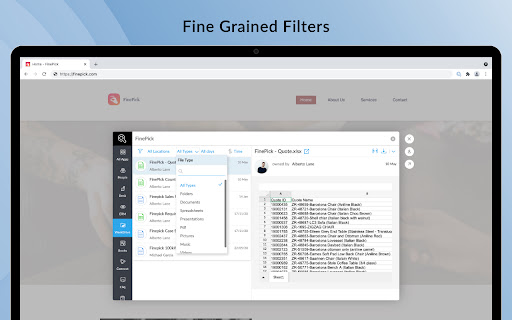
- Quickly finding documents or emails without switching tabs

- Executing contextual actions like replying to mail or assigning tickets from search results

Positive themes

- Efficiency of cross-app searching

- Usefulness as a company-wide best practice

Negative themes

- Lack of native browser integration

- Perception as a simple web wrapper

- System resource overhead

Observed friction

- Performance complaints detected

- No pricing friction mentioned in available reviews.

Evidence boundary: Extracted from the Chrome Web Store listing and four representative user reviews. Very low review volume (12 total reviews) may not fully represent the overall user sentiment.
Complaint summaries
Review-backed complaint signals grouped by operational area.

Support

No support or account-related complaints found in sample reviews.

Reliability

Some users view the extension as redundant or inefficient because it simply opens the web version of the search tool.

Privacy

No privacy or security complaints found in sample reviews.

Access & pricing

- No clear monetization signal

- Account required for core usage

- Free plan or free usage claimed

Store listing facts

Listing assets

- Screenshots: 4

- Videos: 1

- Languages: 1

Trust signals

- Privacy policy

- Developer contact

- Official website

Store metadata

- Version: 1.6.3

- Size: 17.38MiB

- Last updated:

Listing SEO keywords

Search intent keywords
Keyword signals for evaluating how users may discover, compare, or search for this extension category.

Core discovery

Zoho unified searchZia Search extensionsearch across Zoho apps

Comparison

Zia Search vs manual searchZoho search tool comparison

Problem

switching between Zoho appsfinding data in Zoho CRMunified business search

Alternative

Zoho search alternativescross-app search extension

Similar extensions

Jump to related discovery paths:

Screenshots

Zia Search from Zoho screenshot

Links

Website: zoho.com

Privacy policy: https://www.zoho.com/privacy.html

Videos: Watch

Recommended Chrome extensions

Related listings from the same category, trending peers, and the same publisher portfolio.

Browse workflow