Three.js DevTools icon

Three.js DevTools Chrome Extension Analysis

Developer & Designer Tools

Chrome extension ID: jechbjkglifdaldbdbigibihfaclnkbo

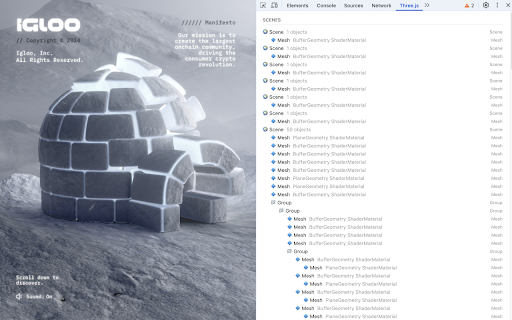
Three.js DevTools is a browser extension that allows developers to examine the internal state of Three.js applications. It provides visibility into object hierarchies, material properties, textures, and renderer settings.

Developer:Mr.doob
Version:1.16
Size:29.68KiB
Last updated:

Overview

Installs

20K+

Rating

4.0

18 reviews

Languages

1 locales

Includes English

Market analysis

Review-backed positioning, friction, and market signals for this Chrome extension.

Backed by review samples

Macro category

Developer & Designer Tools

Pricing friction

Low review signal

Complaint intensity

Moderate review signal

Listing & review signals
Observed signals from store listing text and review samples.

Listing positioning

The extension is positioned as a dedicated developer utility for the Three.js library. It emphasizes the ability to inspect scenes, renderers, and object hierarchies directly within the browser.

Inferred product pattern

Official developer companion tool for a major open-source graphics library.

Review-backed pain points

Some users find the tool's utility too limited, specifically citing that viewing only a tree structure is insufficient for their needs, while others report the tool simply does not work.

Observed feature gaps

Users express a desire for more comprehensive inspection capabilities beyond basic tree-structure visualization.

Tags
Three.js3D Web DevelopmentDebugging ToolWeb GraphicsDeveloper Tool
Target users

- Three.js Developers

- Web Graphics Engineers

- 3D Web Designers

Primary use cases

- Debugging 3D scene graphs

- Inspecting material and texture properties

- Analyzing Three.js implementations on existing websites

- Verifying renderer settings

Positive themes

- Simplified analysis of third-party Three.js sites

- Helpful debugging utility

- High perceived value for core functionality

Negative themes

- Limited feature set

- Functional reliability issues

- Insufficient depth of inspection

Observed friction

- Performance complaints detected

- No pricing friction observed as the tool appears to be free.

Evidence boundary: Extracted from store listing and a sample of user reviews. Small review sample size available for sentiment analysis.
Complaint summaries
Review-backed complaint signals grouped by operational area.

Support

No specific support or account complaints observed.

Reliability

Some users report the tool is non-functional or lacks sufficient depth to be useful.

Privacy

No privacy or security complaints observed.

Access & pricing

- Free usage observed

- No account requirement observed

- Free plan or free usage claimed

Store listing facts

Listing assets

- Screenshots: 1

- Videos: 0

- Languages: 1

Trust signals

- Developer contact

- Official website

Store metadata

- Version: 1.16

- Size: 29.68KiB

- Last updated:

Listing SEO keywords

Search intent keywords
Keyword signals for evaluating how users may discover, compare, or search for this extension category.

Core discovery

Three.js inspectorThree.js debuggerWebGL devtoolsinspect Three.js scene

Comparison

Three.js DevTools vs manual debuggingbest Three.js inspection tools

Problem

how to inspect Three.js objectsdebug Three.js materialsview Three.js scene hierarchy

Alternative

Three.js debugger alternativesWebGL inspector

Similar extensions

Jump to related discovery paths:

Screenshots

Three.js DevTools screenshot

Links

Website: threejs.org

Recommended Chrome extensions

Related listings from the same category, trending peers, and the same publisher portfolio.

Browse developer