X Pixel Helper icon

X Pixel Helper Chrome Extension Analysis

SEO & Traffic Analytics

Chrome extension ID: jepminnlebllinfmkhfbkpckogoiefpd

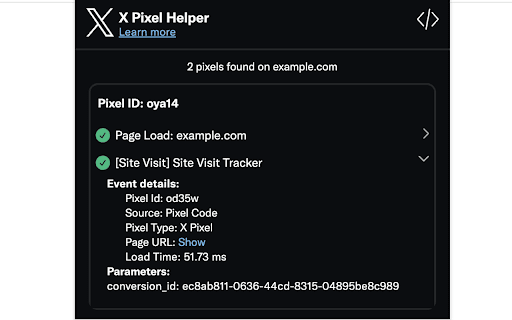
This extension monitors websites for the presence of the X website tag. It visualizes whether tags are firing correctly and highlights configuration errors to assist marketers in debugging their tracking setup.

Version:3.0.11
Size:269KiB
Last updated:

Overview

Installs

60K+

Rating

★ 3.6

21 reviews

Languages

1 locales

Includes English (United States)

Market analysis

Review-backed positioning, friction, and market signals for this Chrome extension.

Backed by review samples

Macro category

SEO & Traffic Analytics

Pricing friction

Low review signal

Complaint intensity

High review signal

Listing & review signals
Observed signals from store listing text and review samples.

Listing positioning

The X Pixel Helper is positioned as a diagnostic tool for advertisers to verify the correct implementation of the X (formerly Twitter) website pixel. It provides real-time feedback on tag fires and implementation warnings directly through the browser icon.

Inferred product pattern

Single-purpose diagnostic developer tool provided by the platform itself.

Review-backed pain points

Users frequently report that the extension fails to detect active X pixels even when they are correctly installed, rendering it unreliable for technical verification.

Observed feature gaps

The extension lacks consistent detection capabilities compared to competitor tools or manual network request inspection.

Tags
X PixelMarketing AnalyticsTracking ToolConversion TrackingAds Measurement
Target users

- Digital Marketers

- Web Developers

- Advertising Specialists

- E-commerce Managers

Primary use cases

- Verifying X pixel installation

- Debugging pixel firing issues

- Monitoring tag load times

- Checking for implementation warnings

Positive themes

- Ease of installation

- Simple removal process

Negative themes

- Failure to detect active pixels

- General lack of functionality

- Inconsistency in reporting

Observed friction

- Performance complaints detected

- None identified; tool is free.

Evidence boundary: Analysis is based on 22 user reviews indicating frequent functionality failures, supported by the official store description of the tool's intended use. Review data contains a mix of non-English/non-functional feedback, limiting the scope of specific technical bug reports to general 'not working' complaints.
Complaint summaries
Review-backed complaint signals grouped by operational area.

Support

No official support feedback, though users suggest alternative extensions when this one fails.

Reliability

High; multiple reports indicate the extension fails to identify active pixels or displays incorrect status information.

Privacy

None identified.

Access & pricing

- Free usage observed

- No account requirement observed

- Free plan or free usage claimed

Store listing facts

Listing assets

- Screenshots: 1

- Videos: 0

- Languages: 1

Trust signals

- Developer contact

Store metadata

- Version: 3.0.11

- Size: 269KiB

- Last updated:

Listing SEO keywords

Search intent keywords
Keyword signals for evaluating how users may discover, compare, or search for this extension category.

Core discovery

X pixel helperverify twitter pixelx ads tracking debugwebsite tag fire checker

Comparison

twitter pixel helper alternativecheck x pixel status

Problem

x pixel not workingpixel helper shows no tagtroubleshoot x pixel

Alternative

browser network tabtag manager debug

Similar extensions

Jump to related discovery paths:

Screenshots

X Pixel Helper screenshot

Recommended Chrome extensions

Related listings from the same category, trending peers, and the same publisher portfolio.

Browse developer