X Twitter Video and Picture Batch Downloader icon

X Twitter Video and Picture Batch Downloader Chrome Extension Analysis

Video & Image Downloaders

Chrome extension ID: jidhhkmbpeilobphobknnlolcpclmifl

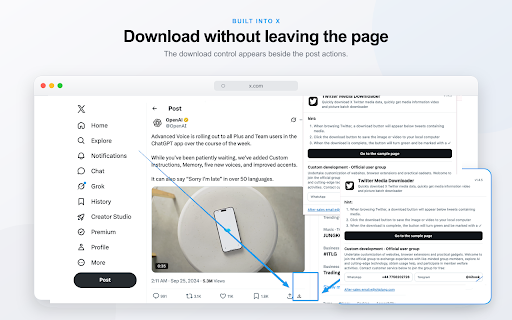
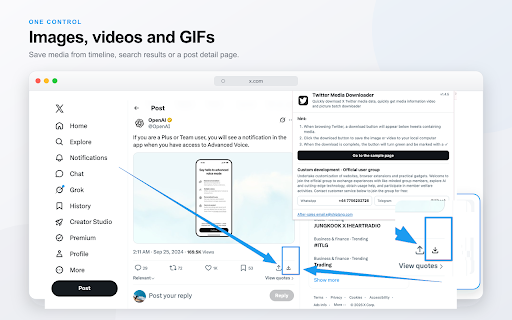
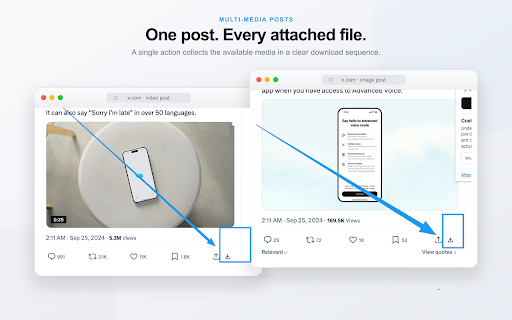
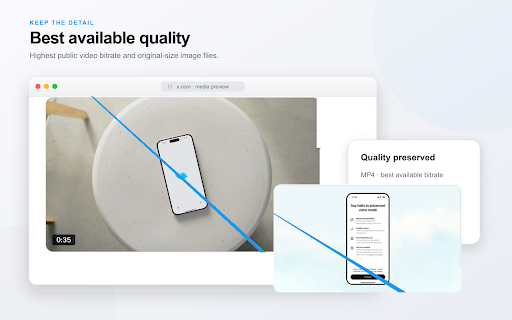
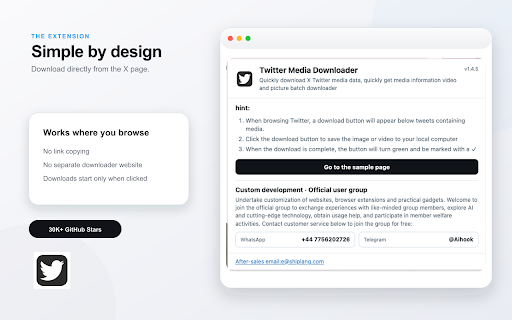
This Chrome extension allows users to download images and videos directly from X (formerly Twitter) posts. It automatically identifies media content and adds a download button beneath posts. For multiple images, it downloads them in their original size, and for videos, it selects the highest bitrate MP4. The extension saves files to the browser's default download directory without requiring user login or payment.

Version:1.4.5
Size:159KiB
Last updated:

Overview

Installs

1K+

Rating

★ 2.9

12 reviews

Languages

55 locales

Includes Deutsch, English, English (Australia), English (United Kingdom)...

Market analysis

Review-backed positioning, friction, and market signals for this Chrome extension.

Backed by review samples

Macro category

Video & Image Downloaders

Pricing friction

Low review signal

Complaint intensity

High review signal

Listing & review signals
Observed signals from store listing text and review samples.

Listing positioning

This extension positions itself as a quick and simple solution for downloading X (Twitter) media, including videos and pictures. It emphasizes bypassing the need for copy-pasting links or using external websites by providing an integrated download button directly below posts.

Inferred product pattern

Social media media downloader with batch processing claims, but potential issues with multi-image downloads.

Review-backed pain points

Users report that the extension sometimes only downloads one photo from a multi-image post, contrary to its stated batch download capability. There are also reports of errors and unexpected requirements, such as needing to log into Google for user information, which is not explained by the listing.

Observed feature gaps

The listing claims batch downloading of multiple images, but user reviews indicate it often only downloads one image per post, suggesting a discrepancy or bug in this functionality.

Tags
X DownloaderTwitter DownloaderBatch DownloaderMedia Saver
Target users

- Social media users

- Content curators

- Archivists

Primary use cases

- Downloading X (Twitter) videos

- Downloading X (Twitter) images

- Batch downloading multiple images from a single post

- Saving media from X (Twitter) without external tools

Positive themes

- Easy to use

- Convenient

- Downloads highest resolution

Negative themes

- Does not download multiple images from a post

- Errors encountered

- Appears to require payment (contrary to listing)

- Requires login to Google (unexpected)

Observed friction

- Privacy complaints detected

- The listing explicitly states no registration, purchase, or additional payments are required. However, one review mentions "платно" (paid) and another questions needing to log into Google for user information, indicating potential confusion or misrepresentation regarding cost or required actions.

Evidence boundary: Review evidence indicates issues with batch downloading multiple images and some confusion regarding required user information. Positive feedback highlights ease of use and quality of downloads. The review data is limited in volume and scope. Some reviews are in languages other than English, and their full context might be lost in translation. The low rating count may not fully represent the overall user experience.
Complaint summaries
Review-backed complaint signals grouped by operational area.

Support

One user questioned the need to log into Google for user information, indicating a potential lack of clarity or trust regarding data access. No other explicit support complaints were found.

Reliability

Multiple users reported that the extension is not working as expected, with specific complaints about it only downloading one photo from a post instead of multiple, and general reports of "error".

Privacy

One user in Japanese questioned why Google login and user information retrieval were necessary, which is an observed privacy concern due to a lack of transparency in the listing.

Access & pricing

- Free usage observed

- No account requirement observed

- Free plan or free usage claimed

Store listing facts

Listing assets

- Screenshots: 5

- Videos: 1

- Languages: 55

Trust signals

- Privacy policy

- Developer contact

- Official website

Store metadata

- Version: 1.4.5

- Size: 159KiB

- Last updated:

Listing SEO keywords

Search intent keywords
Keyword signals for evaluating how users may discover, compare, or search for this extension category.

Core discovery

X downloaderTwitter video downloaderTwitter image downloaderBatch download XSave X media

Comparison

X video saverTwitter media grabberBest X downloader extension

Problem

Cannot download X videoX multiple image download not workingTwitter downloader error

Alternative

X download toolTwitter media downloader alternative

Similar extensions

Jump to related discovery paths:

Screenshots

X Twitter Video and Picture Batch Downloader screenshot

Links

Recommended Chrome extensions

Related listings from the same category, trending peers, and the same publisher portfolio.

Browse tools
BandLab Audio Video Downloader icon

BandLab Audio Video Downloader

darkmodechrome.com

Download BandLab audio, music and video from track, feed, discovery and artist pages with simple on-page download controls.

Installs

1K+

Rating

★ 4.5

AnyDoc Translator - Translate Web and PDF icon

AnyDoc Translator - Translate Web and PDF

www.wps.com

Handwritten notes, course reading, creased scans, TED/Coursera lectures: layout kept, bilingual subtitles. Web instant, auto match.

Installs

6.0M+

Rating

★ 4.6

WPS PDF - Read, Edit, Fill, Convert, and AI Chat PDF with Ease icon

WPS PDF - Read, Edit, Fill, Convert, and AI Chat PDF with Ease

www.wps.com

Easy-to-use PDF tools to view, edit, convert, fill, e-sign PDF files, and more in your browser.

Installs

6.0M+

Rating

★ 4.5

Sider: Chat with all AI: GPT-5, Claude, DeepSeek, Gemini, Grok icon

Sider: Chat with all AI: GPT-5, Claude, DeepSeek, Gemini, Grok

ChatGPT Sidebar

ChatGPT, DeepSeek, Gemini, Claude, Grok all in one AI sidebar, for AI search, read, and write.

Installs

5.0M+

Rating

★ 4.9

Norton Safe Search icon

Norton Safe Search

NortonLifeLock Inc

Search safely online by enabling Norton Safe Search as your default search provider for maximum protection on Chrome.

Installs

5.0M+

Rating

★ 2.7

Shazam: Find song names from your browser icon

Shazam: Find song names from your browser

Shazam

Identify music, search lyrics & more

Installs

5.0M+

Rating

★ 4.7

Google Input Tools icon

Google Input Tools

cloud-input-team

Input Tools lets you type in the language of your choice.

Installs

4.0M+

Rating

★ 3.7

IE Tab icon

IE Tab

Blackfish Software

Display web pages using IE within Chrome. Use Java, Silverlight, ActiveX, Sharepoint, and more.

Installs

4.0M+

Rating

★ 4.0

Ad Blocker: Stands AdBlocker icon

Ad Blocker: Stands AdBlocker

Stands

Stands AdBlocker – it's a free ad blocker for YouTube, Twitch, Pop-Ups, Video Ads, and websites. Block ads everywhere with Stands!

Installs

4.0M+

Rating

★ 4.8

Google Dictionary (by Google) icon

Google Dictionary (by Google)

dictionary-extension-dev

View definitions easily as you browse the web.

Installs

4.0M+

Rating

★ 3.8