TypeScript Console icon

TypeScript Console Chrome Extension Analysis

Developer & Designer Tools

Chrome extension ID: jkanoakidjoklcefakbdnnhgdenddppg

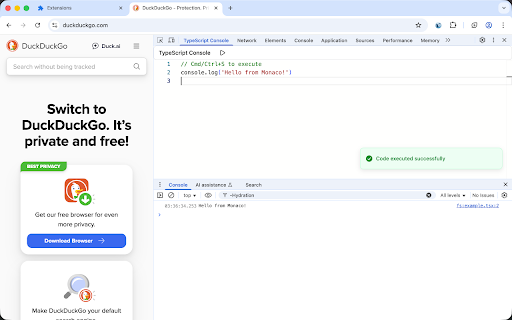
TypeScript Console is a developer utility that adds a dedicated TypeScript panel to the browser's developer tools. It allows users to write, execute, and test TypeScript snippets and DOM manipulations in real-time without a local project setup.

Developer:rxliuli
Version:0.6.3
Size:8.02MiB
Last updated:

Overview

Installs

921

Rating

3.3

6 reviews

Languages

1 locales

Includes English

Market analysis

Review-backed positioning, friction, and market signals for this Chrome extension.

Backed by review samples

Macro category

Developer & Designer Tools

Pricing friction

Low review signal

Complaint intensity

Moderate review signal

Listing & review signals
Observed signals from store listing text and review samples.

Listing positioning

The extension positions itself as a productivity tool for developers to run and debug TypeScript code directly within Chrome DevTools. It emphasizes zero configuration, support for TSX and npm packages, and seamless browser API access.

Inferred product pattern

DevTools extension for language-specific runtime execution.

Review-backed pain points

Users have reported that the TypeScript Console tab sometimes does not appear in DevTools and that the extension does not function on internal Chrome pages (e.g., the New Tab page).

Observed feature gaps

Some users requested a visible 'Run' button as an alternative to the Cmd/Ctrl+S keyboard shortcut.

Tags
TypeScriptDevToolsCode SandboxFrontend Development
Target users

- TypeScript Developers

- Frontend Engineers

- Web Development Students

Primary use cases

- Quick TypeScript prototyping

- Testing code snippets

- Learning TypeScript syntax

- Type-safe DOM manipulation

Positive themes

- Ease of use via keyboard shortcuts

- Helpful error reporting

- Efficient for rapid experimentation

Negative themes

- Extension panel visibility issues

- Execution failures

- Poor developer communication

Observed friction

- No pricing friction observed; the product appears to be free.

Evidence boundary: Analysis based on the public store listing and 6 user reviews. Extremely small review sample size limits the ability to generalize reliability issues across all environments.
Complaint summaries
Review-backed complaint signals grouped by operational area.

Support

One user mentioned a lack of professionalism and a negative interaction with the developer on GitHub when reporting bugs.

Reliability

Reports of the extension being 'not working' or the console tab missing entirely for some users.

Privacy

No privacy complaints observed.

Access & pricing

- Free usage observed

- No account requirement observed

- Free plan or free usage claimed

Store listing facts

Listing assets

- Screenshots: 1

- Videos: 1

- Languages: 1

Trust signals

- Developer contact

- Official website

- Support link

Store metadata

- Version: 0.6.3

- Size: 8.02MiB

- Last updated:

Listing SEO keywords

Search intent keywords
Keyword signals for evaluating how users may discover, compare, or search for this extension category.

Core discovery

TypeScript Chrome ExtensionRun TypeScript in BrowserTypeScript DevTools Console

Comparison

TypeScript vs JavaScript ConsoleTypeScript Playground alternative

Problem

how to run typescript in chromedebug typescript in browsertypescript dom manipulation

Alternative

TypeScript PlaygroundOnline TS compiler

Similar extensions

Jump to related discovery paths:

Screenshots

TypeScript Console screenshot

Links

Recommended Chrome extensions

Related listings from the same category, trending peers, and the same publisher portfolio.

Browse developer