Sidebar for Google Tasks icon

Sidebar for Google Tasks Chrome Extension Analysis

Automation & Workflow Efficiency

Chrome extension ID: jlgndcbgcfaaidgacjgelccmedbjenhb

A Chrome extension designed to integrate Google Tasks into the browser's side panel for easier access. It supports task creation, editing, deletion, reminders, and real-time synchronization across devices.

Developer:BrowseCraft
Version:26.4.4
Size:42.35KiB
Last updated:

Overview

Installs

30K+

Rating

4.4

119 reviews

Languages

54 locales

Includes Deutsch, English, English (United Kingdom), English (United States)...

Market analysis

Review-backed positioning, friction, and market signals for this Chrome extension.

Backed by review samples

Macro category

Automation & Workflow Efficiency

Pricing friction

Moderate review signal

Complaint intensity

High review signal

Listing & review signals
Observed signals from store listing text and review samples.

Listing positioning

The extension positions itself as a productivity enhancer that allows users to access and manage Google Tasks directly within the Chrome side panel. It emphasizes efficiency by removing the need to switch between tabs or open Gmail and Google Calendar.

Inferred product pattern

A utility extension that has moved toward a model of forced partner extension integration and situational advertising to sustain development.

Review-backed pain points

Users report extreme frustration with being forced to install an additional extension called KitPass to continue using the sidebar. Additionally, users have reported the extension opening website tabs without explicit permission.

Observed feature gaps

Users noted the inability to easily access the 'Completed' tasks tab in some views and a lack of an indicator showing which Google account is currently active.

Tags
Google TasksTask ManagementChrome Side PanelProductivity Tool
Target users

- Google Workspace users

- Chrome browser users

- Productivity enthusiasts

Primary use cases

- Managing to-do lists while browsing other websites

- Quick task entry without leaving the current tab

- Organizing daily schedules via a persistent side panel

Positive themes

- Capability to add both date and time to tasks

- Convenient side-panel access for multitasking

Negative themes

- Requirement to install a secondary extension (KitPass) to maintain functionality

- Unsolicited opening of browser tabs

- Perceived deceptive marketing regarding 'free' usage

Observed friction

- Free-tier complaints detected

- Account blocking complaints detected

- Privacy complaints detected

- High friction caused by a perceived 'bait and switch' where the extension requires the installation of a partner extension (KitPass) to function, which users find non-transparent.

Evidence boundary: Evidence is drawn from user reviews detailing functional benefits like date/time support, contrasted against severe complaints regarding forced secondary installations and unsolicited tab behavior. The analysis is based on a subset of available reviews provided in the input.
Complaint summaries
Review-backed complaint signals grouped by operational area.

Support

No specific support desk complaints, but users express significant dissatisfaction with the current functional state of the product.

Reliability

Users report the extension breaking following Google updates and the unexpected behavior of the extension triggering new browser tabs.

Privacy

Users expressed concerns regarding data privacy due to the mandatory installation of KitPass and the extension opening tabs without user consent.

Access & pricing

- Free entry with paid features

- Login needed for core features

- Limited free usage observed

Store listing facts

Listing assets

- Screenshots: 1

- Videos: 0

- Languages: 54

Trust signals

- Privacy policy

- Developer contact

- Official website

- Support link

Store metadata

- Version: 26.4.4

- Size: 42.35KiB

- Last updated:

Listing SEO keywords

Search intent keywords
Keyword signals for evaluating how users may discover, compare, or search for this extension category.

Core discovery

Google Tasks sidebarChrome side panel tasksGoogle Tasks Chrome extensionManage Google Tasks in browser

Comparison

Google Tasks sidebar vs GmailBest Google Tasks Chrome extensions

Problem

Google Tasks sidebar brokenKitPass extension requirementGoogle Tasks extension opening tabs

Alternative

Todoist Chrome extensionTickTick side panelGoogle Calendar sidebar

Similar extensions

Jump to related discovery paths:

Screenshots

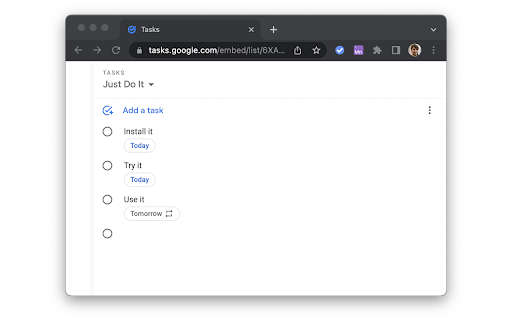
Sidebar for Google Tasks screenshot

Links

Recommended Chrome extensions

Related listings from the same category, trending peers, and the same publisher portfolio.

Browse workflow