Typing Practice icon

Typing Practice Chrome Extension Analysis

Tab & Bookmark Productivity

Chrome extension ID: jmelinmnnkfanophcakljpmanhhndcgj

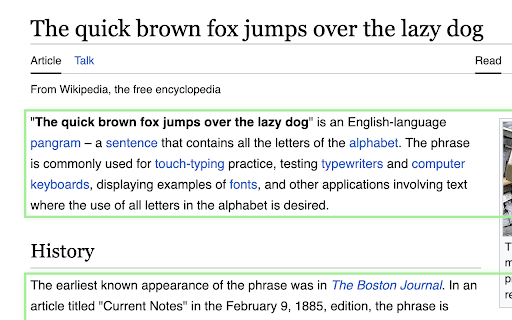
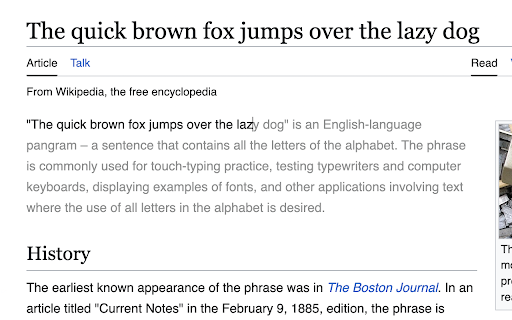
Typing Practice is a Chrome extension that allows users to select text on any website and convert it into an interactive typing exercise. It provides real-time speed and accuracy feedback via on-screen shortcuts and displays.

Developer:Maxim
Version:1.0.0
Size:148KiB
Last updated:

Overview

Installs

2K+

Rating

4.9

59 reviews

Languages

1 locales

Includes English

Market analysis

Review-backed positioning, friction, and market signals for this Chrome extension.

Backed by review samples

Macro category

Tab & Bookmark Productivity

Pricing friction

Low review signal

Complaint intensity

Low review signal

Listing & review signals
Observed signals from store listing text and review samples.

Listing positioning

The extension positions itself as a tool to transform any webpage into a personalized typing practice session. It emphasizes the ability to practice using original formatting and real-world text to improve typing speed and accuracy.

Inferred product pattern

A browser utility that overlays skill-building exercises onto existing web content to provide contextual practice.

Review-backed pain points

Users reported the lack of a manual pause button, difficulty reading typos because the mistyped character is displayed instead of the correct one, and the inability to move the UI elements.

Observed feature gaps

Missing features include saving typing history/scores, manual pause functionality, rebindable shortcuts, and support for Firefox.

Tags
Typing PracticeSkill BuildingWeb ProductivityEducation Tool
Target users

- Students

- Touch typists

- Language learners

- Keyboard layout enthusiasts

- Users with ADHD

Primary use cases

- Practicing typing with real-world web content

- Improving typing speed and accuracy

- Mastering custom keyboard layouts like Colemak

Positive themes

- Versatility of practicing with any web text

- Effectiveness for focus and ADHD

- Ease of use and simplicity

Negative themes

- Lack of session history or score persistence

- Fixed UI placement for the speedometer

- Limited support for certain complex web structures

Observed friction

- No pricing friction observed; users explicitly mention the extension is free.

Evidence boundary: Analysis based on Chrome Web Store listing and user reviews highlighting core functionality and requested improvements. Evidence is limited to Chrome Web Store user feedback and public listing data.
Complaint summaries
Review-backed complaint signals grouped by operational area.

Support

No support complaints observed.

Reliability

No reliability complaints observed, though users noted limited compatibility with certain site structures like Reddit.

Privacy

No privacy complaints observed.

Access & pricing

- Free usage observed

- No account requirement observed

- Free plan or free usage claimed

Store listing facts

Listing assets

- Screenshots: 2

- Videos: 1

- Languages: 1

Trust signals

- Developer contact

Store metadata

- Version: 1.0.0

- Size: 148KiB

- Last updated:

Listing SEO keywords

Search intent keywords
Keyword signals for evaluating how users may discover, compare, or search for this extension category.

Core discovery

typing practice extensionlearn to type onlinetyping speed trainerwebpage typing tutor

Comparison

Monkeytype alternativetyping tutor

Problem

improve typing speedtyping accuracy practice

Alternative

typing trainertouch typing tool

Similar extensions

Jump to related discovery paths:

Screenshots

Typing Practice screenshot

Links

Videos: Watch

Recommended Chrome extensions

Related listings from the same category, trending peers, and the same publisher portfolio.

Browse education