Brave Search icon

Brave Search Chrome Extension Analysis

Privacy, Security & Ad Blockers

Chrome extension ID: jojedekgcncccnjhilimdojbfnfamkda

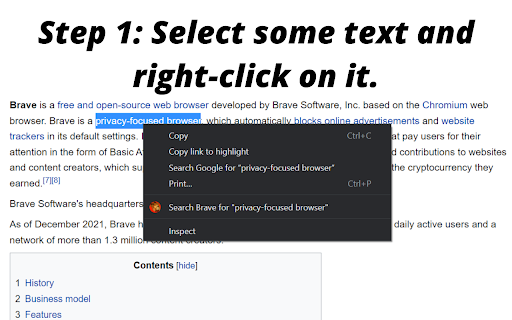
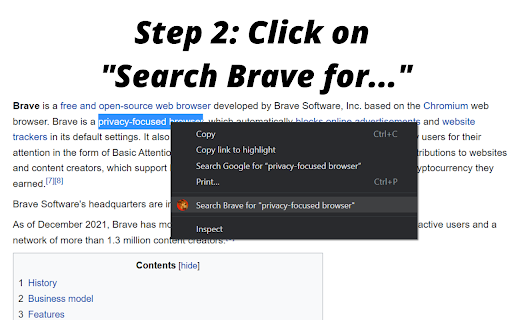
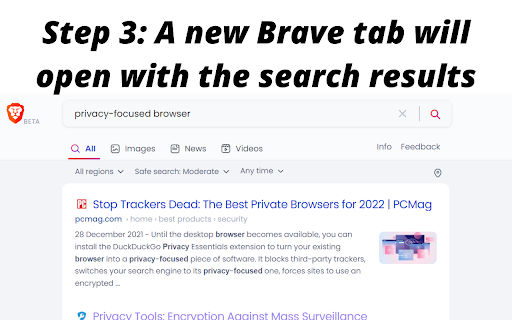
This Chrome extension allows users to select text on any webpage and right-click to initiate a search using the Brave search engine. The search results are opened in a new tab, providing a quicker way to utilize Brave's privacy-focused search capabilities without manually navigating to the search engine.

Developer:champagne
Version:1.0.0
Size:48.19KiB
Last updated:

Overview

Installs

3K+

Rating

4.0

4 reviews

Languages

1 locales

Includes English (United States)

Market analysis

Review-backed positioning, friction, and market signals for this Chrome extension.

Backed by review samples

Macro category

Privacy, Security & Ad Blockers

Pricing friction

Low review signal

Complaint intensity

Moderate review signal

Listing & review signals
Observed signals from store listing text and review samples.

Listing positioning

The store listing positions the Brave Search extension as a simple tool designed to save time by enabling faster private web searches using the Brave search engine directly from a right-click context menu. It emphasizes Brave's claims of an independent index and user privacy.

Inferred product pattern

A free utility extension designed to enhance productivity and privacy by providing a quick, context-menu-based shortcut for searching selected text directly with the Brave search engine.

Review-backed pain points

One review highlighted a significant pain point where the extension stopped working after Chrome updates, specifically the 'Search with Brave' option disappearing from the right-click menu, rendering the extension unusable for that user at the time.

Observed feature gaps

The primary observed feature gap stems from the reported intermittent failure of the core functionality, where the right-click context menu option does not appear after browser updates. While a later update to the review suggested a resolution, this indicates a potential reliability gap.

Tags
Private SearchSearch ShortcutContext MenuProductivity Tool
Target users

- Users prioritizing privacy in web search

- Regular users of Brave Search engine

- Individuals seeking productivity shortcuts for web searching

Primary use cases

- Quickly searching selected text using Brave Search

- Accessing Brave's privacy-focused search features with less friction

- Integrating Brave Search functionality into browsers where it's not the default

Positive themes

- Easy integration of Brave Search functionality

- Ability to use Brave Search (including Leo AI) in restricted work environments

- General appreciation for the utility

Negative themes

- Functionality breaking after Chrome updates (right-click menu option disappearing)

Observed friction

- Performance complaints detected

- No pricing or payment information is provided for this extension, and no related complaints were identified in the available reviews.

Evidence boundary: This analysis is based on the Chrome Web Store listing, including the title, short and long descriptions, and three user reviews, which included both high-rating and low-rating samples. The analysis is based on a very small sample of reviews (three), which limits the ability to draw broad conclusions about user sentiment or widespread issues. One review provided partially conflicting information about the resolution of a reported bug.
Complaint summaries
Review-backed complaint signals grouped by operational area.

Support

No support, account, or refund-related complaints were identified in the reviews.

Reliability

One review reported the extension stopped working after specific Chrome updates, with the right-click menu option disappearing. However, a subsequent update by the same reviewer indicated it was later 'working alright' on Chromium browsers.

Privacy

No privacy or security complaints were found in the reviews. The extension's listing explicitly promotes privacy, aligning with the Brave search engine's claims.

Access & pricing

- Free usage observed

- No account requirement observed

- Free plan or free usage claimed

Store listing facts

Listing assets

- Screenshots: 3

- Videos: 0

- Languages: 1

Trust signals

- Developer contact

Store metadata

- Version: 1.0.0

- Size: 48.19KiB

- Last updated:

Listing SEO keywords

Search intent keywords
Keyword signals for evaluating how users may discover, compare, or search for this extension category.

Core discovery

brave search extensionprivate search chromeright-click searchfast web searchsearch shortcut chrome

Comparison

brave search vs googlebrave search vs duckduckgobrave search shortcut alternative

Problem

slow search processmanual brave searchchrome default search engineprivacy search issues

Alternative

private search toolcontext menu search extensionbrave search integration

Similar extensions

Jump to related discovery paths:

Screenshots

Brave Search screenshot

Recommended Chrome extensions

Related listings from the same category, trending peers, and the same publisher portfolio.

Browse tools
Enhance Gemini icon

Enhance Gemini

champagne

Enhance Chrome's integration with Gemini. Quick Search, Context Menus, And more!

Installs

10K+

Rating

4.1

Ecosia - The search engine that plants trees icon

Ecosia - The search engine that plants trees

Ecosia GmbH

This extension sets your search engine to Ecosia and customizes your new tab page so you can plant trees with every search.

Installs

1.0M+

Rating

4.7

Video Downloader Plus icon

Video Downloader Plus

Video Downloader Plus

Download and save videos from any website instantly. A fast, simple video downloader that just works.

Installs

1.0M+

Rating

4.5

Wordtune: AI Paraphrasing and Grammar Tool icon

Wordtune: AI Paraphrasing and Grammar Tool

Wordtune

Unlock your potential with Wordtune's free AI writer – paraphrase, rewrite, translate, fix grammar, and more.

Installs

1.0M+

Rating

4.6

Keep Awake your System or Display icon

Keep Awake your System or Display

Dorian Hiller

Keep your system or display from going to sleep with just one click!

Installs

1.0M+

Rating

5.0

Поиск Яндексa icon

Поиск Яндексa

Yandex

Вводите запросы в адресную строку и получайте ответы от Яндекса

Installs

1.0M+

Rating

3.2

Bing Search and Homepage icon

Bing Search and Homepage

Microsoft Corporation

Set Microsoft Bing as your default homepage and default search engine

Installs

1.0M+

Rating

2.3

uberAgent icon

uberAgent

Cloud Software Group, Inc.

Enables uberAgent to collect web app usage and performance data (e.g., foreground tab, page load duration) from Chrome.

Installs

1.0M+

Rating

3.0

Ace Script icon

Ace Script

Ace Stream

Everything can be scripted, allowing your browser to do more!

Installs

1.0M+

Rating

3.4

MSN + Bing for Chrome icon

MSN + Bing for Chrome

Microsoft Corporation

Set MSN as your homepage and Bing as your search engine

Installs

1.0M+

Rating

4.1