Call on Whats icon

Call on Whats Chrome Extension Analysis

Automation & Workflow Efficiency

Chrome extension ID: kacceiomkmbogkahfpgenakgdonlomlm

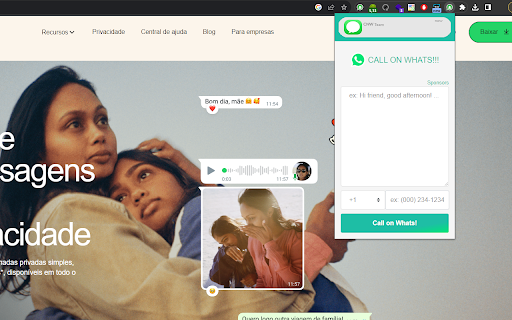
Call on Whats is a browser extension that allows users to initiate WhatsApp chats via WhatsApp Web by entering a phone number directly into the extension popup. It functions as a bridge to start new conversations without saving contact information to the user's phone address book.

Developer:Tw
Version:0.0.9
Size:1.58MiB
Last updated:

Overview

Installs

1K+

Rating

1.0

4 reviews

Languages

1 locales

Includes English (United States)

Market analysis

Review-backed positioning, friction, and market signals for this Chrome extension.

Backed by review samples

Macro category

Automation & Workflow Efficiency

Pricing friction

Low review signal

Complaint intensity

High review signal

Listing & review signals
Observed signals from store listing text and review samples.

Listing positioning

The product positions itself as a productivity utility that facilitates starting WhatsApp conversations without requiring contacts to be saved on a mobile device. It emphasizes ease of use through a browser-based interface and includes a dedicated shortcut to WhatsApp Web.

Inferred product pattern

Utility-based productivity extension with ad-supported monetization.

Review-backed pain points

Users have expressed total dissatisfaction, labeling the extension as 'fake' or a 'scam' without providing specific technical details.

Observed feature gaps

Reviews suggest users feel the product does not perform as advertised, with no positive user confirmation of the core functionality.

Tags
WhatsAppCommunication ToolProductivityWeb Shortcut
Target users

- WhatsApp Web users

- Customer support representatives

- Business professionals

Primary use cases

- Initiating unsaved contact chats

- Managing WhatsApp Web shortcuts

Positive themes

- Review-backed data is not available.

Negative themes

- Product functionality skepticism

- Claims of the extension being a scam or fake

Observed friction

- The listing mentions an ad-supported free version and a paid 'PRO' version, but no specific pricing details are provided.

Evidence boundary: Evidence is derived from public store description and a small sample of user reviews that uniformly express high distrust. The limited number of reviews prevents a detailed analysis of specific technical bugs or feature performance.
Complaint summaries
Review-backed complaint signals grouped by operational area.

Support

No specific support or refund complaints were identified, only general dissatisfaction regarding the product's validity.

Reliability

Users explicitly labeled the product as 'fake' or a 'scam' in public reviews.

Privacy

No specific privacy complaints were identified.

Access & pricing

- Free entry with paid features

- No account requirement observed

- Free plan or free usage claimed

Store listing facts

Listing assets

- Screenshots: 1

- Videos: 0

- Languages: 1

Trust signals

- Developer contact

Store metadata

- Version: 0.0.9

- Size: 1.58MiB

- Last updated:

Listing SEO keywords

Search intent keywords
Keyword signals for evaluating how users may discover, compare, or search for this extension category.

Core discovery

WhatsApp direct messageWhatsApp no contactWhatsApp Web shortcutstart WhatsApp chat

Comparison

WhatsApp link generator alternative

Problem

WhatsApp errornot working

Alternative

Click to chat WhatsApp

Similar extensions

Jump to related discovery paths:

Screenshots

Call on Whats screenshot

Recommended Chrome extensions

Related listings from the same category, trending peers, and the same publisher portfolio.

Browse communication
Chama no Whats icon

Chama no Whats

Tw

Chame pessoas no whatassp sem precisar adicionar o contato no seu celular.

Installs

4K+

Rating

4.5

Grammar Checker and AI tool - Correcto icon

Grammar Checker and AI tool - Correcto

product-development-correcto

Improve your writing with the AI-powered online grammar and spelling checker in Spanish and our paraphrasing tool.

Installs

70K+

Rating

4.6

Share link via email icon

Share link via email

Cobote

Adds a button and context menu item to send the page URL or a link URL via email

Installs

70K+

Rating

3.9

MerciApp - AI Writing Assistant icon

MerciApp - AI Writing Assistant

MerciApp

Write better, faster, wherever you work.

Installs

60K+

Rating

4.5

Mail Merge for Gmail - Mailmeteor icon

Mail Merge for Gmail - Mailmeteor

Mailmeteor

Free mail merge & mass email tool for Gmail, with email tracking and auto follow-ups

Installs

60K+

Rating

4.8

Cursorful - Screen Recorder with Auto Zoom icon

Cursorful - Screen Recorder with Auto Zoom

Cursorful

Cursorful creates beautiful screen recordings with automatic zooms and pans that keep the viewer engaged.

Installs

60K+

Rating

4.9

Auto BCC for Gmail™ by cloudHQ icon

Auto BCC for Gmail™ by cloudHQ

cloudHQ

Setup automatic blind copies to your CRM or any other email address

Installs

60K+

Rating

4.2

Amazon Q Business icon

Amazon Q Business

Amazon Q Business by Amazon Web Services

An enterprise AI assistant available to assist you when browsing the web.

Installs

50K+

Rating

5.0

CrankWheel Screen Sharing icon

CrankWheel Screen Sharing

CrankWheel

Easier screen sharing. No app needed for viewers, even on their mobile. Record your screen or webcam.

Installs

50K+

Rating

4.8

Reminders for Google Calendar™ icon

Reminders for Google Calendar™

SMS Reminder for Google Calendar™

Send reminders by SMS/Text from your Google Calendar™. Use it for your customers or your own appointments.

Installs

50K+

Rating

3.6