Make it Pig — No-Code Web Scraper, Data Extractor & Excel Exporter icon

Make it Pig Chrome Extension Analysis

Web Scraping & Data Extraction

Store listing title: Make it Pig — No-Code Web Scraper, Data Extractor & Excel Exporter

Chrome extension ID: kdbeidpnnjjocknacggemgibcjfibbbn

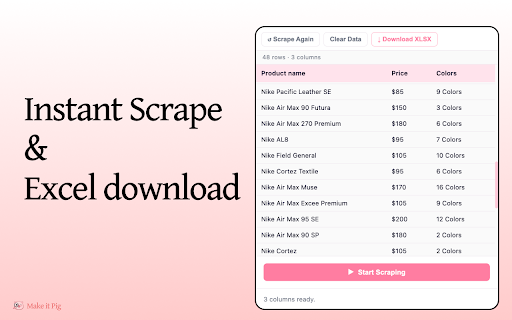
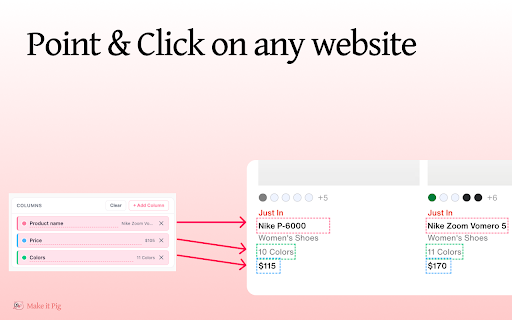
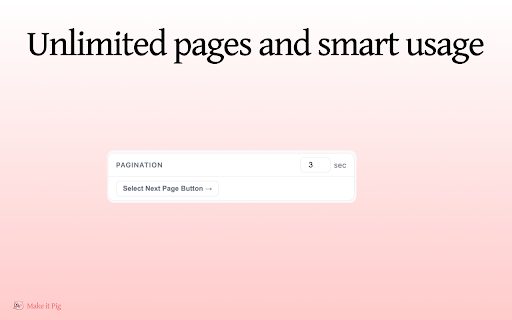
This Chrome extension allows users to extract repeating data patterns from websites by clicking on them. It features automatic pagination handling and exports results into .xlsx files, operating entirely locally within the browser.

Developer:Onepaper.ai
Version:1.1.0
Size:131KiB
Last updated:

Overview

Installs

21

Rating

★ 5.0

1 reviews

Languages

1 locales

Includes English

Market analysis

Review-backed positioning, friction, and market signals for this Chrome extension.

Backed by review samples

Macro category

Web Scraping & Data Extraction

Pricing friction

Low review signal

Complaint intensity

Low review signal

Listing & review signals
Observed signals from store listing text and review samples.

Listing positioning

Make it Pig positions itself as a simplified, visual-first alternative to complex scraping tools. It emphasizes a no-code, privacy-focused experience that requires no account or cloud subscription to export data directly to Excel.

Inferred product pattern

Client-side, visual data extraction tool with zero-friction onboarding.

Review-backed pain points

No review-backed pain points available.

Observed feature gaps

No feature gaps identified from the limited public listing and review data.

Tags
Web ScraperData ExtractionNo-CodeExcel Exporter
Target users

- Marketers

- Recruiters

- Researchers

- E-commerce sellers

- Real estate professionals

Primary use cases

- Competitor pricing analysis

- Lead list generation

- Market research

- Extracting directory data

- Job and real estate listing aggregation

Positive themes

- Ease of use

- Time-saving efficiency

- Simple point-and-click functionality

Negative themes

No negative theme data.

Observed friction

- None; the listing explicitly states the tool is free with no trials or paywalls.

Evidence boundary: Data derived from official Chrome Web Store listing descriptions and one available user review. The analysis is based on a very small sample size of user reviews, which may not represent the full range of potential technical issues.
Complaint summaries
Review-backed complaint signals grouped by operational area.

Support

No support complaints reported.

Reliability

No reliability or performance issues reported.

Privacy

No privacy concerns reported; the developer emphasizes that data remains local to the machine.

Access & pricing

- Free usage observed

- No account requirement observed

- Free plan or free usage claimed

Store listing facts

Listing assets

- Screenshots: 3

- Videos: 0

- Languages: 1

Trust signals

- Privacy policy

- Developer contact

- Official website

Store metadata

- Version: 1.1.0

- Size: 131KiB

- Last updated:

Listing SEO keywords

Search intent keywords
Keyword signals for evaluating how users may discover, compare, or search for this extension category.

Core discovery

chrome web scraperextract data to excelno-code web scrapingvisual data extractor

Comparison

alternative to web scrapereasy scraping tool

Problem

manual data entrycopy paste website data

Alternative

import.io alternativeoctoparse alternative

Similar extensions

Jump to related discovery paths:

Screenshots

Make it Pig — No-Code Web Scraper, Data Extractor & Excel Exporter screenshot

Links

Recommended Chrome extensions

Related listings from the same category, trending peers, and the same publisher portfolio.

Browse tools
MemoryStats – Close Heavy Tabs, Reduce RAM Usage, Boost Chrome Memory Saver icon

MemoryStats – Close Heavy Tabs, Reduce RAM Usage, Boost Chrome Memory Saver

Onepaper.ai

Memory Saver - See how much RAM each tab uses, track CPU load, and close slow or frozen tabs in one click.

Installs

2K+

Rating

★ 4.9

Email Open Tracker – Unlimited Real-Time Gmail Read Receipts & Tracking icon

Email Open Tracker – Unlimited Real-Time Gmail Read Receipts & Tracking

Onepaper.ai

Track email opens in Gmail with real-time read receipts, open notifications, and proof of receipt — know when your emails are read.

Installs

282

Rating

★ 4.7

The QR Code Generator icon

The QR Code Generator

Uniqode

Create, scan, and edit QR codes instantly with one click.

Installs

2.0M+

Rating

★ 4.5

AI Chat for Search icon

AI Chat for Search

AI Chat for Search Team

Display AI Chat response alongside search engine results

Installs

2.0M+

Rating

★ 4.6

Planet Search icon

Planet Search

Free VPN Planet

Enchanced default search engine.

Installs

2.0M+

Rating

★ 3.1

Lightshot (screenshot tool) icon

Lightshot (screenshot tool)

Skillbrains

Simple and convenient screenshot tool. Select an area, edit your screenshot and upload it to the server.

Installs

2.0M+

Rating

★ 3.4

Ruffle - Flash Emulator icon

Ruffle - Flash Emulator

ruffle

Puts Flash back on the web where it belongs.

Installs

1.0M+

Rating

★ 4.7

PrintFriendly: Print, PDF Editor & Full Page Screenshot icon

PrintFriendly: Print, PDF Editor & Full Page Screenshot

PrintFriendly

Print clean web pages, save as PDF, edit PDFs, and capture full-page screenshots. Integrates with ChatGPT, Claude, and Gemini.

Installs

1.0M+

Rating

★ 4.9

NaturalReader - AI Text to Speech icon

NaturalReader - AI Text to Speech

NaturalSoft Limited

NaturalReader reads text aloud on the pages you browse, including emails, online documents, PDFs and ebooks.

Installs

1.0M+

Rating

★ 4.1

Kimi icon

Kimi

Kimi

Kimi Browser Extension — for AI agents. AI can open pages, click, fill forms, extract info, and automate web tasks.

Installs

1.0M+

Rating

★ 3.9