Usersnap - Capture visual feedback & bugs icon

Usersnap Chrome Extension Analysis

Developer & Designer Tools

Store listing title: Usersnap - Capture visual feedback & bugs

Chrome extension ID: khehmhbaabkepkojebhcpjifcmojdmgd

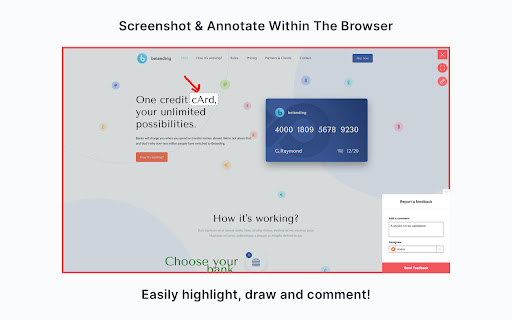
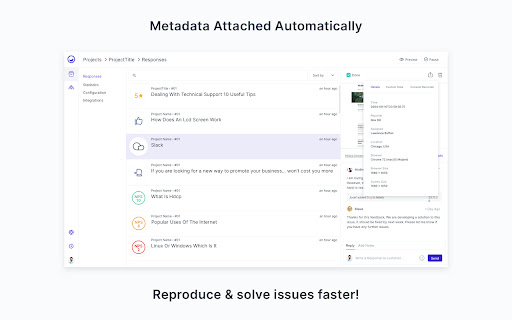
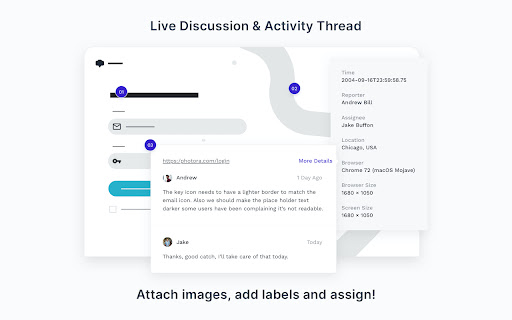
A browser extension that allows users to report bugs and provide feedback on websites via screenshots and annotations. It automatically captures environment data like browser versions and console logs to assist developers in troubleshooting.

Developer:Usersnap GmbH
Version:3.0.2
Size:1.16MiB
Last updated:

Overview

Installs

6K+

Rating

4.7

34 reviews

Languages

1 locales

Includes English

Market analysis

Review-backed positioning, friction, and market signals for this Chrome extension.

Backed by review samples

Macro category

Developer & Designer Tools

Pricing friction

High review signal

Complaint intensity

Moderate review signal

Listing & review signals
Observed signals from store listing text and review samples.

Listing positioning

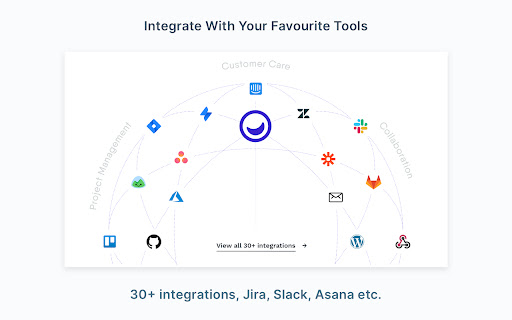
Usersnap positions itself as a professional tool for digital product teams to streamline QA and User Acceptance Testing (UAT). It emphasizes the ability to capture visual feedback and technical metadata without requiring code installation on the target site.

Inferred product pattern

B2B visual feedback bridge designed to translate non-technical user complaints into actionable technical tickets.

Review-backed pain points

Users expressed frustration over the requirement to create an account to access features and perceived misleading marketing regarding the 'free' nature of the tool. Agency users specifically noted the inability to see colleagues' feedback before it is sent to developers.

Observed feature gaps

Lack of a shared internal collaboration view for team members to align on feedback before submission to developers.

Tags
Visual FeedbackBug ReportingUX TestingQA ToolsProduct Feedback
Target users

- Digital Product Teams

- QA Engineers

- Web Developers

- UI/UX Designers

- Client-facing Agencies

Primary use cases

- User Acceptance Testing (UAT)

- Visual Bug Reporting

- Client Feedback Collection

- UX Auditing

- Technical Troubleshooting

Positive themes

- Significant reduction in communication back-and-forth

- Efficiency in bridging the gap between non-technical sales teams and developers

- Value of automatic technical metadata collection

- Ease of user adoption

Negative themes

- Friction regarding mandatory account creation

- Confusion over free vs. paid status in search results

- Lack of shared feedback visibility for internal teams

Observed friction

- Payment required for meaningful usage

- Free-tier complaints detected

- Some users feel the product is marketed as free in search results but requires payment after a very small initial quota.

Evidence boundary: Analysis based on the official Chrome Web Store listing and 10 sampled user reviews. The sample of 10 reviews is small relative to the total user base, potentially underrepresenting the full distribution of sentiment.
Complaint summaries
Review-backed complaint signals grouped by operational area.

Support

No significant support complaints; one user explicitly praised the support as amazing.

Reliability

No reliability or performance complaints observed in the provided samples.

Privacy

No privacy or security complaints observed.

Access & pricing

- Free entry with paid features

- Account required for core usage

- Limited free usage observed

Store listing facts

Listing assets

- Screenshots: 5

- Videos: 0

- Languages: 1

Trust signals

- Privacy policy

- Developer contact

- Official website

- Support link

Store metadata

- Version: 3.0.2

- Size: 1.16MiB

- Last updated:

Listing SEO keywords

Search intent keywords
Keyword signals for evaluating how users may discover, compare, or search for this extension category.

Core discovery

visual feedback toolbrowser bug reporterUAT testing extensionwebsite annotation tool

Comparison

Usersnap alternativesUsersnap vs Jiravisual bug tracking comparison

Problem

how to report website bugs visuallycollecting client feedback on staging sitereduce developer back-and-forth

Alternative

visual bug reporting softwarewebsite feedback extension

Similar extensions

Jump to related discovery paths:

Screenshots

Usersnap - Capture visual feedback & bugs screenshot

Links

Recommended Chrome extensions

Related listings from the same category, trending peers, and the same publisher portfolio.

Browse developer
Tampermonkey BETA icon

Tampermonkey BETA

Jan Biniok

Change the web at will with userscripts

Installs

700K+

Rating

4.8

Color Picker for Chrome™ icon

Color Picker for Chrome™

colorpicker08

HEX, RGB Color picker, Advanched Eyedropper, Find color code on any page

Installs

700K+

Rating

4.0

Assinatura Digital no Navegador icon

Assinatura Digital no Navegador

bry-suporte-apps

Esta extensão é projetada para ser utilizada em conjunto com outras soluções e não funciona de forma isolada para a assinatura.

Installs

700K+

Rating

2.4

Postman Interceptor icon

Postman Interceptor

Postman

Capture requests from any website and send them to Postman Client.

Installs

700K+

Rating

4.3

Window Resizer icon

Window Resizer

Ionuț Botizan

Resize the browser window to emulate various screen resolutions.

Installs

700K+

Rating

4.3

Talend API Tester - Free Edition icon

Talend API Tester - Free Edition

Qlik

Visually interact with REST, SOAP and HTTP APIs.

Installs

600K+

Rating

4.8

Detailed SEO Extension icon

Detailed SEO Extension

ahrefsseotoolbar

Get SEO insights at the click of a button to any website you're currently on. Built by full-time SEO's for daily analysis.

Installs

600K+

Rating

4.9

TikTok Pixel Helper icon

TikTok Pixel Helper

TikTok For Business

The TikTok Pixel Helper is a plug-in that monitors whether your TikTok Pixel is functioning properly.

Installs

600K+

Rating

2.6

Google Analytics Debugger icon

Google Analytics Debugger

Google Analytics

Prints useful information to the JavaScript console by enabling the debug version of the Google Analytics Javascript.

Installs

600K+

Rating

4.2

Tag Assistant Companion icon

Tag Assistant Companion

Google

The Tag Assistant Companion extension works with Tag Assistant to help troubleshoot installation of gtag.js and Google Tag Manager.

Installs

500K+

Rating

3.1