Grammarlyier - Unofficial Grammarly Autocorrect extension icon

Grammarlyier Chrome Extension Analysis

AI & Writing Assistants

Store listing title: Grammarlyier - Unofficial Grammarly Autocorrect extension

Chrome extension ID: klpgpnjmnlikbnflccmdhgibbaoflobf

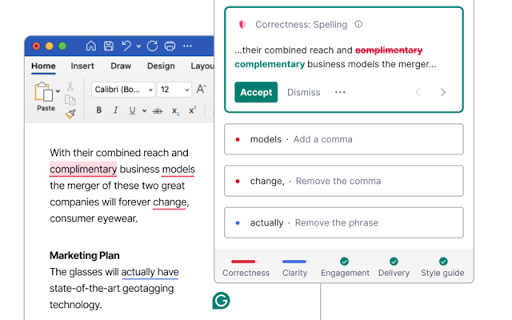
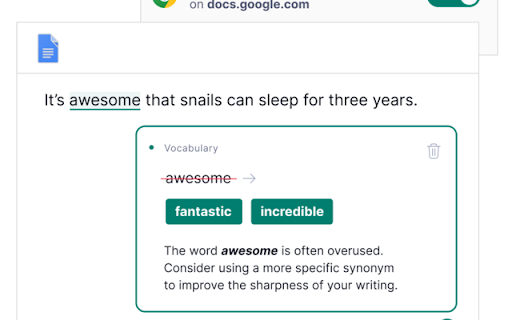
Grammarlyier is an unofficial browser extension intended to provide additional tools for Grammarly users. It offers real-time auto-correction for grammar and spelling, alongside a dark mode interface for visual comfort.

Developer:Software - Moxo
Version:6.0.1
Size:32.7KiB
Last updated:

Overview

Installs

2K+

Rating

3.9

7 reviews

Languages

1 locales

Includes English (United States)

Market analysis

Review-backed positioning, friction, and market signals for this Chrome extension.

Backed by review samples

Macro category

AI & Writing Assistants

Pricing friction

Low review signal

Complaint intensity

Moderate review signal

Listing & review signals
Observed signals from store listing text and review samples.

Listing positioning

The product positions itself as an unofficial extension designed to extend the capabilities of Grammarly. It specifically highlights features like enhanced auto-correction and a dark mode to improve the writing environment.

Inferred product pattern

An unofficial utility extension that attempts to add layers of functionality to a major third-party writing platform.

Review-backed pain points

Users have reported that the dark mode feature fails to activate and that the auto-correct functionality may not work as promised.

Observed feature gaps

There is a significant gap between the claimed functionality (dark mode and auto-correct) and the actual user experience reported in reviews.

Tags
Grammarly EnhancerAuto-CorrectDark ModeWriting Utility
Target users

- Grammarly users

- Fast typists

- Writers

Primary use cases

- Automating grammar and spelling corrections

- Enabling dark mode in writing tools

Positive themes

- Effective real-time error correction for fast typists

Negative themes

- Functional breakage of dark mode

- Failure of auto-correct features

- Slow performance

Observed friction

- Performance complaints detected

- No pricing friction observed as the product is marketed as free.

Evidence boundary: Data extracted from the store listing description and a limited set of user reviews. The analysis is based on a very small sample of 7 reviews.
Complaint summaries
Review-backed complaint signals grouped by operational area.

Support

No support-specific complaints found in the provided reviews.

Reliability

Users report reliability issues including the dark mode toggle not working and auto-correct failing to function.

Privacy

No privacy complaints observed.

Access & pricing

- Free usage observed

- No account requirement observed

- Free plan or free usage claimed

Store listing facts

Listing assets

- Screenshots: 3

- Videos: 1

- Languages: 1

Trust signals

- Privacy policy

- Developer contact

Store metadata

- Version: 6.0.1

- Size: 32.7KiB

- Last updated:

Listing SEO keywords

Search intent keywords
Keyword signals for evaluating how users may discover, compare, or search for this extension category.

Core discovery

Grammarly auto-correctGrammarly dark modeGrammarly premium tools extender

Comparison

GrammarlyUnofficial Grammarly tools

Problem

Grammarly dark mode not workingGrammarly auto-correct failure

Alternative

Grammarly utilityWriting enhancer extension

Similar extensions

Jump to related discovery paths:

Screenshots

Grammarlyier - Unofficial Grammarly Autocorrect extension screenshot

Links

Privacy policy: https://moxoai.com/privacy

Videos: Watch

Recommended Chrome extensions

Related listings from the same category, trending peers, and the same publisher portfolio.

Browse tools
Jambofy v3.0 - Popify Youtube Themes & Customizers icon

Jambofy v3.0 - Popify Youtube Themes & Customizers

Software - Moxo

Improves boring youtube thumbnails with popify, benify, dogify & more!

Installs

10K+

Rating

4.7

YouTube Summary with ChatGPT & Claude icon

YouTube Summary with ChatGPT & Claude

Glasp

Summarize YouTube videos, web articles, and PDFs to save time, powered by ChatGPT, Claude, Mistral AI, and Gemini.

Installs

2.0M+

Rating

4.3

ЮБуст - VPN для YouTube. Обход блокировки Ютуб без ВПН. VPN для браузера icon

ЮБуст - VPN для YouTube. Обход блокировки Ютуб без ВПН. VPN для браузера

Uboost

Ускоритель Ютуб без ВПН, VPN для браузера Яндекс, Chrome, Opera, Edge. Обход замедления Ютуба.

Installs

2.0M+

Rating

4.2

Pie Adblock - A Powerful Free Ad Blocker icon

Pie Adblock - A Powerful Free Ad Blocker

Pie Extensions

Pie Adblock blocks ads & pop-ups, plus YouTube & Twitch video ads. You can customize your ad experience with Pie!

Installs

2.0M+

Rating

4.9

HID Credential Management Extension icon

HID Credential Management Extension

hid-global-chrome-web-store

Browser extension for HID credential management solution.

Installs

2.0M+

Rating

1.3

AI Chat for Search icon

AI Chat for Search

AI Chat for Search Team

Display AI Chat response alongside search engine results

Installs

2.0M+

Rating

4.6

WPS浏览器助手:文档在线阅读编辑 icon

WPS浏览器助手:文档在线阅读编辑

金山PDF

PDF、Excel、Word、PPT等文档无需下载即可在线预览,还能对文档进行编辑、打印、转换等处理。

Installs

2.0M+

Rating

3.0

Planet Search icon

Planet Search

Free VPN Planet

Enchanced default search engine.

Installs

2.0M+

Rating

3.4

Lightshot (screenshot tool) icon

Lightshot (screenshot tool)

Skillbrains

Simple and convenient screenshot tool. Select an area, edit your screenshot and upload it to the server.

Installs

2.0M+

Rating

4.4

PrintFriendly: Print, PDF Editor & Full Page Screenshot icon

PrintFriendly: Print, PDF Editor & Full Page Screenshot

PrintFriendly

Print clean web pages, save as PDF, edit PDFs, and capture full-page screenshots. Integrates with ChatGPT, Claude, and Gemini.

Installs

1.0M+

Rating

4.6