Pixel Perfect : Color Picker icon

Pixel Perfect Chrome Extension Analysis

Developer & Designer Tools

Store listing title: Pixel Perfect : Color Picker

Chrome extension ID: kmpiebbhgoghpnngomnmcbmionnieimj

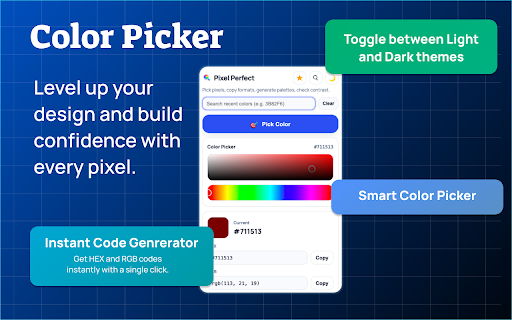
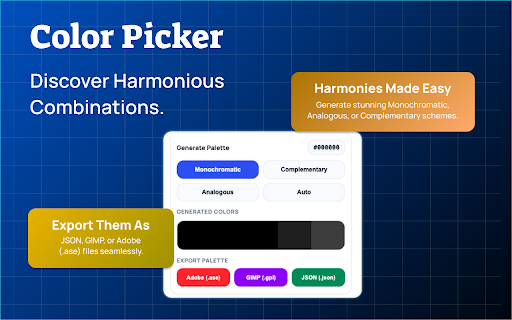
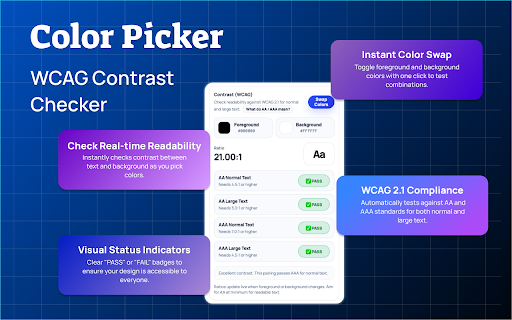
This is a browser-based color picker tool that allows users to extract HEX, RGB, and HSL values from any pixel on a webpage. It includes additional professional utilities such as a palette generator, WCAG accessibility contrast checkers, and export support for Adobe and GIMP formats.

Developer:Anslation
Version:1.0.1
Size:212KiB
Last updated:

Overview

Installs

236

Rating

4.8

11 reviews

Languages

1 locales

Includes English

Market analysis

Review-backed positioning, friction, and market signals for this Chrome extension.

Backed by review samples

Macro category

Developer & Designer Tools

Pricing friction

Low review signal

Complaint intensity

Low review signal

Listing & review signals
Observed signals from store listing text and review samples.

Listing positioning

Pixel Perfect positions itself as a professional-grade, lightweight color utility designed for developers and designers. It emphasizes precision, local-only data processing, and a clutter-free experience that integrates into existing design workflows.

Inferred product pattern

A high-utility, privacy-first developer tool that provides core functional value without secondary account requirements or monetization friction.

Review-backed pain points

No negative review-backed pain points available; users generally report a positive, straightforward experience.

Observed feature gaps

No major feature gaps identified in user reviews or store documentation.

Tags
Color PickerDesign ToolPalette GeneratorWCAGDeveloper Tool
Target users

- Web Developers

- UI/UX Designers

- Students

- Creative Professionals

Primary use cases

- Color extraction from websites

- Palette generation

- WCAG accessibility contrast verification

- Exporting colors to design software

Positive themes

- Precise color capturing

- Lightweight performance

- Privacy-focused with no tracking

- Ease of use for design tasks

Negative themes

No negative theme data.

Observed friction

- None observed; the extension appears to be free with no mentioned payment barriers.

Evidence boundary: Evidence is drawn from 10 English-language user reviews and the product's official store listing, confirming high user satisfaction regarding usability and performance. Evidence is limited to a small sample of recent reviews, which may not capture long-term performance or edge-case compatibility issues.
Complaint summaries
Review-backed complaint signals grouped by operational area.

Support

None observed.

Reliability

None observed; performance is described as smooth and fast.

Privacy

None observed; the developer emphasizes local processing and lack of user tracking.

Access & pricing

- Free usage observed

- No account requirement observed

- Free plan or free usage claimed

Store listing facts

Listing assets

- Screenshots: 3

- Videos: 0

- Languages: 1

Trust signals

- Privacy policy

- Developer contact

Store metadata

- Version: 1.0.1

- Size: 212KiB

- Last updated:

Listing SEO keywords

Search intent keywords
Keyword signals for evaluating how users may discover, compare, or search for this extension category.

Core discovery

Chrome color pickereyedropper toolpalette generatorWCAG contrast checkerextract color from website

Comparison

alternative to ColorZillabest color picker for designers

Problem

how to find color code on websitecheck contrast ratio

Alternative

color palette toolsdesign productivity tools

Similar extensions

Jump to related discovery paths:

Screenshots

Pixel Perfect : Color Picker screenshot

Links

Recommended Chrome extensions

Related listings from the same category, trending peers, and the same publisher portfolio.

Browse developer