Edit & Redact PDF Text in Place | Kern icon

Edit & Redact PDF Text in Place Chrome Extension Analysis

Automation & Workflow Efficiency

Store listing title: Edit & Redact PDF Text in Place | Kern

Chrome extension ID: kolbpkakejnfpkfhccgnnoofimfkoich

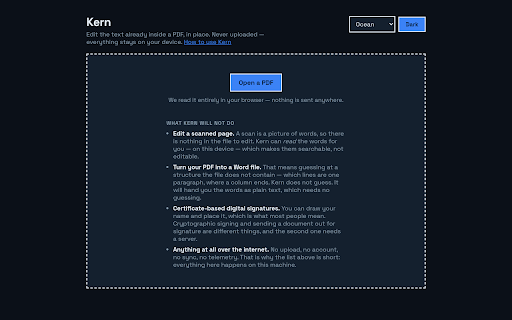
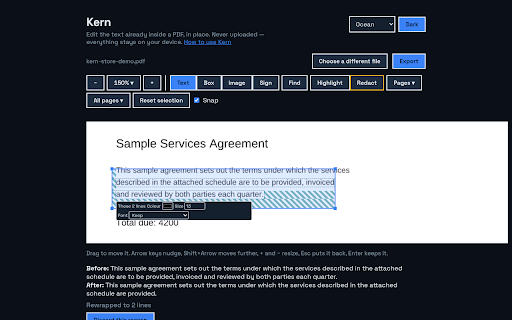
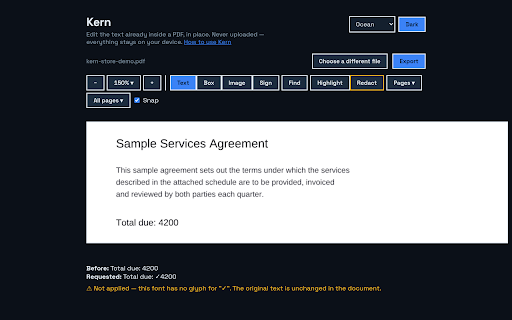
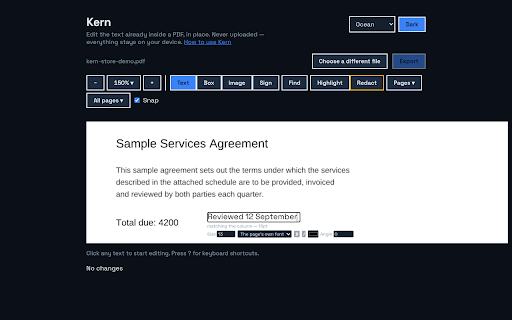
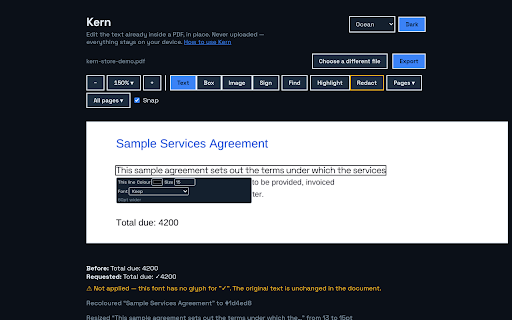
Kern is a Chrome extension that allows users to edit, redact, and rearrange PDF documents directly in the browser. It offers features like on-device OCR, text re-wrapping, and true redaction without requiring an account or cloud uploads.

Developer:Mr.Rage
Version:1.0.1
Size:5.42MiB
Last updated:

Overview

Installs

1

Rating

★ —

0 reviews

Languages

1 locales

Includes English

Market analysis

Review-backed positioning, friction, and market signals for this Chrome extension.

No review samples found

Macro category

Automation & Workflow Efficiency

Pricing friction

Low review signal

Complaint intensity

Low review signal

Listing & review signals
Observed signals from store listing text and review samples.

Listing positioning

Kern positions itself as a privacy-first, honest PDF editor that focuses on editing text in place using a document's original embedded fonts. It emphasizes that all processing is done 100% on-device with no data uploads.

Inferred product pattern

A privacy-centric, on-device PDF manipulation tool using a limited free daily export model and a one-time purchase pro version.

Review-backed pain points

Review-backed data is not available.

Observed feature gaps

Review-backed data is not available.

Tags
PDF EditorPrivacy FocusedText RedactionOn-Device OCR
Target users

- Legal professionals

- Finance professionals

- Privacy-conscious users

- Administrative staff

Primary use cases

- Correcting typos in contracts

- Redacting sensitive information from documents

- Merging or splitting PDF files

- Filling out PDF forms

Positive themes

- Review-backed data is not available.

Negative themes

- Review-backed data is not available.

Observed friction

- The product provides a free tier allowing 3 exports per day, with a one-time $20 purchase available for unlimited exports via Kern Pro.

Evidence boundary: Data extracted from the official Chrome Web Store product listing and feature descriptions. No user reviews were available to provide sentiment analysis or validate feature performance.
Complaint summaries
Review-backed complaint signals grouped by operational area.

Support

No review-backed data available.

Reliability

No review-backed data available.

Privacy

No review-backed data available.

Access & pricing

- Free entry with paid features

- No account requirement observed

- Limited free usage observed

Store listing facts

Listing assets

- Screenshots: 5

- Videos: 0

- Languages: 1

Trust signals

- Developer contact

- Official website

Store metadata

- Version: 1.0.1

- Size: 5.42MiB

- Last updated:

Listing SEO keywords

Search intent keywords
Keyword signals for evaluating how users may discover, compare, or search for this extension category.

Core discovery

Edit PDF text in placePrivate PDF editorRedact PDF textOn-device PDF OCRSecure PDF editor

Comparison

Adobe Acrobat alternativePrivate PDF editor

Problem

edit PDF without uploadingsecure text redactionfix PDF typos

Alternative

Adobe AcrobatSmallPDFILovePDF

Similar extensions

Jump to related discovery paths:

Screenshots

Edit & Redact PDF Text in Place | Kern screenshot

Links

Website: mr.rage

Recommended Chrome extensions

Related listings from the same category, trending peers, and the same publisher portfolio.

Browse tools
HEIC to JPG — Convert HEIC Photos | HEICFlip icon

HEIC to JPG — Convert HEIC Photos | HEICFlip

Mr.Rage

Convert HEIC/HEIF photos to JPG, PNG, or PDF right in your browser. No uploads, no watermark, no sign-up.

Installs

25

Rating

★ —

Compress Video — Trim, Crop & GIF | ClipFit icon

Compress Video — Trim, Crop & GIF | ClipFit

Mr.Rage

Compress, convert, trim, crop & GIF videos right in your browser. No uploads, no watermark, no sign-up.

Installs

20

Rating

★ —

Ad Blocker: Stands AdBlocker icon

Ad Blocker: Stands AdBlocker

Stands

Stands AdBlocker – it's a free ad blocker for YouTube, Twitch, Pop-Ups, Video Ads, and websites. Block ads everywhere with Stands!

Installs

3.0M+

Rating

★ 4.8

Monica: All-In-One AI Assist & Smartest  AI Agent icon

Monica: All-In-One AI Assist & Smartest AI Agent

Monica Team

One stop AI Assistant with GPT, Claude, Gemini: Chat, Write, Translate, Search, Summarize, image generator, video generation

Installs

3.0M+

Rating

★ 4.9

BetterTTV icon

BetterTTV

NightDev, LLC

BetterTTV enhances Twitch and YouTube with new features, emotes, and more.

Installs

3.0M+

Rating

★ 4.6

Smallpdf—Edit, Convert, Compress, & AI Summarize PDF icon

Smallpdf—Edit, Convert, Compress, & AI Summarize PDF

Smallpdf AG

Get instant access to dozens of PDF tools directly in your browser – no downloads, no switching tabs.

Installs

3.0M+

Rating

★ 4.6

Microsoft Bing Search with Rewards icon

Microsoft Bing Search with Rewards

Microsoft Corporation

Use the Microsoft Rewards extension to find new ways to earn every day, easily track your points and set your default search to Bing

Installs

3.0M+

Rating

★ 4.4

Google Scholar Button icon

Google Scholar Button

scholar-chrome-extensions

Lookup scholarly articles as you browse the web.

Installs

3.0M+

Rating

★ 4.6

Dark Mode icon

Dark Mode

Grephy

A global dark theme for the web.

Installs

2.0M+

Rating

★ 3.6

YouTube Summary with ChatGPT & Claude icon

YouTube Summary with ChatGPT & Claude

Glasp

Summarize YouTube videos, web articles, and PDFs to save time, powered by ChatGPT, Claude, Mistral AI, and Gemini.

Installs

2.0M+

Rating

★ 4.3