M-Files for Chrome icon

M-Files for Chrome Chrome Extension Analysis

Automation & Workflow Efficiency

Chrome extension ID: lapmgejioldofnecdomcdgblbiffefhb

This extension acts as a bridge between the M-Files web interface and local document editing capabilities. It allows users to manage document lifecycle states (check-in/check-out) without needing to manually download and re-upload files.

Version:2.1.1
Size:335KiB
Last updated:

Overview

Installs

70K+

Rating

3.1

28 reviews

Languages

1 locales

Includes English

Market analysis

Review-backed positioning, friction, and market signals for this Chrome extension.

Backed by review samples

Macro category

Automation & Workflow Efficiency

Pricing friction

Low review signal

Complaint intensity

High review signal

Listing & review signals
Observed signals from store listing text and review samples.

Listing positioning

M-Files for Chrome is positioned as a companion tool that optimizes the user experience within the M-Files document management system. It focuses on streamlining document workflows by enabling users to check files in and out directly from the web browser.

Inferred product pattern

Enterprise browser-to-desktop bridge for document management software.

Review-backed pain points

Users frequently report that the extension is not detected by their browser or the M-Files web interface, leading to persistent prompts to install an extension that is already present.

Observed feature gaps

Lack of seamless integration for some environment configurations (e.g., VDI sessions), and complex installation requirements on macOS regarding security permissions.

Tags
Document ManagementM-FilesWorkflow AutomationEnterprise Productivity
Target users

- Corporate M-Files users

- Document controllers

- Enterprise knowledge workers

Primary use cases

- Checking documents out for editing

- Checking documents back into the M-Files repository

- Document workflow management

Positive themes

- Enhanced workflow efficiency

- Improved productivity on macOS

- Useful bridge between web and desktop client

Negative themes

- Installation failures

- Detection errors

- Browser compatibility issues

- Technical setup complexity

Observed friction

- Performance complaints detected

- No direct pricing friction reported; the extension is an enterprise add-on for existing M-Files customers.

Evidence boundary: Extracted from Chrome Web Store listing data and 10 user reviews, highlighting a pattern of technical installation and detection issues. Review sample is small (28 total), and some reviews are dated, potentially reflecting older versions of the extension.
Complaint summaries
Review-backed complaint signals grouped by operational area.

Support

Users report significant frustration with setup loops, where the system fails to recognize the installed extension.

Reliability

High incidence of reports stating the extension 'does not work', crashes, or fails to detect installation status.

Privacy

No privacy complaints observed in review data.

Access & pricing

- Free usage observed

- Login needed for core features

- Free plan or free usage claimed

Store listing facts

Listing assets

- Screenshots: 1

- Videos: 0

- Languages: 1

Trust signals

- Developer contact

- Official website

Store metadata

- Version: 2.1.1

- Size: 335KiB

- Last updated:

Listing SEO keywords

Search intent keywords
Keyword signals for evaluating how users may discover, compare, or search for this extension category.

Core discovery

M-Files Chrome extensionM-Files web integrationdocument check-out Chrome

Comparison

M-Files browser pluginM-Files desktop vs web

Problem

M-Files extension not workingM-Files yellow ribbon errorM-Files installation failure

Alternative

M-Files document management tool

Similar extensions

Jump to related discovery paths:

Screenshots

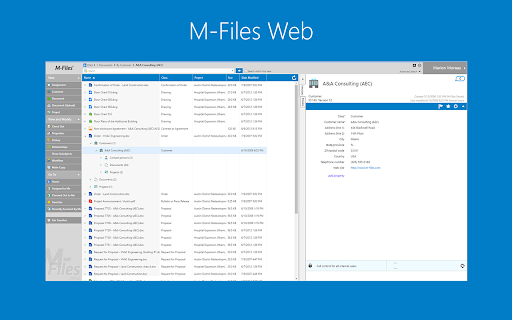
M-Files for Chrome screenshot

Links

Website: m-files.com

Recommended Chrome extensions

Related listings from the same category, trending peers, and the same publisher portfolio.

Browse workflow
M-Files for Google Workspace™ icon

M-Files for Google Workspace™

M-Files Corporation

Securely save your Gmail™ and Google Drive™ content in M-Files with just one click

Installs

4K+

Rating

4.0

Mendeley Web Importer icon

Mendeley Web Importer

Mendeley

Fast, convenient import of references and PDFs to your Mendeley Reference Manager library.

Installs

2.0M+

Rating

2.3

Enable local file links icon

Enable local file links

Takashi Sugimoto (tksugimoto)

Make it possible to open by click a link to a local file that is disabled by Chrome.

Installs

2.0M+

Rating

3.9

Microsoft Defender Browser Protection icon

Microsoft Defender Browser Protection

Microsoft Corporation

Protect yourself against online threats, like phishing and malicious websites, with real-time protection from Microsoft.

Installs

2.0M+

Rating

4.2

Визуальные закладки icon

Визуальные закладки

Yandex

Визуальные закладки – это страница, на которой собраны ваши любимые сайты

Installs

2.0M+

Rating

3.4

Web Signer icon

Web Signer

Softplan Websigner Developers

Extensão para assinatura digital no browser

Installs

2.0M+

Rating

2.9

Screen Recorder icon

Screen Recorder

Erich Behrens

Record a video from the camera or capture it from the screen (desktop, specific application window or browser tab)

Installs

2.0M+

Rating

3.8

Адаптер Рутокен Плагин icon

Адаптер Рутокен Плагин

АО "Актив-Софт"

Позволяет использовать Рутокен Плагин

Installs

2.0M+

Rating

2.5

Content Server Browser Web Extension icon

Content Server Browser Web Extension

OpenText Corporation

Content Server Browser Web Extension for Chrome

Installs

2.0M+

Rating

2.8

Steam Inventory Helper icon

Steam Inventory Helper

csinvhelp

Enhances Steam: auto-selling skins, affordable items from various sources, and much more.

Installs

1.0M+

Rating

4.5