M-Files for Google Workspace™ icon

M-Files for Google Workspace™ Chrome Extension Analysis

Automation & Workflow Efficiency

Chrome extension ID: egpgbbicplfbdphfmajbinbjlednginl

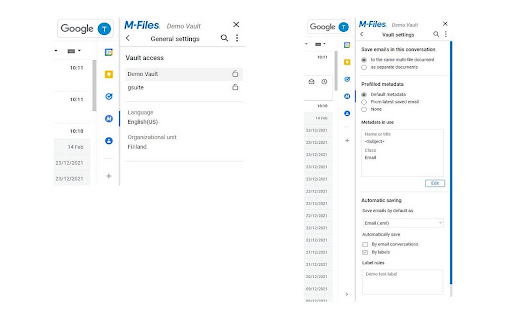
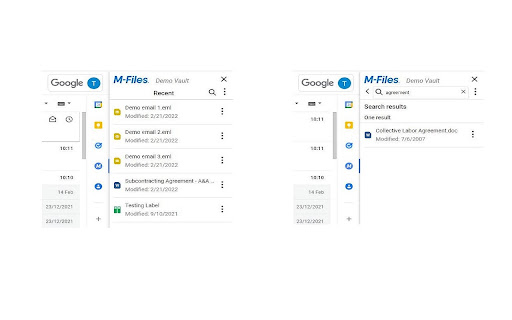
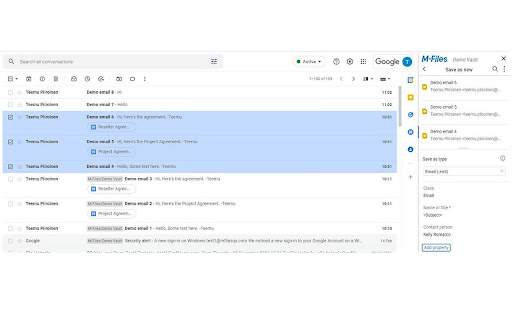
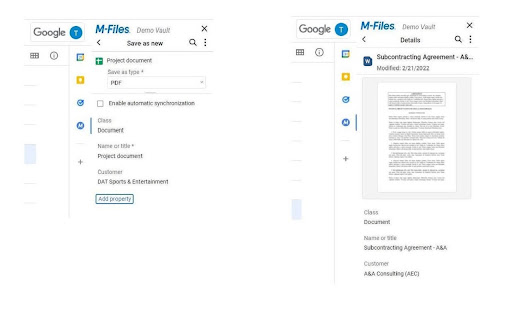
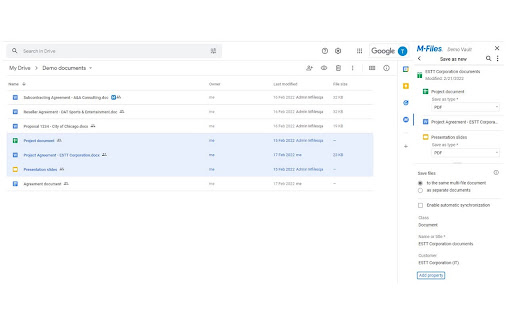
This extension enables users to save Gmail emails, attachments, and Google Drive files directly into the M-Files platform. It facilitates metadata tagging and allows for automated workflows, ensuring content remains synchronized between Google and M-Files environments.

Version:7.0.5.0
Size:652KiB
Last updated:

Overview

Installs

4K+

Rating

4.0

2 reviews

Languages

1 locales

Includes English

Market analysis

Review-backed positioning, friction, and market signals for this Chrome extension.

Backed by review samples

Macro category

Automation & Workflow Efficiency

Pricing friction

Moderate review signal

Complaint intensity

Low review signal

Listing & review signals
Observed signals from store listing text and review samples.

Listing positioning

M-Files for Google Workspace™ positions itself as an enterprise-grade bridge that centralizes Google Workspace content into the M-Files document management system. It emphasizes metadata-driven classification and workflow automation to break down data silos and improve document control.

Inferred product pattern

Enterprise-integrated SaaS connector for document management systems.

Review-backed pain points

Users have expressed confusion regarding the scope of compatibility, specifically whether the extension functions for personal/standard Google accounts versus enterprise accounts.

Observed feature gaps

Lack of clarity in the UI or onboarding regarding account-type requirements.

Tags
Document ManagementEnterprise ContentGmail IntegrationWorkflow Automation
Target users

- Enterprise document managers

- Knowledge workers

- M-Files platform users

Primary use cases

- Saving emails to M-Files

- Archiving Drive documents

- Automating document classification

- Cross-platform content synchronization

Positive themes

- Utility for streamlining document management workflows

Negative themes

- Uncertainty regarding compatibility with standard (non-enterprise) Google accounts

Observed friction

- Payment required for meaningful usage

- No specific pricing complaints found, though it is implied that an M-Files enterprise subscription is required.

Evidence boundary: Data gathered from official Chrome Web Store listing details and available user feedback. The review sample size is extremely small, limiting the depth of user sentiment analysis.
Complaint summaries
Review-backed complaint signals grouped by operational area.

Support

No support complaints identified.

Reliability

No performance or reliability complaints identified.

Privacy

No privacy or security complaints identified.

Access & pricing

- Enterprise pricing observed

- Account required for core usage

- Paid-only usage observed

Store listing facts

Listing assets

- Screenshots: 5

- Videos: 0

- Languages: 1

Trust signals

- Privacy policy

- Developer contact

Store metadata

- Version: 7.0.5.0

- Size: 652KiB

- Last updated:

Listing SEO keywords

Search intent keywords
Keyword signals for evaluating how users may discover, compare, or search for this extension category.

Core discovery

M-Files Google Workspace integrationGmail to M-Files connectorGoogle Drive document management

Comparison

M-Files alternativesdocument management Chrome extensions

Problem

archive Gmail to M-FilesGoogle Workspace document silos

Alternative

enterprise content management extensions

Similar extensions

Jump to related discovery paths:

Screenshots

M-Files for Google Workspace™ screenshot

Links

Recommended Chrome extensions

Related listings from the same category, trending peers, and the same publisher portfolio.

Browse workflow
M-Files for Chrome icon

M-Files for Chrome

M-Files Corporation

M-Files for Chrome ensures optimal M-Files user experience for Google Chrome.

Installs

70K+

Rating

3.1

Signer.Digital Digital Signature, PKI icon

Signer.Digital Digital Signature, PKI

Chartered Information Systems Pvt. Ltd.

Digital Signature of eReturns, PDF & Web User Auth, RSA Encryption/Decryption, Certificate Enrollment/Download on Smartcard.

Installs

3.0M+

Rating

4.2

Web Threat Shield icon

Web Threat Shield

Webroot

Keeps you safe when browsing the web by identifying and blocking dangerous websites.

Installs

3.0M+

Rating

2.5

Free Download Manager icon

Free Download Manager

Free Download Manager.ORG

Free Download Manager integration with browser

Installs

3.0M+

Rating

4.2

TeraBox Download Assistant icon

TeraBox Download Assistant

terabox-developers

Supports screenshots, uploads, and other TeraBox features

Installs

3.0M+

Rating

2.3

夸克网盘-网页嗅探 icon

夸克网盘-网页嗅探

广州市动悦信息技术有限公司

识别到网页资源时,可一键存夸克网盘

Installs

3.0M+

Rating

1.7

Pop up blocker for Chrome™ - Poper Blocker icon

Pop up blocker for Chrome™ - Poper Blocker

dingosolutions

Block popups, ads, cookie requests, trackers, notifications, ads on social media & more. A clean browsing experience starts today.

Installs

2.0M+

Rating

4.8

AI Grammar Checker & Paraphraser – LanguageTool icon

AI Grammar Checker & Paraphraser – LanguageTool

lt-extension-publisher

Instantly Enhance Your Texts with LanguageTool’s Grammar Checker and Paraphrasing Tool

Installs

2.0M+

Rating

4.7

Sound Booster - increase volume up icon

Sound Booster - increase volume up

Sound-ultimate.com

Volume Booster helps boost sound video or music on any tab! Increase volume and bass booster, equalizer. Volume control.

Installs

2.0M+

Rating

4.5

Momentum icon

Momentum

Momentum

Transform your browser into a beautifully designed tab that helps you feel calm, keep focus, and stay energized.

Installs

2.0M+

Rating

4.5