Snipping Tool For Chrome icon

Snipping Tool For Chrome Chrome Extension Analysis

Automation & Workflow Efficiency

Chrome extension ID: ldobdegphdkfnjpniibpiaeejnacanbd

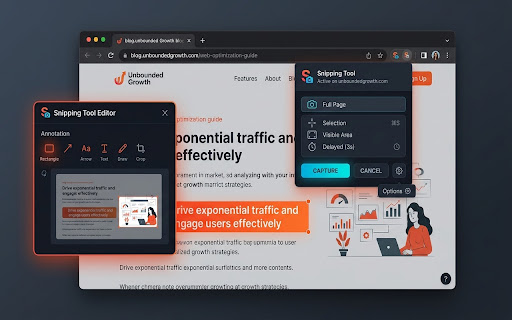
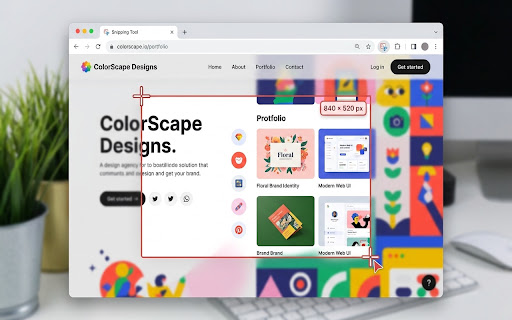
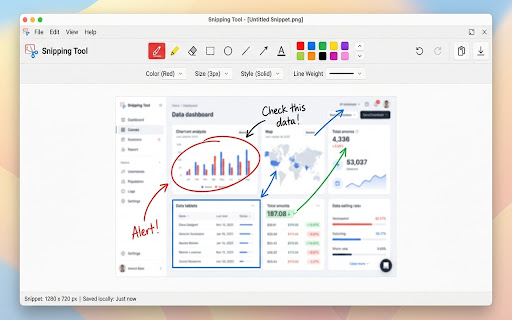
A Chrome extension that allows users to capture specific screen regions or full visible tabs. It includes a built-in canvas for adding shapes, arrows, and freehand drawings before exporting as PNGs via clipboard or local download.

Developer:johnycode01
Version:1.1.1
Size:51.57KiB
Last updated:

Overview

Installs

701

Rating

★ 5.0

1 reviews

Languages

52 locales

Includes Deutsch, English, English (United Kingdom), English (United States)...

Market analysis

Review-backed positioning, friction, and market signals for this Chrome extension.

No review samples found

Macro category

Automation & Workflow Efficiency

Pricing friction

Low review signal

Complaint intensity

Low review signal

Listing & review signals
Observed signals from store listing text and review samples.

Listing positioning

The product is positioned as a fast, intuitive, desktop-grade screen capture and annotation tool for Chrome. It emphasizes precision, a comprehensive suite of markup tools, and a strict privacy-first, local-only processing approach.

Inferred product pattern

Local-first utility tool for browser-based screen capture and annotation.

Review-backed pain points

Review-backed data is not available.

Observed feature gaps

No review data available to identify gaps; listing claims comprehensive basic snipping and annotation features.

Tags
Screen CaptureAnnotation ToolProductivityScreenshot ToolWeb Markup
Target users

- QA testers

- Technical writers

- Students

- Presenters

- Remote collaborators

Primary use cases

- Creating bug reports

- Developing tutorials

- UI/UX feedback

- Quick visual communication

Positive themes

- Review-backed data is not available

Negative themes

- Review-backed data is not available

Observed friction

- No pricing information provided in the listing.

Evidence boundary: Analysis based solely on the Chrome Web Store product title, short description, and long description. There are no user reviews or usage statistics available to validate the developer's claims.
Complaint summaries
Review-backed complaint signals grouped by operational area.

Support

Review-backed data is not available.

Reliability

Review-backed data is not available.

Privacy

Review-backed data is not available.

Access & pricing

- Free usage observed

- No account requirement observed

- Free plan or free usage claimed

Store listing facts

Listing assets

- Screenshots: 4

- Videos: 0

- Languages: 52

Trust signals

- Privacy policy

- Developer contact

Store metadata

- Version: 1.1.1

- Size: 51.57KiB

- Last updated:

Listing SEO keywords

Search intent keywords
Keyword signals for evaluating how users may discover, compare, or search for this extension category.

Core discovery

chrome snipping toolscreen capture extensionbrowser annotation toolcapture area chromewebpage screenshot tool

Comparison

best chrome screenshot toolsnipping tool vs chrome extensionfree screen capture for chrome

Problem

how to take screenshot in chromehow to annotate websitecapture specific area browser

Alternative

snipping tool alternativechrome screen capture alternativewebpage markup tool

Similar extensions

Jump to related discovery paths:

Screenshots

Snipping Tool For Chrome screenshot

Links

Recommended Chrome extensions

Related listings from the same category, trending peers, and the same publisher portfolio.

Browse tools
Honey Hive - Coupons, Promo Codes, & Discounts icon

Honey Hive - Coupons, Promo Codes, & Discounts

johnycode01

Privacy friendly coupon, promo code, & discount finder. Make online shopping sweet as honey 🍀

Installs

2K+

Rating

★ 1.0

Caffeine App icon

Caffeine App

johnycode01

Prevent screen dimming or activating a screen saver by overriding power-saving settings to keep the system or display awake

Installs

2K+

Rating

★ 5.0

Immersive Translate: AI Web, PDF & Video Translator icon

Immersive Translate: AI Web, PDF & Video Translator

Immersive Translate

Free Translate Website, Translate PDF & Epub eBook, Translate Video Subtitles in Bilingual

Installs

3.0M+

Rating

★ 4.6

BetterTTV icon

BetterTTV

NightDev, LLC

BetterTTV enhances Twitch and YouTube with new features, emotes, and more.

Installs

3.0M+

Rating

★ 4.0

Monica: All-In-One AI Assist & Smartest  AI Agent icon

Monica: All-In-One AI Assist & Smartest AI Agent

Monica Team

One stop AI Assistant with GPT, Claude, Gemini: Chat, Write, Translate, Search, Summarize, image generator, video generation

Installs

3.0M+

Rating

★ 4.8

Smallpdf—Edit, Convert, Compress, & AI Summarize PDF icon

Smallpdf—Edit, Convert, Compress, & AI Summarize PDF

Smallpdf AG

Get instant access to dozens of PDF tools directly in your browser – no downloads, no switching tabs.

Installs

3.0M+

Rating

★ 4.2

Google Scholar Button icon

Google Scholar Button

scholar-chrome-extensions

Lookup scholarly articles as you browse the web.

Installs

3.0M+

Rating

★ 4.5

YouTube Summary with ChatGPT & Claude icon

YouTube Summary with ChatGPT & Claude

Glasp

AI YouTube summarizer: get the key points of videos and articles, copy YouTube transcripts, and chat about them.

Installs

2.0M+

Rating

★ 4.2

Kimi icon

Kimi

Kimi

Kimi Browser Extension — for AI agents. AI can open pages, click, fill forms, extract info, and automate web tasks.

Installs

2.0M+

Rating

★ 3.9

WPS浏览器助手:文档在线阅读编辑 icon

WPS浏览器助手:文档在线阅读编辑

金山PDF

PDF、Excel、Word、PPT等文档无需下载即可在线预览,还能对文档进行编辑、打印、转换等处理。

Installs

2.0M+

Rating

★ 3.0