데이터랩툴즈 헬퍼 icon

데이터랩툴즈 헬퍼 Chrome Extension Analysis

Social Media Growth & Marketing

Chrome extension ID: ldoknfkedngbdfgdkeicojmhnojgpdcb

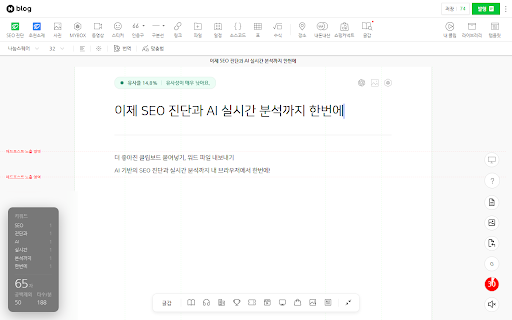
This Chrome extension provides a suite of utility tools for Naver platform users, including word count tracking, keyword similarity analysis, and influencer engagement verification. It is marketed as a free tool designed to save time and improve digital marketing efficiency.

Developer:모두의오늘
Version:1.1.37
Size:246KiB
Last updated:

Overview

Installs

100K+

Rating

★ 4.1

53 reviews

Languages

1 locales

Includes 한국어

Market analysis

Review-backed positioning, friction, and market signals for this Chrome extension.

Backed by review samples

Macro category

Social Media Growth & Marketing

Pricing friction

Low review signal

Complaint intensity

Moderate review signal

Listing & review signals
Observed signals from store listing text and review samples.

Listing positioning

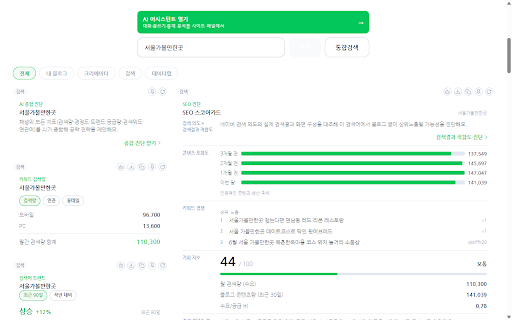
Datalab Tools Helper positions itself as an essential marketing companion for Naver bloggers and marketers. It promises to streamline content creation by providing real-time analytics for keywords, word counts, and search engine optimization metrics.

Inferred product pattern

Free utility extension targeting a specific domestic niche platform (Naver) with declining stability.

Review-backed pain points

Users frequently report that the tool stops functioning correctly on Naver platforms, suffers from performance lag that affects typing, and fails to provide accurate analysis metrics for blog posts.

Observed feature gaps

The extension lacks consistent maintenance, leading to feature degradation over time. Several core features like keyword similarity checkers and visitor statistics often become unresponsive.

Tags
Naver BlogContent OptimizationMarketing AnalyticsInfluencer Tools
Target users

- Naver Bloggers

- Digital Marketers

- Influencers

Primary use cases

- Blog post word counting

- Keyword similarity analysis

- Influencer fan management

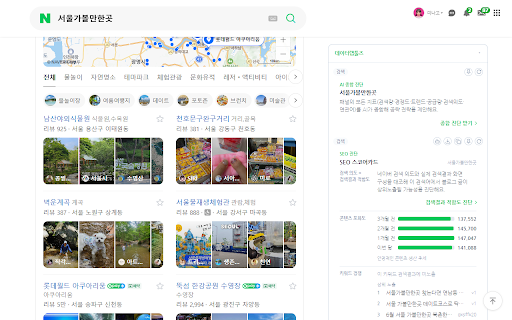
- Search trend monitoring

Positive themes

- Initial utility for blogging productivity

- Ease of access to real-time analytics

- Generally seen as a useful helper for Naver-specific tasks

Negative themes

- Frequent service outages and non-functional features

- System performance issues causing browser lag/slowdown

- Reliability issues with keyword and word count tracking

- Broken registration/authentication processes

Observed friction

- Account blocking complaints detected

- Performance complaints detected

- The extension claims to be free, but users experience friction related to account creation (missing verification emails).

Evidence boundary: Analysis based on user reviews citing functional failures and performance issues, contrasted with the developer's claim of a free, feature-rich toolset. Reviews are primarily in Korean and focus on specific Naver platform interactions, which may not reflect international use cases.
Complaint summaries
Review-backed complaint signals grouped by operational area.

Support

Users report that service appears abandoned or unmaintained, with broken features remaining unresolved.

Reliability

High incidence of reports regarding the tool causing site crashes, browser latency, and failure of the tracking features on the target Naver website.

Privacy

No specific privacy complaints found; developer includes a disclaimer regarding data collection for service improvement.

Access & pricing

- Free usage observed

- Account required for core usage

- Free plan or free usage claimed

Store listing facts

Listing assets

- Screenshots: 5

- Videos: 0

- Languages: 1

Trust signals

- Privacy policy

- Developer contact

- Official website

- Support link

Store metadata

- Version: 1.1.37

- Size: 246KiB

- Last updated:

Listing SEO keywords

Search intent keywords
Keyword signals for evaluating how users may discover, compare, or search for this extension category.

Core discovery

Naver blog analysis toolblog word counter extensioninfluencer marketing helper

Comparison

Naver keyword tool alternative

Problem

extension not workingNaver blog tracking error

Alternative

blog post optimization tools

Similar extensions

Jump to related discovery paths:

Screenshots

데이터랩툴즈 헬퍼 screenshot

Links

Recommended Chrome extensions

Related listings from the same category, trending peers, and the same publisher portfolio.

Browse tools
Microsoft Bing Homepage & Search for Chrome icon

Microsoft Bing Homepage & Search for Chrome

Microsoft Corporation

Set Microsoft Bing as your default homepage and default search engine

Installs

7.0M+

Rating

★ 3.8

Video Download Helper icon

Video Download Helper

Aclap

Download Videos from the Web.

Installs

6.0M+

Rating

★ 4.7

AnyDoc Translator - Translate Web and PDF icon

AnyDoc Translator - Translate Web and PDF

www.wps.com

Handwritten notes, course reading, creased scans, TED/Coursera lectures: layout kept, bilingual subtitles. Web instant, auto match.

Installs

6.0M+

Rating

★ 4.6

WPS PDF - Read, Edit, Fill, Convert, and AI Chat PDF with Ease icon

WPS PDF - Read, Edit, Fill, Convert, and AI Chat PDF with Ease

www.wps.com

Easy-to-use PDF tools to view, edit, convert, fill, e-sign PDF files, and more in your browser.

Installs

6.0M+

Rating

★ 4.5

Sider: Chat with all AI: GPT-5, Claude, DeepSeek, Gemini, Grok icon

Sider: Chat with all AI: GPT-5, Claude, DeepSeek, Gemini, Grok

ChatGPT Sidebar

ChatGPT, DeepSeek, Gemini, Claude, Grok all in one AI sidebar, for AI search, read, and write.

Installs

5.0M+

Rating

★ 4.9

Norton Safe Search icon

Norton Safe Search

NortonLifeLock Inc

Search safely online by enabling Norton Safe Search as your default search provider for maximum protection on Chrome.

Installs

5.0M+

Rating

★ 2.7

Shazam: Find song names from your browser icon

Shazam: Find song names from your browser

Shazam

Identify music, search lyrics & more

Installs

5.0M+

Rating

★ 4.7

Google Input Tools icon

Google Input Tools

cloud-input-team

Input Tools lets you type in the language of your choice.

Installs

4.0M+

Rating

★ 3.7

IE Tab icon

IE Tab

Blackfish Software

Display web pages using IE within Chrome. Use Java, Silverlight, ActiveX, Sharepoint, and more.

Installs

4.0M+

Rating

★ 4.0

Ad Blocker: Stands AdBlocker icon

Ad Blocker: Stands AdBlocker

Stands

Stands AdBlocker – it's a free ad blocker for YouTube, Twitch, Pop-Ups, Video Ads, and websites. Block ads everywhere with Stands!

Installs

4.0M+

Rating

★ 4.8