Downloads Button icon

Downloads Button Chrome Extension Analysis

Tab & Bookmark Productivity

Chrome extension ID: lgoanegcmpbjkigpclkemagmkfmecmij

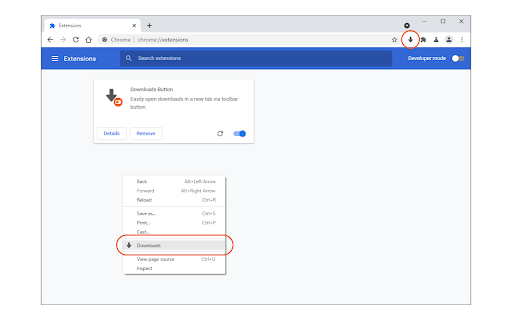
This extension adds a button to the browser toolbar that allows users to open their downloads tab instantly. It also features a context menu option and supports both light and dark browser themes.

Developer:Jorvi
Version:0.1.6
Size:13.11KiB
Last updated:

Overview

Installs

4K+

Rating

4.1

14 reviews

Languages

1 locales

Includes English

Market analysis

Review-backed positioning, friction, and market signals for this Chrome extension.

Backed by review samples

Macro category

Tab & Bookmark Productivity

Pricing friction

Low review signal

Complaint intensity

Moderate review signal

Listing & review signals
Observed signals from store listing text and review samples.

Listing positioning

The product is positioned as a lightweight and simple utility designed for speed. It aims to provide one-click access to the browser's downloads page via the toolbar or context menu.

Inferred product pattern

A lightweight browser utility focused on reducing navigation friction for system pages.

Review-backed pain points

Users expressed concern over the extension's requirement for browsing history permissions and requested the ability to hide the context menu item.

Observed feature gaps

Users desire more granular control to disable specific UI elements like the context menu item while keeping the toolbar button.

Tags
Downloads ShortcutToolbar ButtonBrowser UtilityQuick Access
Target users

- Frequent downloaders

- Productivity-focused web users

Primary use cases

- Quickly navigating to the downloads management page

- Reloading the existing downloads tab

Positive themes

- Simplicity

- Clean interface

- Ease of use

Negative themes

- Privacy permission concerns

- Unwanted context menu items

- Window focus issues

Observed friction

- Privacy complaints detected

- No pricing friction observed in the provided data.

Evidence boundary: Analysis based on store listing description and a small sample of user reviews highlighting functionality and privacy concerns. The sample size of reviews is very small (14 total).
Complaint summaries
Review-backed complaint signals grouped by operational area.

Support

No support complaints observed.

Reliability

One user reported the downloads page sometimes opens in a non-active window instead of the current one.

Privacy

Users have questioned the necessity of browsing history permissions for a simple shortcut tool.

Access & pricing

- No clear monetization signal

- No account requirement observed

- No clear pricing signal

Store listing facts

Listing assets

- Screenshots: 1

- Videos: 0

- Languages: 1

Trust signals

- Developer contact

- Official website

Store metadata

- Version: 0.1.6

- Size: 13.11KiB

- Last updated:

Listing SEO keywords

Search intent keywords
Keyword signals for evaluating how users may discover, compare, or search for this extension category.

Core discovery

Downloads ButtonOpen Downloads TabBrowser Downloads ShortcutDownloads Manager Extension

Comparison

Ctrl+J shortcutChrome downloads manager

Problem

How to open downloads tab fastAccess downloads page quickly

Alternative

Downloads extensionQuick downloads access

Similar extensions

Jump to related discovery paths:

Screenshots

Downloads Button screenshot

Links

Recommended Chrome extensions

Related listings from the same category, trending peers, and the same publisher portfolio.

Browse tools