Oxford Dictionary Lookup icon

Oxford Dictionary Lookup Chrome Extension Analysis

Tab & Bookmark Productivity

Chrome extension ID: llcdhkifjccomnbldmapjdeoaopnalfh

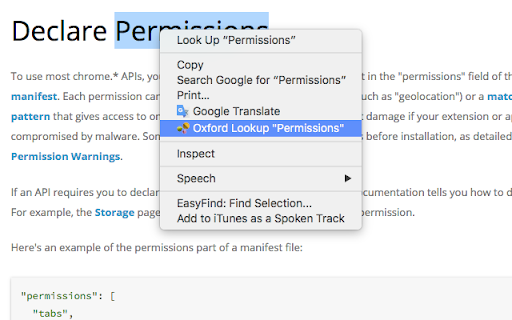
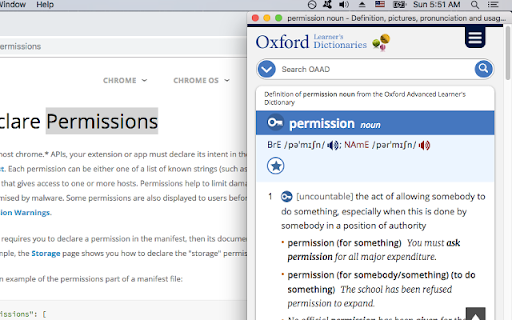
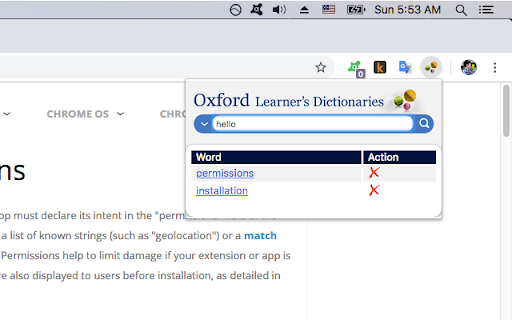
This extension allows users to highlight any text on a webpage and quickly find its definition on Oxford Learner's Dictionaries via a right-click shortcut. It opens lookups in separate windows and automatically closes old popups to keep the browser workspace clean. It also records a localized search history of up to 15 words for quick revision.

Developer:Nam Nguyen Hoai
Version:1.2
Size:142KiB
Last updated:

Overview

Installs

10K+

Rating

4.7

31 reviews

Languages

1 locales

Includes English (United States)

Market analysis

Review-backed positioning, friction, and market signals for this Chrome extension.

Backed by review samples

Macro category

Tab & Bookmark Productivity

Pricing friction

Low review signal

Complaint intensity

Moderate review signal

Listing & review signals
Observed signals from store listing text and review samples.

Listing positioning

The store listing positions this extension as a privacy-focused utility for looking up selected text on the Oxford Learner's Dictionaries website. It emphasizes workflow efficiency through automatic management of lookup windows and a right-click context menu integration. Additionally, it highlights standard convenience features like maintaining a history of the last 15 words searched.

Inferred product pattern

Free context-menu shortcut redirecting highlighted text queries to an external learning dictionary.

Review-backed pain points

The most notable pain point is a technical bug where the first dictionary lookup after starting the browser consistently fails and displays an error screen. Additionally, some users experience frustration with the window management style, expressing a strong preference for tab-based lookups or double-click gestures.

Observed feature gaps

Based on user feedback, the extension lacks a double-click activation option, a setting to open definitions in browser tabs rather than new popup windows, and a cloud backup feature (such as Google Drive synchronization) to save a permanent history of searched terms.

Tags
Dictionary LookupLanguage LearningOxford DictionaryReading Assistant
Target users

- English language learners

- Students and academic researchers

- Avid online readers

- Writers and editors

Primary use cases

- Looking up unfamiliar vocabulary words while reading online articles

- Reviewing recently searched words via the built-in 15-word history log

- Simplifying dictionary lookups without manually copy-pasting text into a search bar

Positive themes

- Overall simplicity and high utility for fast reference

- Appreciation for localized vocabulary lookup capabilities

- Helpfulness in daily English language acquisition and reading

Negative themes

- Occurrence of an 'An error has occurred' page on the very first popup launch

- Inconvenience of opening lookups in a new window instead of a new tab

- Desire for a faster double-click trigger instead of right-clicking

Observed friction

- Performance complaints detected

- There are no pricing complaints, paywalls, or monetization frictions observed. The extension appears to be fully free.

Evidence boundary: The analysis is built on the store listing details describing context menu use, word history, and zero data tracking. Review evidence points to a functional but slightly buggy launch behavior ('first popup error') and requested workflow improvements like double-click lookups. Findings are based on a small sample of 10 public reviews spanning from 2019 to 2026, which may not represent all user interactions or the absolute latest developer patches.
Complaint summaries
Review-backed complaint signals grouped by operational area.

Support

No support or account-related complaints were identified in the user reviews.

Reliability

Multiple reviewers report a recurring bug where launching the browser and performing the first lookup prompts an error page, requiring the user to reload or try a second time.

Privacy

No privacy complaints have been raised. The developer explicitly claims a zero data collection policy.

Access & pricing

- Free usage observed

- No account requirement observed

- Free plan or free usage claimed

Store listing facts

Listing assets

- Screenshots: 3

- Videos: 1

- Languages: 1

Trust signals

- Developer contact

Store metadata

- Version: 1.2

- Size: 142KiB

- Last updated:

Listing SEO keywords

Search intent keywords
Keyword signals for evaluating how users may discover, compare, or search for this extension category.

Core discovery

oxford dictionary chrome extensionlookup oxford dictionary browseroxford learner's dictionary lookup shortcut

Comparison

google dictionary vs oxford lookup chromeoxford dictionary extension vs dictionary anywhere

Problem

how to look up words quickly on chromedefine selected word chrome extensionright click to search dictionary

Alternative

Google DictionaryDictionary AnywhereInstant Dictionary by GoodWordGuide

Similar extensions

Jump to related discovery paths:

Screenshots

Oxford Dictionary Lookup screenshot

Links

Videos: Watch

Recommended Chrome extensions

Related listings from the same category, trending peers, and the same publisher portfolio.

Browse education
Cambridge Dictionary Lookup icon

Cambridge Dictionary Lookup

Nam Nguyen Hoai

Looks up the selected text on Cambridge Dictionary

Installs

20K+

Rating

4.7

LibKey Nomad icon

LibKey Nomad

Third Iron LLC

One-click access to millions of scholarly articles.

Installs

1.0M+

Rating

4.5

MyBib: Free Citation Generator icon

MyBib: Free Citation Generator

MyBib

Automatically create APA style, MLA format, and Harvard referencing style citations with our citation generator add-on for Chrome.

Installs

1.0M+

Rating

4.8

Scribbr Citation Generator icon

Scribbr Citation Generator

Scribbr

Instantly get accurate citations for any webpage in APA, MLA, Chicago, Harvard and any other style with our Citation Generator.

Installs

1.0M+

Rating

3.9

Speechify — Text to Speech icon

Speechify — Text to Speech

Speechify

Read aloud any Google Doc, PDF, webpage, or book with text to speech (TTS). Natural sounding voices in 60+ languages & 1,000 voices.

Installs

900K+

Rating

4.6

Tasks for Canvas – now supporting Blackboard, D2L Brightspace icon

Tasks for Canvas – now supporting Blackboard, D2L Brightspace

BetterCampus

A better to-do list sidebar for Canvas, Blackboard, and D2L Brightspace.

Installs

800K+

Rating

4.7

ImTranslator: Translator, Dictionary, TTS icon

ImTranslator: Translator, Dictionary, TTS

smartlink

Translator, Dictionary, Voice

Installs

800K+

Rating

4.4

Mote for Google Chrome™ icon

Mote for Google Chrome™

Mote Technologies, Inc.

The literacy platform for Chrome: Mote’s Sidebar and integrations address barriers in learning to read, write, speak and listen.

Installs

700K+

Rating

4.6

eJOY AI Dictionary icon

eJOY AI Dictionary

ejoy-english.com

Your ultimate knowledge and English learning tool to discover the world and upskill yourself. Translate video, websites and PDF.

Installs

700K+

Rating

4.8

ProctorExam Activity Sharing icon

ProctorExam Activity Sharing

ProctorExam BV

Lets you share your browsing activity when taking an online exam on ProctorExam - https://www.proctorexam.com

Installs

700K+

Rating

1.6