Keyboard Shortcuts icon

Keyboard Shortcuts Chrome Extension Analysis

Automation & Workflow Efficiency

Chrome extension ID: lplcmnhgijkkmflbmhabnccgelffpnog

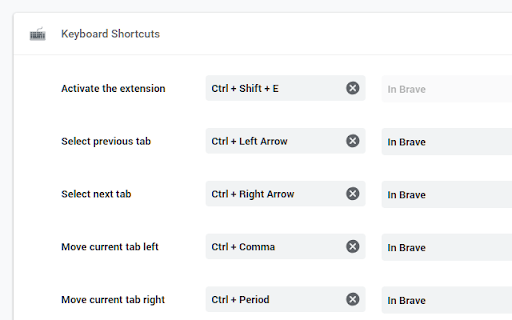
A utility extension that enables the mapping of custom keyboard shortcuts to various Chrome browser functions, including tab navigation, window management, and quick access to internal Chrome pages. It integrates directly with the browser's native shortcut settings.

Developer:Joe Pestro
Version:1.1
Size:33.04KiB
Last updated:

Overview

Installs

50K+

Rating

4.5

122 reviews

Languages

1 locales

Includes English

Market analysis

Review-backed positioning, friction, and market signals for this Chrome extension.

Backed by review samples

Macro category

Automation & Workflow Efficiency

Pricing friction

Low review signal

Complaint intensity

Moderate review signal

Listing & review signals
Observed signals from store listing text and review samples.

Listing positioning

The product positions itself as a privacy-first utility that allows users to customize 25 different Chrome keyboard shortcuts. It emphasizes a zero-permission architecture where all operations are performed locally.

Inferred product pattern

Single-purpose productivity utility providing an interface for native browser shortcut mapping.

Review-backed pain points

Users report frustration over the inability to use single-key shortcuts. Some users experienced conflicts where extension shortcuts overrode standard system commands, and others noted that specific shortcuts (e.g., 'go back') failed to function as intended.

Observed feature gaps

Users have requested shortcuts for the Chrome Password Manager and native Google Translate features.

Tags
Keyboard ShortcutsProductivity ToolTab ManagementCustom Hotkeys
Target users

- Power users

- Keyboard enthusiasts

- Productivity hackers

Primary use cases

- Customizing tab switching and movement

- Rapidly accessing Chrome settings and history

- Reducing mouse reliance for browser navigation

Positive themes

- Clean interface

- Useful for users who prefer keyboard-driven workflows

- Appreciation for the lack of required permissions

Negative themes

- Lack of single-key shortcut support

- Conflicts with existing system/OS shortcuts

- Occasional functional bugs with specific shortcuts

Observed friction

- Performance complaints detected

- No pricing friction observed; the product appears to be free.

Evidence boundary: Analysis based on store listing data and 10 sampled reviews. The review sample size is small compared to the total user base.
Complaint summaries
Review-backed complaint signals grouped by operational area.

Support

No direct support complaints, though some users reported bugs in reviews without mentioned resolutions.

Reliability

Reports of intermittent failures where the extension stopped working or specific shortcuts failed to trigger, including a Mac-specific conflict with Ctrl/Cmd keys.

Privacy

No privacy complaints; listing explicitly claims no additional permissions are required.

Access & pricing

- Free usage observed

- No account requirement observed

- Free plan or free usage claimed

Store listing facts

Listing assets

- Screenshots: 1

- Videos: 0

- Languages: 1

Trust signals

- Developer contact

Store metadata

- Version: 1.1

- Size: 33.04KiB

- Last updated:

Listing SEO keywords

Search intent keywords
Keyword signals for evaluating how users may discover, compare, or search for this extension category.

Core discovery

custom chrome shortcutskeyboard shortcuts for chromechrome tab hotkeys

Comparison

chrome vs opera shortcutsbest chrome shortcut extension

Problem

chrome shortcut conflictschange chrome tab shortcuts

Alternative

chrome shortcut manager alternativeskeyboard mapper for chrome

Similar extensions

Jump to related discovery paths:

Screenshots

Keyboard Shortcuts screenshot

Recommended Chrome extensions

Related listings from the same category, trending peers, and the same publisher portfolio.

Browse workflow