JSON Beautifier and Editor icon

JSON Beautifier and Editor Chrome Extension Analysis

Developer & Designer Tools

Chrome extension ID: lpopeocbeepakdnipejhlpcmifheolpl

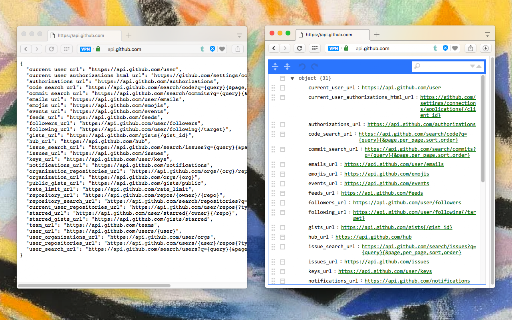
A Chrome extension that monitors and formats JSON responses in the browser, providing a syntax-highlighted editor for validation and modification. It supports various MIME types and includes features like collapsible trees and clickable URLs.

Developer:yokris.dev
Version:0.6.6
Size:490KiB
Last updated:

Overview

Installs

30K+

Rating

4.8

54 reviews

Languages

13 locales

Includes Deutsch, English, Nederlands, español...

Market analysis

Review-backed positioning, friction, and market signals for this Chrome extension.

Backed by review samples

Macro category

Developer & Designer Tools

Pricing friction

Low review signal

Complaint intensity

Low review signal

Listing & review signals
Observed signals from store listing text and review samples.

Listing positioning

The product positions itself as an automatic utility that transforms raw JSON pages into human-readable, editable, and searchable HTML. It emphasizes zero-configuration installation and versatility in viewing modes (Tree, Code, Text).

Inferred product pattern

Automatic browser-based JSON formatter and editor for developer productivity.

Review-backed pain points

A user reported a precision issue where '0.0' is automatically converted to '0'. Another user mentioned a lack of a settings menu.

Observed feature gaps

Users have requested an 'auto expand all nodes' feature to improve navigation of large JSON files.

Tags
JSON ViewerJSON EditorDeveloper ToolSyntax HighlightingAPI Debugging
Target users

- Frontend Developers

- Backend Developers

- API Testers

- Data Analysts

Primary use cases

- Debugging API responses

- Formatting raw JSON data

- Editing JSON objects in-browser

- Validating JSON structure

Positive themes

- High utility of expression-based filtering

- Appreciation for table view with nested objects

- Effective JMESPath implementation

- Useful element counting in collapsed trees

Negative themes

- Generic stability issues for specific users

- Minor data precision bugs

- Lack of customization settings

- Basic UI aesthetics

Observed friction

- No pricing friction observed; the tool appears to be free.

Evidence boundary: Analysis based on the store listing description and a sample of 10 user reviews. The review sample is small relative to the total user base.
Complaint summaries
Review-backed complaint signals grouped by operational area.

Support

No support or account-related complaints found in the provided samples.

Reliability

One user reported it did not work properly for them, though the overall rating remains very high.

Privacy

No privacy or security complaints found.

Access & pricing

- Free usage observed

- No account requirement observed

- Free plan or free usage claimed

Store listing facts

Listing assets

- Screenshots: 1

- Videos: 1

- Languages: 13

Trust signals

- Privacy policy

- Developer contact

- Official website

Store metadata

- Version: 0.6.6

- Size: 490KiB

- Last updated:

Listing SEO keywords

Search intent keywords
Keyword signals for evaluating how users may discover, compare, or search for this extension category.

Core discovery

JSON beautifierJSON editor extensionformat JSON in ChromeJSON viewer

Comparison

best JSON formatter extensionJSON viewer vs JSON beautifier

Problem

unreadable JSON in browserhow to edit JSON in chromeJSON validation tool

Alternative

JSON formatter alternativeChrome JSON viewer alternatives

Similar extensions

Jump to related discovery paths:

Screenshots

JSON Beautifier and Editor screenshot

Links

Recommended Chrome extensions

Related listings from the same category, trending peers, and the same publisher portfolio.

Browse workflow