Notion Code Formatter icon

Notion Code Formatter Chrome Extension Analysis

Developer & Designer Tools

Chrome extension ID: maijefmgfbmajbpbdlpbbplggifdgmme

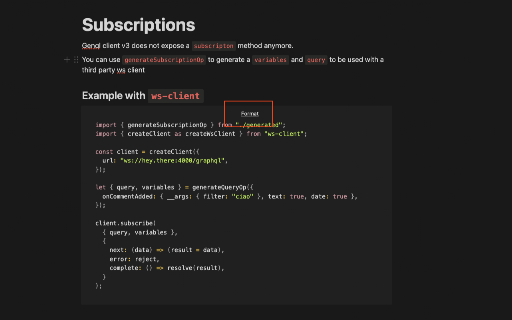
This Chrome extension adds a formatting button to Notion code blocks, allowing users to instantly clean up code using Prettier. It aims to solve the common problem of inconsistent code formatting within Notion workspaces.

Developer:morse
Version:1.0.3
Size:1.51MiB
Last updated:

Overview

Installs

123

Rating

3.1

7 reviews

Languages

1 locales

Includes English (United States)

Market analysis

Review-backed positioning, friction, and market signals for this Chrome extension.

Backed by review samples

Macro category

Developer & Designer Tools

Pricing friction

Low review signal

Complaint intensity

Moderate review signal

Listing & review signals
Observed signals from store listing text and review samples.

Listing positioning

The extension is positioned as a specialized utility to fix indentation and whitespace issues in Notion code blocks. It highlights the integration of Prettier to provide a seamless formatting experience directly within the Notion interface.

Inferred product pattern

A niche utility extension that adds a single, high-value formatting feature to a major productivity platform.

Review-backed pain points

Users expressed frustration over the lack of support for languages like Java and Swift, and noted that the formatting button is difficult to access in long code blocks.

Observed feature gaps

Lack of support for various programming languages (e.g., Java, Swift) and the absence of a floating or more accessible formatting UI.

Tags
Code FormatterNotion UtilityDeveloper Tools
Target users

- Developers using Notion

- Technical writers

- Students using Notion

Primary use cases

- Formatting code blocks in Notion

- Correcting code indentation and whitespace

Positive themes

- Effective formatting for supported languages like JS/CSS

- Helpful for maintaining clean code within Notion

Negative themes

- Limited language support

- Inconvenient button placement for long code blocks

Observed friction

- No pricing information or friction observed in the provided data.

Evidence boundary: Evidence is drawn from the store listing description and user reviews regarding language support and UI functionality. The sample size is small, with only 7 reviews available, which may not capture the full user experience.
Complaint summaries
Review-backed complaint signals grouped by operational area.

Support

No support-related complaints were identified.

Reliability

No general reliability or performance complaints were identified, though language-specific functionality is missing.

Privacy

No privacy or security complaints were identified.

Access & pricing

- No clear monetization signal

- No account requirement observed

- No clear pricing signal

Store listing facts

Listing assets

- Screenshots: 1

- Videos: 1

- Languages: 1

Trust signals

- Developer contact

- Official website

Store metadata

- Version: 1.0.3

- Size: 1.51MiB

- Last updated:

Listing SEO keywords

Search intent keywords
Keyword signals for evaluating how users may discover, compare, or search for this extension category.

Core discovery

Notion code formatterformat code in NotionPrettier for NotionNotion code block indentation

Comparison

Notion built-in code blocksPrettier

Problem

Notion code formatting issuesfix Notion indentation

Alternative

Notion productivity toolscode snippet formatter

Similar extensions

Jump to related discovery paths:

Screenshots

Notion Code Formatter screenshot

Links

Website: notaku.so

Videos: Watch

Recommended Chrome extensions

Related listings from the same category, trending peers, and the same publisher portfolio.

Browse workflow