Webpage Spell-Check icon

Webpage Spell-Check Chrome Extension Analysis

Developer & Designer Tools

Chrome extension ID: mgdhaoimpabdhmacaclbbjddhngchjik

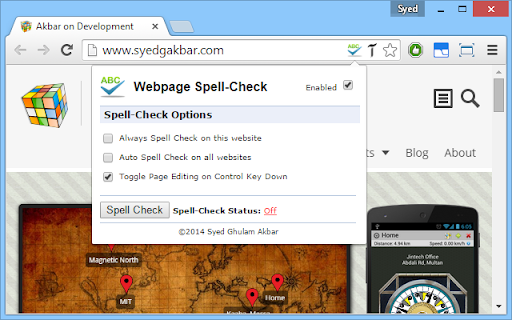
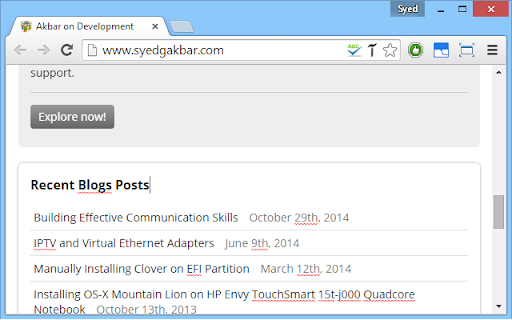
A Chrome extension that enables spell-checking on any webpage. It allows users to edit text directly on the page to correct mistakes using the browser's built-in spell-check functionality.

Developer:syedgakbar
Version:0.3
Size:7.63MiB
Last updated:

Overview

Installs

20K+

Rating

2.7

90 reviews

Languages

1 locales

Includes English (United States)

Market analysis

Review-backed positioning, friction, and market signals for this Chrome extension.

Backed by review samples

Macro category

Developer & Designer Tools

Pricing friction

Low review signal

Complaint intensity

Moderate review signal

Listing & review signals
Observed signals from store listing text and review samples.

Listing positioning

The product is positioned as a utility for web developers and cautious users to catch spelling errors on live web pages. It claims to identify typos that might be missed by HTML editors by leveraging Chrome's native spell-check capabilities.

Inferred product pattern

A utility that toggles the document's contentEditable flag to trigger the browser's native spell-check on static elements.

Review-backed pain points

Users report that the tool often fails to activate, renders links unclickable by forcing a contentEditable state, and causes the cursor to jump unexpectedly.

Observed feature gaps

Lack of automatic scanning (requires manual activation), inability to check nested sections, and lack of a non-destructive mode that preserves webpage functionality.

Tags
Spell CheckerWeb DevelopmentProofreadingQA Tool
Target users

- Web Developers

- QA Testers

- Content Managers

- Website Owners

Primary use cases

- Proofreading live websites before client delivery

- Checking static HTML content for typos

- Quickly editing text on a webpage to verify corrections

Positive themes

- Appreciation for the tool being free

- Strong conceptual appeal of in-page spell-checking

Negative themes

- Widespread reports of the extension not working

- Breaking page interactivity (unclickable links)

- Erratic cursor behavior and CSS overrides

- Technical misrepresentation of how the tool functions

Observed friction

- Performance complaints detected

- No pricing friction observed as the product is free.

Evidence boundary: Extracted from the store listing and 16 sampled reviews containing both helpful and low-rating signals. Review samples include very old entries (2015-2017), which may not reflect current performance.
Complaint summaries
Review-backed complaint signals grouped by operational area.

Support

No specific support or account-related complaints found in the samples.

Reliability

Significant reliability issues, with multiple users stating the extension does nothing when the spell-check button is clicked.

Privacy

No privacy or security complaints observed.

Access & pricing

- Free usage observed

- No account requirement observed

- Free plan or free usage claimed

Store listing facts

Listing assets

- Screenshots: 2

- Videos: 1

- Languages: 1

Trust signals

- Privacy policy

- Developer contact

- Official website

Store metadata

- Version: 0.3

- Size: 7.63MiB

- Last updated:

Listing SEO keywords

Search intent keywords
Keyword signals for evaluating how users may discover, compare, or search for this extension category.

Core discovery

webpage spell checkbrowser spell checkercheck typos on website

Comparison

webpage spell check vs grammarlybest browser spell checker for developers

Problem

spelling errors on live websitetypos in htmlhow to spell check a web page

Alternative

online spell checkerweb developer proofreading tool

Similar extensions

Jump to related discovery paths:

Screenshots

Webpage Spell-Check screenshot

Links

Recommended Chrome extensions

Related listings from the same category, trending peers, and the same publisher portfolio.

Browse developer