Kimchi Reader icon

Kimchi Reader Chrome Extension Analysis

Automation & Workflow Efficiency

Chrome extension ID: mhballnbcieehgglecpjocnbggoogbge

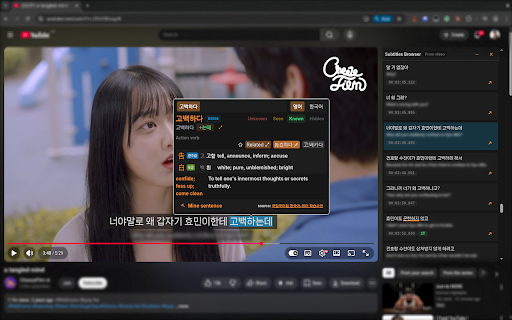
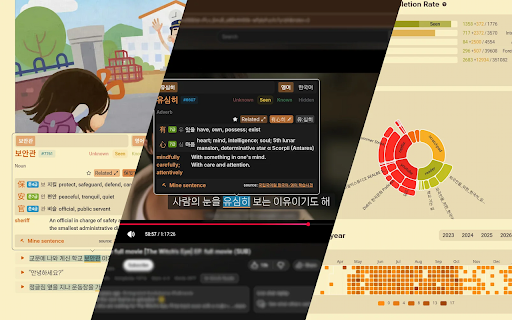
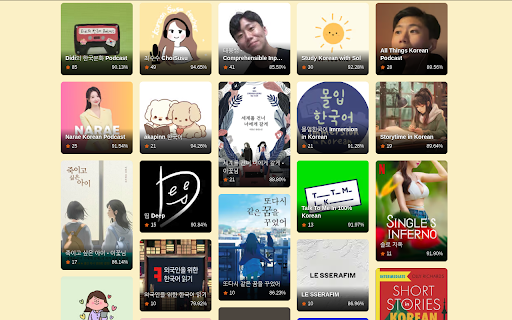
Kimchi Reader is a Chrome extension that functions as a popup Korean dictionary for any website, including YouTube, Netflix, and Viki. It helps users learn Korean by providing instant definitions, grammar analysis, and vocabulary tracking. The tool also offers sentence mining with Anki export and is part of a larger platform for content recommendations and reading Korean books.

Version:0.21.5
Size:121MiB
Last updated:

Overview

Installs

3K+

Rating

4.8

30 reviews

Languages

1 locales

Includes English

Market analysis

Review-backed positioning, friction, and market signals for this Chrome extension.

Backed by review samples

Macro category

Automation & Workflow Efficiency

Pricing friction

Moderate review signal

Complaint intensity

Moderate review signal

Listing & review signals
Observed signals from store listing text and review samples.

Listing positioning

This extension is positioned as an essential tool for intermediate to advanced Korean learners who want to consume native content like YouTube and Netflix without losing flow. It highlights its ability to provide instant definitions, grammar breakdowns, and vocabulary tracking to improve reading comprehension and learning efficiency.

Inferred product pattern

This is a specialized language learning tool that integrates with online content, providing enhanced dictionary and vocabulary management functionalities. It aims to reduce friction in the learning process by offering context-aware information and data-driven progress tracking.

Review-backed pain points

Users report that the extension can take hours to fix different bugs, leading to frustration. While the functionality is praised, the initial setup and troubleshooting process is described as annoying and time-consuming, making it questionable if the effort is worth it for some.

Observed feature gaps

No specific feature gaps were mentioned in the provided reviews, though the initial bug fixing experience suggests potential for early-stage instability.

Tags
Korean DictionaryLanguage LearningPopup DictionaryAnki ExportVideo Subtitles
Target users

- Intermediate Korean language learners

- Advanced Korean language learners

- Students consuming Korean media

Primary use cases

- Learning Korean vocabulary

- Understanding Korean grammar

- Reading Korean websites and books

- Watching Korean videos with dual subtitles

- Creating flashcards for Korean words

Positive themes

- Effectively handles Korean grammar and word conjugations better than other tools

- Significantly speeds up the vocabulary lookup process

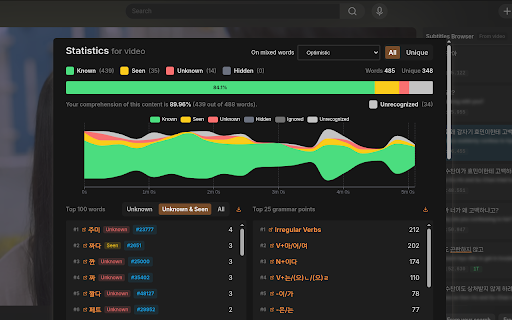
- Provides valuable insights into word frequency and root meanings

- Seamless integration with Anki for spaced repetition

- Tracks vocabulary progress and learning, aiding comprehension

- Developer is responsive and actively improving the tool

Negative themes

- Initial setup and bug fixing can be time-consuming and frustrating

Observed friction

- Payment required for meaningful usage

- The product is a paid subscription with a 7-day free trial that does not require a credit card. Users find it 'worth every penny' and a vital tool, suggesting the value proposition outweighs the cost for dedicated learners.

Evidence boundary: Reviews highlight the extension's effectiveness in handling Korean grammar, accelerating vocabulary lookup, and providing useful learning data. One review notes initial bug fixing can be time-consuming. The number of reviews is relatively small (24 comments), and the specific details of bug-fixing times are subjective.
Complaint summaries
Review-backed complaint signals grouped by operational area.

Support

No explicit complaints regarding support were found, but one review mentions the developer being super responsive to user feedback and working hard on improvements.

Reliability

One user reported that the extension "always takes hours to fix different bugs," indicating potential reliability issues that can be time-consuming to resolve.

Privacy

No privacy concerns were raised in the provided reviews or listing information.

Access & pricing

- Subscription model observed

- No clear access signal

- Trial or limited free usage before paid plan

Store listing facts

Listing assets

- Screenshots: 4

- Videos: 1

- Languages: 1

Trust signals

- Privacy policy

- Developer contact

- Official website

Store metadata

- Version: 0.21.5

- Size: 121MiB

- Last updated:

Listing SEO keywords

Search intent keywords
Keyword signals for evaluating how users may discover, compare, or search for this extension category.

Core discovery

Korean dictionaryKorean learning toolYouTube Korean subtitlesNetflix Korean learningPopup Korean dictionaryAnki Korean flashcardsLearn Korean online

Comparison

Lingq alternativeMigaku alternativeLanguage Reactor alternativeKorean learning apps

Problem

Difficult Korean vocabularyKorean grammar complexityLearning Korean with native contentSlow word lookup for KoreanInefficient Korean flashcards

Alternative

Korean translation extensionKorean learning softwareOnline Korean dictionary

Similar extensions

Jump to related discovery paths:

Screenshots

Kimchi Reader screenshot

Links

Recommended Chrome extensions

Related listings from the same category, trending peers, and the same publisher portfolio.

Browse education
Voice In - Voice Typing & Speech-to-Text Dictation icon

Voice In - Voice Typing & Speech-to-Text Dictation

Dictanote

Voice typing in ChatGPT, Gmail, Google Docs & 10,000+ sites. Dictate emails, notes & AI prompts in 50+ languages.

Installs

600K+

Rating

4.4

Translate for Chrome -Translator, Dictionary icon

Translate for Chrome -Translator, Dictionary

Translator App.

Translate words, phrases or text on any webpage. Full page translator and dictionary, text to speech (TTS) using Google Translate.

Installs

600K+

Rating

4.7

GPTZero: AI Detection & Writing Replay icon

GPTZero: AI Detection & Writing Replay

chrome-extension-publisher

Bring AI detection, citation checks, live essay feedback, and writing replays directly into Google Docs and your workflow.

Installs

400K+

Rating

4.7

Cite This For Me: Web Citer icon

Cite This For Me: Web Citer

Chegg Writing Tools

Automatically create website citations in the APA, MLA, Chicago, or Harvard referencing styles at the click of a button.

Installs

400K+

Rating

3.8

Trancy - AI Translator & Dual Subtitles icon

Trancy - AI Translator & Dual Subtitles

Trancy

Trancy provides bilingual subtitle for platforms like YouTube, Disney+, as well as AI translator for websites.

Installs

300K+

Rating

4.7

Google Meet Attendance List icon

Google Meet Attendance List

MeetList

Easiest way to save the attendance list for your meetings or lectures

Installs

300K+

Rating

4.7

edpuzzle icon

edpuzzle

Edpuzzle

Import your favorite educational YouTube video into Edpuzzle with a click!

Installs

300K+

Rating

4.2

rikaikun icon

rikaikun

Erek Speed

rikaikun shows the reading and English definition of Japanese words when you hover over Japanese text in the browser.

Installs

200K+

Rating

4.7

Revision History: Writing Process Visibility for Google Docs & Slides icon

Revision History: Writing Process Visibility for Google Docs & Slides

Revision History

Built for teachers: See how students write, not just what they wrote. View the writing process in Google Docs & Slides.

Installs

200K+

Rating

3.7

Mouse Tooltip Translator - PDF & Netflix YouTube dual subs icon

Mouse Tooltip Translator - PDF & Netflix YouTube dual subs

ttop324

Mouse Tooltip Translator translate mouseover text using google translate. Support OCR, TTS, manga translator & pdf translator.

Installs

200K+

Rating

4.6