ChartLense: AI Chart Analysis & Journaling icon

ChartLense Chrome Extension Analysis

AI & Writing Assistants

Store listing title: ChartLense: AI Chart Analysis & Journaling

Chrome extension ID: mlefllemblmlibeibbjbjbhfoocpipll

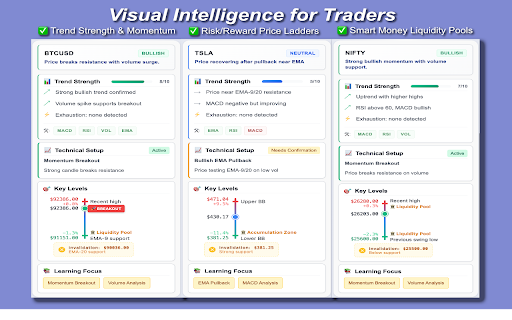
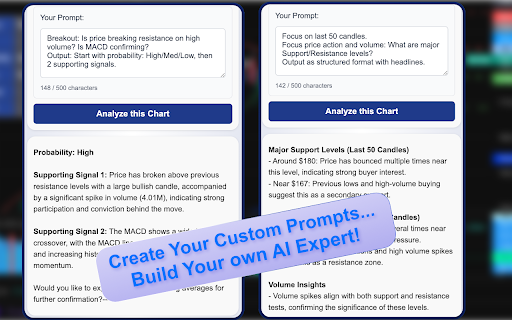
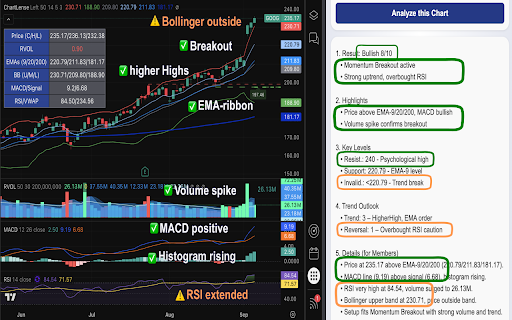
This extension functions as a technical analysis and journaling tool for traders, utilizing AI to interpret chart patterns and trends. It also provides a one-click mechanism to document trade setups with auto-data overlays for personal review or social sharing.

Version:1.8.0
Size:198KiB
Last updated:

Overview

Installs

1K+

Rating

★ 3.7

3 reviews

Languages

4 locales

Includes Deutsch, English, español, français

Market analysis

Review-backed positioning, friction, and market signals for this Chrome extension.

Backed by review samples

Macro category

AI & Writing Assistants

Pricing friction

Low review signal

Complaint intensity

Low review signal

Listing & review signals
Observed signals from store listing text and review samples.

Listing positioning

ChartLense positions itself as an integrated AI assistant for TradingView, designed to provide instant pattern recognition and trade documentation. It emphasizes professional-grade analysis features like Smart Money Concepts and EMA alignment without requiring users to leave the TradingView interface.

Inferred product pattern

TradingView-integrated AI analysis overlay and logging tool.

Review-backed pain points

Review-backed data is not available for negative user experiences.

Observed feature gaps

No feature gaps identified through user reviews.

Tags
AI TradingTechnical AnalysisTradingViewJournaling
Target users

- Day traders

- Swing traders

- Forex traders

- Crypto traders

Primary use cases

- Real-time technical chart analysis

- Automated trade journaling

- Visualizing trade setups for social sharing

Positive themes

- Discipline building

- Reduction of emotional trading

- Integration with existing chart workflows

Negative themes

No negative theme data.

Observed friction

- The listing explicitly states a free tier exists with no credit card required, including 5 AI analyses daily and unlimited journaling.

Evidence boundary: Evidence is derived from the Chrome Web Store listing, product feature descriptions, and limited positive user testimonials. Review sample size is small, limiting insight into potential long-term technical reliability or widespread user friction.
Complaint summaries
Review-backed complaint signals grouped by operational area.

Support

Review-backed data is not available.

Reliability

Review-backed data is not available.

Privacy

Review-backed data is not available.

Access & pricing

- Free entry with paid features

- No clear access signal

- Limited free usage observed

Store listing facts

Listing assets

- Screenshots: 3

- Videos: 1

- Languages: 4

Trust signals

- Privacy policy

- Developer contact

- Official website

- Support link

Store metadata

- Version: 1.8.0

- Size: 198KiB

- Last updated:

Listing SEO keywords

Search intent keywords
Keyword signals for evaluating how users may discover, compare, or search for this extension category.

Core discovery

TradingView AI extensionAI chart pattern recognitionautomated trading journaltechnical analysis assistant

Comparison

TradingView pluginstrading analysis tools

Problem

emotional tradingtrading disciplinechart analysis time

Alternative

trading journaling appstechnical analysis software

Similar extensions

Jump to related discovery paths:

Screenshots

ChartLense: AI Chart Analysis & Journaling screenshot

Links

Recommended Chrome extensions

Related listings from the same category, trending peers, and the same publisher portfolio.

Browse education
Google Translate icon

Google Translate

google-translate-chrome-extension-owners

View translations easily as you browse the web. By the Google Translate team.

Installs

38.0M+

Rating

★ 4.2

EndNote Click icon

EndNote Click

EndNote Click

Fast, one-click access to millions of research papers.

Installs

6.0M+

Rating

★ 4.0

BetterCampus (prev. BetterCanvas) icon

BetterCampus (prev. BetterCanvas)

BetterCampus

Feature packed extension for Canvas.

Installs

2.0M+

Rating

★ 4.7

Language Reactor icon

Language Reactor

Dioco

Learn languages effectively by watching films and series in your target language.

Installs

2.0M+

Rating

★ 4.2

MyBib: Free Citation Generator icon

MyBib: Free Citation Generator

MyBib

Automatically create APA style, MLA format, and Harvard referencing style citations with our citation generator add-on for Chrome.

Installs

1.0M+

Rating

★ 4.8

Brisk Teaching - AI that Works Where Teachers Work icon

Brisk Teaching - AI that Works Where Teachers Work

Brisk Teaching

AI for teachers, right inside Google Docs, Classroom, YouTube, and more. Tell Brisk what you need and save 10+ hours a week.

Installs

1.0M+

Rating

★ 4.7

Speechify — Text to Speech icon

Speechify — Text to Speech

Speechify

Read aloud any Google Doc, PDF, webpage, or book with text to speech (TTS). Natural sounding voices in 60+ languages & 1,000 voices.

Installs

1.0M+

Rating

★ 4.6

LibKey Nomad icon

LibKey Nomad

Third Iron LLC

One-click access to millions of scholarly articles.

Installs

1.0M+

Rating

★ 4.5

Tasks for Canvas – now supporting Blackboard, D2L Brightspace icon

Tasks for Canvas – now supporting Blackboard, D2L Brightspace

BetterCampus

A better to-do list sidebar for Canvas, Blackboard, and D2L Brightspace.

Installs

1.0M+

Rating

★ 4.6

Scribbr Citation Generator icon

Scribbr Citation Generator

Scribbr

Instantly get accurate citations for any webpage in APA, MLA, Chicago, Harvard and any other style with our Citation Generator.

Installs

1.0M+

Rating

★ 3.9